Join us at FabCon Atlanta from March 16 - 20, 2026, for the ultimate Fabric, Power BI, AI and SQL community-led event. Save $200 with code FABCOMM.
Register now!View all the Fabric Data Days sessions on demand. View schedule
Good day All.
Just wondering if someone can help me my issue.
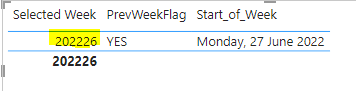
I have created a measure that grabs the selected week in the "Filters on this Page" and put it in dim date table.
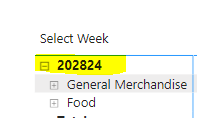
Now I created a Table using Summarizecolumns and would like to filter this using the value above but its seems it is loosing the context. Created a variable and assigned the selected week measure and include it in the table just to see the value. As my selected week measure grabs the max week (i.e 202226), when it comes to the table, it is now grabbing the max week which is wrong.
Any idea how to go about this?
Solved! Go to Solution.
@LeoS , a calculated table can not take dynamic slicer/filter values
refer if needed
Power BI — Week on Week and WTD
https://medium.com/@amitchandak.1978/power-bi-wtd-questions-time-intelligence-4-5-98c30fab69d3
https://community.powerbi.com/t5/Community-Blog/Week-Is-Not-So-Weak-WTD-Last-WTD-and-This-Week-vs-La...
https://www.youtube.com/watch?v=pnAesWxYgJ8
@LeoS , a calculated table can not take dynamic slicer/filter values
refer if needed
Power BI — Week on Week and WTD
https://medium.com/@amitchandak.1978/power-bi-wtd-questions-time-intelligence-4-5-98c30fab69d3
https://community.powerbi.com/t5/Community-Blog/Week-Is-Not-So-Weak-WTD-Last-WTD-and-This-Week-vs-La...
https://www.youtube.com/watch?v=pnAesWxYgJ8
Thank you. That makes sense.
Check out the November 2025 Power BI update to learn about new features.
Advance your Data & AI career with 50 days of live learning, contests, hands-on challenges, study groups & certifications and more!