FabCon is coming to Atlanta
Join us at FabCon Atlanta from March 16 - 20, 2026, for the ultimate Fabric, Power BI, AI and SQL community-led event. Save $200 with code FABCOMM.
Register now!- Power BI forums
- Get Help with Power BI
- Desktop
- Service
- Report Server
- Power Query
- Mobile Apps
- Developer
- DAX Commands and Tips
- Custom Visuals Development Discussion
- Health and Life Sciences
- Power BI Spanish forums
- Translated Spanish Desktop
- Training and Consulting
- Instructor Led Training
- Dashboard in a Day for Women, by Women
- Galleries
- Data Stories Gallery
- Themes Gallery
- Contests Gallery
- QuickViz Gallery
- Quick Measures Gallery
- Visual Calculations Gallery
- Notebook Gallery
- Translytical Task Flow Gallery
- TMDL Gallery
- R Script Showcase
- Webinars and Video Gallery
- Ideas
- Custom Visuals Ideas (read-only)
- Issues
- Issues
- Events
- Upcoming Events
Get Fabric Certified for FREE during Fabric Data Days. Don't miss your chance! Request now
- Power BI forums
- Forums
- Get Help with Power BI
- Desktop
- How to Sort (Left to Right) descending by column t...
- Subscribe to RSS Feed
- Mark Topic as New
- Mark Topic as Read
- Float this Topic for Current User
- Bookmark
- Subscribe
- Printer Friendly Page


- Mark as New
- Bookmark
- Subscribe
- Mute
- Subscribe to RSS Feed
- Permalink
- Report Inappropriate Content
How to Sort (Left to Right) descending by column totals in a matrix.
Hi All,
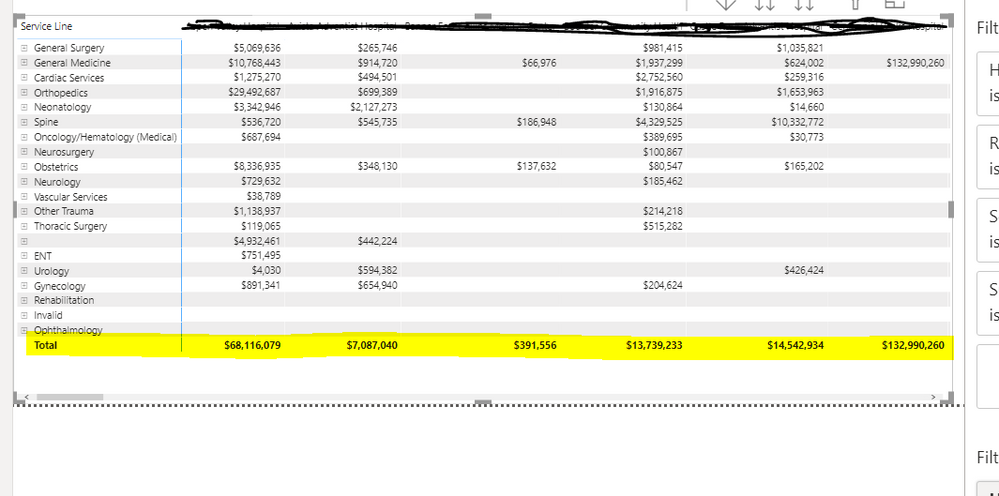
I've search and read tons but can find how to do this. Everything is about sorting on the row or column header or row totals, not the column total values. I'd like to sort the below matrix from highest column total to lowest, left to right. Hard to explain, so here is a picture. Is this possible?
Thanks for any help you can offer.
Terry
Solved! Go to Solution.


- Mark as New
- Bookmark
- Subscribe
- Mute
- Subscribe to RSS Feed
- Permalink
- Report Inappropriate Content
Hi, @tbobolz
You can take a try follow steps:
1.calculate the 'Total' directly in fact table
Total = CALCULATE(SUM('Table'[Rxxxx]),ALLEXCEPT('Table','Table'[Hospital]))2. Create 'Rank' column based on 'Total' filed
Rank = RANKX('Table','Table'[Total],,DESC,Dense) //or asc3.duplicate your original column 'Hospital'
Hospital_2 = 'Table'[Hospital] Then sort this new column by calculated column 'Rank'
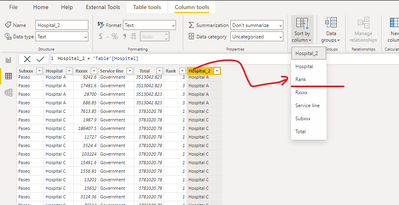
4. replace your original field 'Hospital' with new field 'Hospital_2' in matrix visual
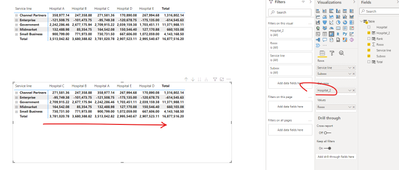
Please check my sample file for more details.
Best Regards,
Community Support Team _ Eason
If this post helps, then please consider Accept it as the solution to help the other members find it more quickly.

- Mark as New
- Bookmark
- Subscribe
- Mute
- Subscribe to RSS Feed
- Permalink
- Report Inappropriate Content
why is it this method sorts from left to right when the rank column isn't even used or refereed to in the matrix?.

- Mark as New
- Bookmark
- Subscribe
- Mute
- Subscribe to RSS Feed
- Permalink
- Report Inappropriate Content
Because they used the "sort by column" option which happens in the background but affects the visual.


- Mark as New
- Bookmark
- Subscribe
- Mute
- Subscribe to RSS Feed
- Permalink
- Report Inappropriate Content
I don't think this is currently possible, at least not where it dynamically resorts depending on slicers/filters.
I could be wrong (someone please correct me if I am) but I can't think of a way to do this other than hacky workarounds.
- Mark as New
- Bookmark
- Subscribe
- Mute
- Subscribe to RSS Feed
- Permalink
- Report Inappropriate Content
Thanks, that's what I'm thinking too.
- Mark as New
- Bookmark
- Subscribe
- Mute
- Subscribe to RSS Feed
- Permalink
- Report Inappropriate Content
Hi, @tbobolz
You can take a try follow steps:
1.calculate the 'Total' directly in fact table
Total = CALCULATE(SUM('Table'[Rxxxx]),ALLEXCEPT('Table','Table'[Hospital]))2. Create 'Rank' column based on 'Total' filed
Rank = RANKX('Table','Table'[Total],,DESC,Dense) //or asc3.duplicate your original column 'Hospital'
Hospital_2 = 'Table'[Hospital] Then sort this new column by calculated column 'Rank'
4. replace your original field 'Hospital' with new field 'Hospital_2' in matrix visual
Please check my sample file for more details.
Best Regards,
Community Support Team _ Eason
If this post helps, then please consider Accept it as the solution to help the other members find it more quickly.
- Mark as New
- Bookmark
- Subscribe
- Mute
- Subscribe to RSS Feed
- Permalink
- Report Inappropriate Content
This approach works as long as that the ranking is fixed. If filters or slicers are applied to the visual, there's no guarantee that this pre-calculated ranking is still accurate.

Helpful resources

Power BI Monthly Update - November 2025
Check out the November 2025 Power BI update to learn about new features.

Fabric Data Days
Advance your Data & AI career with 50 days of live learning, contests, hands-on challenges, study groups & certifications and more!

FabCon Atlanta 2026
Join us at FabCon Atlanta, March 16-20, for the ultimate Fabric, Power BI, AI and SQL community-led event. Save $200 with code FABCOMM.


