This time we’re going bigger than ever. Fabric, Power BI, SQL, AI and more. We're covering it all. You won't want to miss it.
Learn moreLevel up your Power BI skills this month - build one visual each week and tell better stories with data! Get started
Hi There,
Hope you doing well .
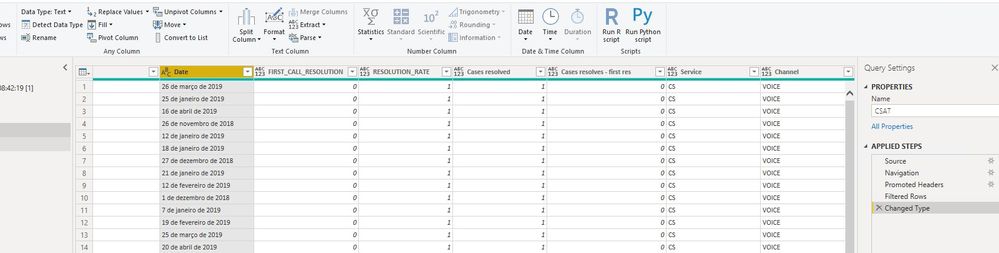
I am stuck a data which have date column given in spanish and its coming in "Text" Format . When i am trying to transform this into power query its giving me an error .
Can anyone help me out in this how can i convert this given Spanish Date value in English(Date Format)
Please see below screenshot for the same:
Thanks
Solved! Go to Solution.
In normal translation, you could use the Microsoft Translator API that can be used in Power BI. Google it. Here you don't have to actually rely on the translation and you could do the translation in DAX itself, based on your sample data, I am giving you the following DAX code. You have to add more months to the SWITCH statement.
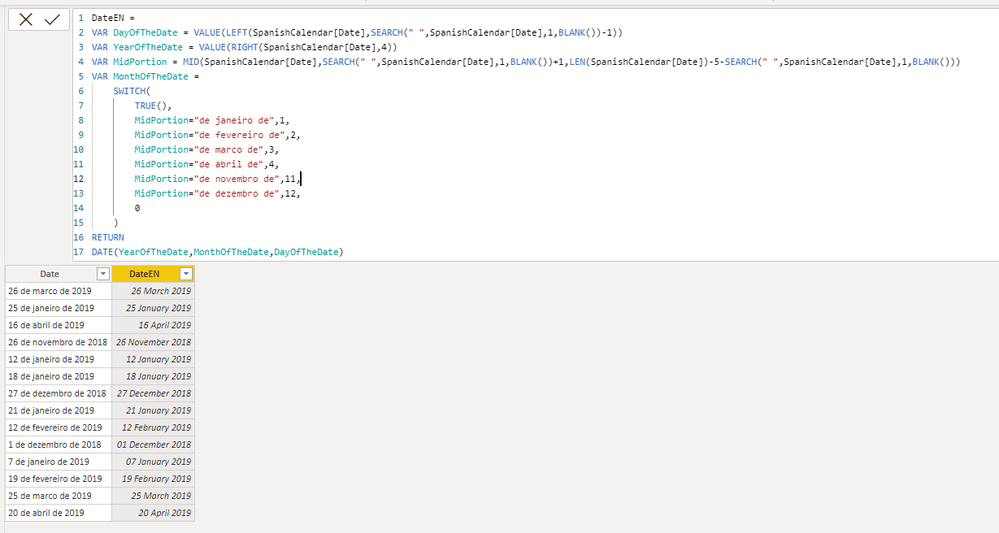
Here is the dax code.
DateEN =
VAR DayOfTheDate = VALUE(LEFT(SpanishCalendar[Date],SEARCH(" ",SpanishCalendar[Date],1,BLANK())-1))
VAR YearOfTheDate = VALUE(RIGHT(SpanishCalendar[Date],4))
VAR MidPortion = MID(SpanishCalendar[Date],SEARCH(" ",SpanishCalendar[Date],1,BLANK())+1,LEN(SpanishCalendar[Date])-5-SEARCH(" ",SpanishCalendar[Date],1,BLANK()))
VAR MonthOfTheDate =
SWITCH(
TRUE(),
MidPortion="de janeiro de",1,
MidPortion="de fevereiro de",2,
MidPortion="de marco de",3,
MidPortion="de abril de",4,
MidPortion="de novembro de",11,
MidPortion="de dezembro de",12,
0
)
RETURN
DATE(YearOfTheDate,MonthOfTheDate,DayOfTheDate)
Another solution that perhaps may work:
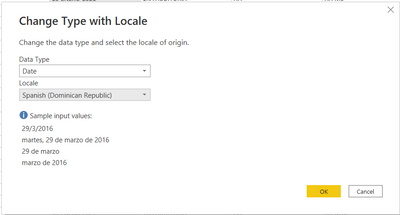
Right click column -> Change type -> Using locale
Search for Spanish
In normal translation, you could use the Microsoft Translator API that can be used in Power BI. Google it. Here you don't have to actually rely on the translation and you could do the translation in DAX itself, based on your sample data, I am giving you the following DAX code. You have to add more months to the SWITCH statement.
Here is the dax code.
DateEN =
VAR DayOfTheDate = VALUE(LEFT(SpanishCalendar[Date],SEARCH(" ",SpanishCalendar[Date],1,BLANK())-1))
VAR YearOfTheDate = VALUE(RIGHT(SpanishCalendar[Date],4))
VAR MidPortion = MID(SpanishCalendar[Date],SEARCH(" ",SpanishCalendar[Date],1,BLANK())+1,LEN(SpanishCalendar[Date])-5-SEARCH(" ",SpanishCalendar[Date],1,BLANK()))
VAR MonthOfTheDate =
SWITCH(
TRUE(),
MidPortion="de janeiro de",1,
MidPortion="de fevereiro de",2,
MidPortion="de marco de",3,
MidPortion="de abril de",4,
MidPortion="de novembro de",11,
MidPortion="de dezembro de",12,
0
)
RETURN
DATE(YearOfTheDate,MonthOfTheDate,DayOfTheDate)
Thank you @Anonymous .
Really appreicate your help.
Check out the April 2026 Power BI update to learn about new features.
Sign up to receive a private message when registration opens and key events begin.
If you have recently started exploring Fabric, we'd love to hear how it's going. Your feedback can help with product improvements.
| User | Count |
|---|---|
| 36 | |
| 28 | |
| 28 | |
| 20 | |
| 18 |
| User | Count |
|---|---|
| 66 | |
| 36 | |
| 33 | |
| 26 | |
| 24 |