Don't miss your chance to take exam DP-600 or DP-700 on us!
Request nowLearn from the best! Meet the four finalists headed to the FINALS of the Power BI Dataviz World Championships! Register now
Hello,
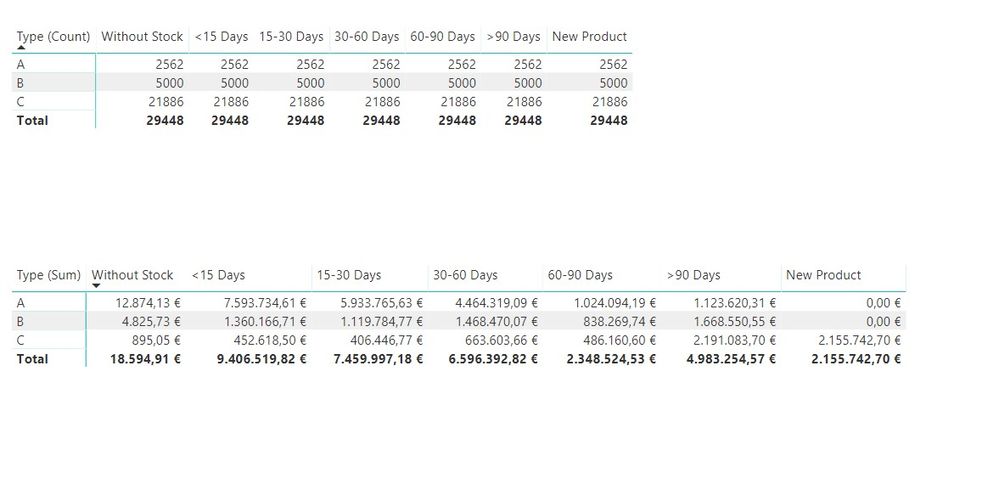
I'm making an ABC analysis report and couldn't show total product number for each group in matrix visual. When I do it for total value of products, it shows correct numbers but for quantity it shows total result for each group.
I guess I should use calculate but I don't how to use it in my case. I created a new measure with calculate function but couldn't figure out how to add two criteria to measure.
I need to show quantity based on group and stock availability. my columns are in same table.
regards
Solved! Go to Solution.
Hi @calerof,
This if the first time I'm using power bi.
I have several workbooks and I extract data from them via calculated column ( with lookupvalue) to my main table. Then I made some basic math calculations, still with calculated columns. There's no measure in my screenshots, but when I tried to write the measure so I can post, I figured my mistake.
I didn't add "count" function to my measure, when I added it works.
Hi @calerof,
This if the first time I'm using power bi.
I have several workbooks and I extract data from them via calculated column ( with lookupvalue) to my main table. Then I made some basic math calculations, still with calculated columns. There's no measure in my screenshots, but when I tried to write the measure so I can post, I figured my mistake.
I didn't add "count" function to my measure, when I added it works.
Share feedback directly with Fabric product managers, participate in targeted research studies and influence the Fabric roadmap.
Check out the February 2026 Power BI update to learn about new features.
| User | Count |
|---|---|
| 50 | |
| 40 | |
| 37 | |
| 14 | |
| 14 |
| User | Count |
|---|---|
| 85 | |
| 69 | |
| 38 | |
| 29 | |
| 27 |