Join us at FabCon Atlanta from March 16 - 20, 2026, for the ultimate Fabric, Power BI, AI and SQL community-led event. Save $200 with code FABCOMM.
Register now!Get Fabric Certified for FREE during Fabric Data Days. Don't miss your chance! Request now
Hello everyone,
I like to seperate the column such that I can have Bronze and Gold in seperate column. Is this possible in Power BI? Many thanks for your help.
Solved! Go to Solution.
HI @Anonymous
You can use Query Editor to do this.
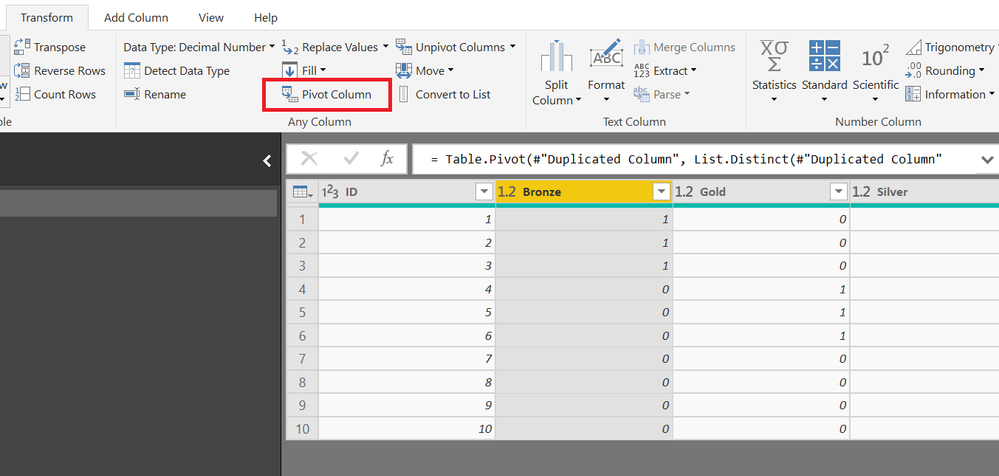
First select your Medal column then in Transform ribon click on Pivot Columns next select your Values Column (ID or Full Name), if you have only one unique column please duplicate it if you want to avoid agregation.
Hope this helps
Mariusz
HI,
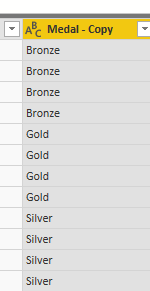
In edit queries -right click on Medal-Copy column and -> duplicate it Then filter the column by Gold,Bronz etc.
HI,
In edit queries -right click on Medal-Copy column and -> duplicate it Then filter the column by Gold,Bronz etc.
Thanks
Hi,
You could also duplicate the column, so you would have two medal columns, and just rename them as bronze and gold, and use replace values (gold = blank, or whatever suits you).
Regards,
Salva.
Thank you
HI @Anonymous
You can use Query Editor to do this.
First select your Medal column then in Transform ribon click on Pivot Columns next select your Values Column (ID or Full Name), if you have only one unique column please duplicate it if you want to avoid agregation.
Hope this helps
Mariusz
Check out the November 2025 Power BI update to learn about new features.
Advance your Data & AI career with 50 days of live learning, contests, hands-on challenges, study groups & certifications and more!