Forum Discussion

How do display duration properly?
I'm displaying durations in some of my charts. However, I haven't figured out how to do it in a proper way.
Currently I'm using a column that represent minutes as a decimal number. Not optimal, since I can display values like "5.85". Can I instead create a calculated column that is of type Duration or similar? I want to be able to display "5 minutes 51 seconds". However, I don't want it to be of type Text, I want to be able to sort it, show averages and such stuff.
I found this:
https://powerbi.microsoft.com/en-us/documentation/powerbi-desktop-data-types/
...and some threads on this forum, but nothing really that directly tells me how to do it.
14 Replies
- Greg_DecklerCommunity Champion
I have a blog article developed in collaboration with konstantinos on this exact subject! It is currently in "staging". The inspiration for it was:
http://community.powerbi.com/t5/Desktop/Aggregating-Duration-Time/m-p/13350/highlight/true#M3358
 AnonymousNot applicable
You should be able to add a claculated column to convert to a time.
A quick experiment gives me this formula to take a duration in minutes and turn it into a time (using time as the field with the minutes in):
=TIME(FLOOR([Time]/60,1),FLOOR(MOD([Time],60),1),MOD([Time],1)*60)
this will probably not work for times above 24 hours though, I'd expect them to wrap aroung to 0:00 at that point.
 guslyHelper II
Anonymous, but how can I use such a value in column (bar) chart? As I can see it I can't use values of Data Type Time, I can only count such values. So even though the conversion works, I'm afraid it doesn't help me.
Greg_Deckler, I'm looking forward to that article. Please let me know where to find it once released.
- Greg_DecklerCommunity Champion
gusly - The article was published, you can find it here: http://community.powerbi.com/t5/Community-Blog/Aggregating-Duration-Time/ba-p/22486
 dshahFrequent Visitor
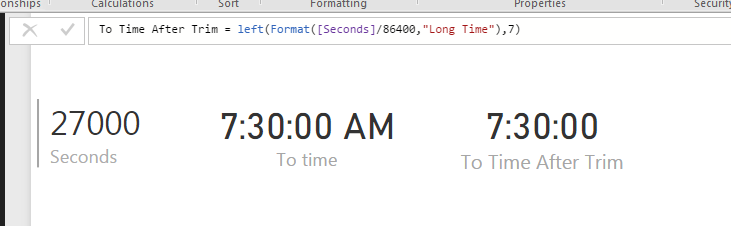
First convert the data into seconds. Then divide the data by 86400 (60 min x 60 secs x 24 hours) to get output that can be converted to time. Then use below to get time equivalent
FORMAT([seconds]/86400,"Long Time"). This gives time equivalent with AM / PM at end. You can use Left to trim it.
Left(FORMAT([seconds]/86400,"Long Time"),7)
This solves the averaging problem and other time duration related problems.
Additional Date/Time formats in DAX can be find below
https://technet.microsoft.com/en-us/library/ee634813(v=sql.105).aspx
Hope this helps.
 beerygazFrequent Visitor
This doesn't work for durations lower than 3600 seconds, however, as you end up with 12:mm:ss rather than 0:mm:ss
- mcolb88Helper III
As a calculated column:
VAR Minutes = ROUNDDOWN([CallDurationSeconds]/60,0)
VAR Seconds = ROUNDUP(([CallDurationSeconds] - Minutes*60), 0)
RETURN IF([CallDurationSeconds]>0, CONCATENATE(CONCATENATE(FORMAT(Minutes, "##0"), ":"), RIGHT(CONCATENATE("0", FORMAT(Seconds, "##")),2)), BLANK())
And as a formatted measure using the numeric equivalent.
Avg Call Duration:= AVERAGEX('Interview Call', [CallDurationSeconds]/60)
Avg Call Duration (min):=
VAR Minutes = ROUNDDOWN([Avg Call Duration],0)
VAR Seconds = ROUNDUP(([Avg Call Duration] - Minutes)*60, 0)
RETURN CONCATENATE(CONCATENATE(FORMAT(Minutes, "##0"), ":"), RIGHT(CONCATENATE("0", FORMAT(Seconds, "#0")),2))
Could add hours to this as well, but that's pretty far out of range for my application.
Hope this helps
- beerygazFrequent Visitor
This doesn't work for durations lower than 3600 seconds, however, as you end up with 12:mm:ss rather than 0:mm:ss
 luigidltRegular Visitor
Is there any way to make it work for durations lower than 3600. Otherwise I get 12hr in all durations.
Thanks