Forum Discussion

How do display duration properly?

First convert the data into seconds. Then divide the data by 86400 (60 min x 60 secs x 24 hours) to get output that can be converted to time. Then use below to get time equivalent
FORMAT([seconds]/86400,"Long Time"). This gives time equivalent with AM / PM at end. You can use Left to trim it.
Left(FORMAT([seconds]/86400,"Long Time"),7)
This solves the averaging problem and other time duration related problems.
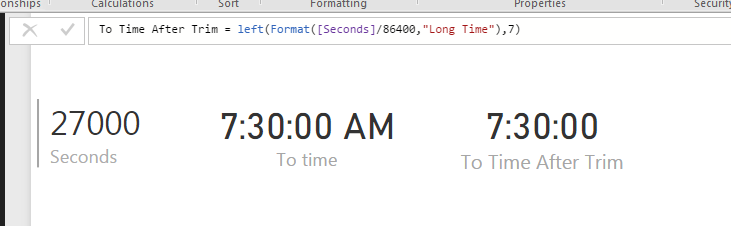
Additional Date/Time formats in DAX can be find below
https://technet.microsoft.com/en-us/library/ee634813(v=sql.105).aspx
Hope this helps.

This doesn't work for durations lower than 3600 seconds, however, as you end up with 12:mm:ss rather than 0:mm:ss
- mcolb889 years agoHelper III
As a calculated column:
VAR Minutes = ROUNDDOWN([CallDurationSeconds]/60,0)
VAR Seconds = ROUNDUP(([CallDurationSeconds] - Minutes*60), 0)
RETURN IF([CallDurationSeconds]>0, CONCATENATE(CONCATENATE(FORMAT(Minutes, "##0"), ":"), RIGHT(CONCATENATE("0", FORMAT(Seconds, "##")),2)), BLANK())
And as a formatted measure using the numeric equivalent.
Avg Call Duration:= AVERAGEX('Interview Call', [CallDurationSeconds]/60)
Avg Call Duration (min):=
VAR Minutes = ROUNDDOWN([Avg Call Duration],0)
VAR Seconds = ROUNDUP(([Avg Call Duration] - Minutes)*60, 0)
RETURN CONCATENATE(CONCATENATE(FORMAT(Minutes, "##0"), ":"), RIGHT(CONCATENATE("0", FORMAT(Seconds, "#0")),2))
Could add hours to this as well, but that's pretty far out of range for my application.
Hope this helps
