Forum Discussion

How do I suppress blank line data?
 Anonymous10 years ago
shehzad you have 3 options to do this on the visualization page. You can filter them out in the specific visual "Visual Level Filters", the report page "Page Level Filters" or on the entire report "Report Level Filters"
Just drag your field that you want filtered into one of those areas, and only select the options you want, or do an advanced filter and exclude the blank.
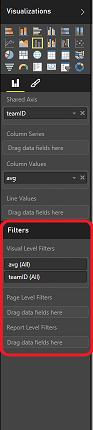
shehzad you have 3 options to do this on the visualization page. You can filter them out in the specific visual "Visual Level Filters", the report page "Page Level Filters" or on the entire report "Report Level Filters"
Just drag your field that you want filtered into one of those areas, and only select the options you want, or do an advanced filter and exclude the blank.

I was asking the same question and ran across this. This solution appears to work but breaks when I have a hierarchy in the Shared Axis. I'm using the Visual Filter to remove blanks for a measure and everything works fine until I put that 2nd level so I can drill down. The error i get is :
Data Shape Query translation failed with error code: 'ContextFilterOnlyAllowsScopeFilterInContextDataShape'. Check report server logs for more information.
Anyone have any thoughts? Can we just remove these blank values with DAX language?