Forum Discussion

How do I suppress blank line data?
 Anonymous10 years ago
shehzad you have 3 options to do this on the visualization page. You can filter them out in the specific visual "Visual Level Filters", the report page "Page Level Filters" or on the entire report "Report Level Filters"
Just drag your field that you want filtered into one of those areas, and only select the options you want, or do an advanced filter and exclude the blank.
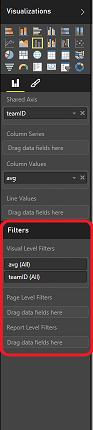
shehzad you have 3 options to do this on the visualization page. You can filter them out in the specific visual "Visual Level Filters", the report page "Page Level Filters" or on the entire report "Report Level Filters"
Just drag your field that you want filtered into one of those areas, and only select the options you want, or do an advanced filter and exclude the blank.
If you have a row with multiple measures, simply checking for one measure may not suffice.
e.g. If you have MeasureA and MeasureB as values in a Matrix and want to hide lines ONLY WHEN both MeasureA and MeasureB are blank, doing what was suggested (i.e. going to the Visual level filters and setting MeasureA is not blank) may filter out the values in MeasureB. The best way to get around it is to create another measure that may look like this.
IsBlankRowMeasure = IF(ISBLANK(MeasureA) && ISBLANK(MeasureB), 1, 0)
In this case, only when both MeasureA and MeasureB are blanks, is the values if IsBlankRowMeasure = 1. Then you can filter out where value of IsBlankRowMeasure = 1.