cancel
Showing results for 
Search instead for 
Did you mean: 

Vote for your favorite vizzies from the Power BI Dataviz World Championship submissions. Vote now!

Reply
Syndicate_Admin
Administrator
Administrator

How do I place specific results generated in an array on a card

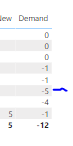
Hello. I have a matrix that distributes results of a measure according to categories in my database.

Based on the results, I want to make a DAX formula that allows me to present my most critical results on a card. For example:

VGDM18_0-1665090057193.png

Let's pretend that my result-5 is within a category that I will call category A, so I want to have a card that reflects: that the most critical category is the one with -5 because it is my smallest result.

Thank you!

1 ACCEPTED SOLUTION
v-yanjiang-msft
Community Support
Community Support

Hi @Syndicate_Admin ,

According to your description, if -5 is the only value of category A, you can create a measure like this:

Measure =
MAXX ( FILTER ( ALL ( 'Table' ), 'Table'[Category] = "A" ), [Demand] )

Best Regards,
Community Support Team _ kalyj

If this post helps, then please consider Accept it as the solution to help the other members find it more quickly.


View solution in original post

2 REPLIES 2
v-yanjiang-msft
Community Support
Community Support

Hi @Syndicate_Admin ,

Is your problem solved? If so, would you mind accept the helpful replies as solutions? Then we are able to close the thread. More people who have the same requirment will find the solution quickly and benefit here, thank you!

Best Regards,
Community Support Team _ kalyj

v-yanjiang-msft
Community Support
Community Support

Hi @Syndicate_Admin ,

According to your description, if -5 is the only value of category A, you can create a measure like this:

Measure =
MAXX ( FILTER ( ALL ( 'Table' ), 'Table'[Category] = "A" ), [Demand] )

Best Regards,
Community Support Team _ kalyj

If this post helps, then please consider Accept it as the solution to help the other members find it more quickly.


Helpful resources

Announcements
Power BI DataViz World Championships

Power BI Dataviz World Championships

Vote for your favorite vizzies from the Power BI World Championship submissions!

Sticker Challenge 2026 Carousel

Join our Community Sticker Challenge 2026

If you love stickers, then you will definitely want to check out our Community Sticker Challenge!

January Power BI Update Carousel

Power BI Monthly Update - January 2026

Check out the January 2026 Power BI update to learn about new features.

FabCon Atlanta 2026 carousel

FabCon Atlanta 2026

Join us at FabCon Atlanta, March 16-20, for the ultimate Fabric, Power BI, AI and SQL community-led event. Save $200 with code FABCOMM.