FabCon is coming to Atlanta
Join us at FabCon Atlanta from March 16 - 20, 2026, for the ultimate Fabric, Power BI, AI and SQL community-led event. Save $200 with code FABCOMM.
Register now!- Power BI forums
- Get Help with Power BI
- Desktop
- Service
- Report Server
- Power Query
- Mobile Apps
- Developer
- DAX Commands and Tips
- Custom Visuals Development Discussion
- Health and Life Sciences
- Power BI Spanish forums
- Translated Spanish Desktop
- Training and Consulting
- Instructor Led Training
- Dashboard in a Day for Women, by Women
- Galleries
- Data Stories Gallery
- Themes Gallery
- Contests Gallery
- QuickViz Gallery
- Quick Measures Gallery
- Visual Calculations Gallery
- Notebook Gallery
- Translytical Task Flow Gallery
- TMDL Gallery
- R Script Showcase
- Webinars and Video Gallery
- Ideas
- Custom Visuals Ideas (read-only)
- Issues
- Issues
- Events
- Upcoming Events
View all the Fabric Data Days sessions on demand. View schedule
- Power BI forums
- Forums
- Get Help with Power BI
- Desktop
- How do I get the difference of balances between da...
- Subscribe to RSS Feed
- Mark Topic as New
- Mark Topic as Read
- Float this Topic for Current User
- Bookmark
- Subscribe
- Printer Friendly Page

- Mark as New
- Bookmark
- Subscribe
- Mute
- Subscribe to RSS Feed
- Permalink
- Report Inappropriate Content
How do I get the difference of balances between dates?
Hello,
I am trying to figure out a way to calculate the difference in balances when I select multiple dates in my slicer. For example, if balance in 12/31/2023 was 11m and balance in 1/31/2024 is 12m I would like to see a difference of 1m be the output.
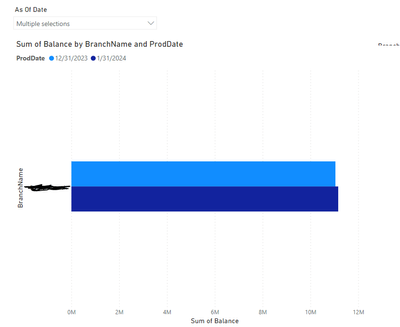
Solved! Go to Solution.


- Mark as New
- Bookmark
- Subscribe
- Mute
- Subscribe to RSS Feed
- Permalink
- Report Inappropriate Content
Hi,
Create a Calendar Table and a retionship (Many to One and Single) from the ProdDate column of your Data Table to the Date column of the Calendar Table. To your slicer, drag the Date column from the Calendar Table and select 2 dates. Write these measures
Total = sum(Data[Amount])
Total on first date = calculate([Total],datesbetween(Calendar[date],min(calendar[date]),min(calendar[date])))
Total on second date = calculate([Total],datesbetween(Calendar[date],max(calendar[date]),max(calendar[date])))
Variance = [Total on first date]-[Total on second date]
Hope this helps.
Regards,
Ashish Mathur
http://www.ashishmathur.com
https://www.linkedin.com/in/excelenthusiasts/

- Mark as New
- Bookmark
- Subscribe
- Mute
- Subscribe to RSS Feed
- Permalink
- Report Inappropriate Content
It's not wrong the number on the card visual. It's the context where DAX is being evaluated.
If I select 31-01-2024 date on my table the card will show the correct number like this:
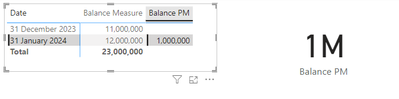
The Dax measure I used it's to calculate the Balance of the previous month of each date that you have on the visual. It's working to the table matrix and bar chart.
Did I answer your question? Mark my post as a solution! Kudos are welcome.
Proud to be a Super User!
- Mark as New
- Bookmark
- Subscribe
- Mute
- Subscribe to RSS Feed
- Permalink
- Report Inappropriate Content
Hi,
Create a Calendar Table and a retionship (Many to One and Single) from the ProdDate column of your Data Table to the Date column of the Calendar Table. To your slicer, drag the Date column from the Calendar Table and select 2 dates. Write these measures
Total = sum(Data[Amount])
Total on first date = calculate([Total],datesbetween(Calendar[date],min(calendar[date]),min(calendar[date])))
Total on second date = calculate([Total],datesbetween(Calendar[date],max(calendar[date]),max(calendar[date])))
Variance = [Total on first date]-[Total on second date]
Hope this helps.
Regards,
Ashish Mathur
http://www.ashishmathur.com
https://www.linkedin.com/in/excelenthusiasts/
- Mark as New
- Bookmark
- Subscribe
- Mute
- Subscribe to RSS Feed
- Permalink
- Report Inappropriate Content
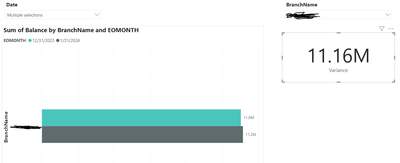
I fixed the measures. However; my card that I want to show for the variance does not pull back correct number. IT only returns the balance for the max date but not the difference between the min and max date selected in slicer.
See Below:
- Mark as New
- Bookmark
- Subscribe
- Mute
- Subscribe to RSS Feed
- Permalink
- Report Inappropriate Content
Share the download link of the PBI file and show the problem there clearly.
Regards,
Ashish Mathur
http://www.ashishmathur.com
https://www.linkedin.com/in/excelenthusiasts/
- Mark as New
- Bookmark
- Subscribe
- Mute
- Subscribe to RSS Feed
- Permalink
- Report Inappropriate Content
Total on first date and total on second date are invalid functions. It says "too few arugments were passed to the DATESBETWEEN function.
- Mark as New
- Bookmark
- Subscribe
- Mute
- Subscribe to RSS Feed
- Permalink
- Report Inappropriate Content
Hi,
As far as I can see, you are using implicit measures, and to do what you want you need to use explicit measures.
I did a quick example in my pbi desktop and have this results:
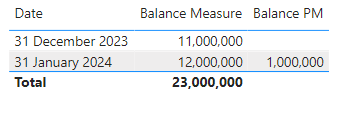
I'm using this two measures:

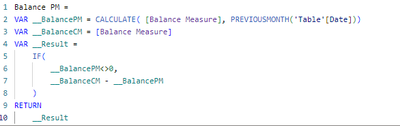
Did I answer your question? Mark my post as a solution! Kudos are welcome.
Proud to be a Super User!
- Mark as New
- Bookmark
- Subscribe
- Mute
- Subscribe to RSS Feed
- Permalink
- Report Inappropriate Content
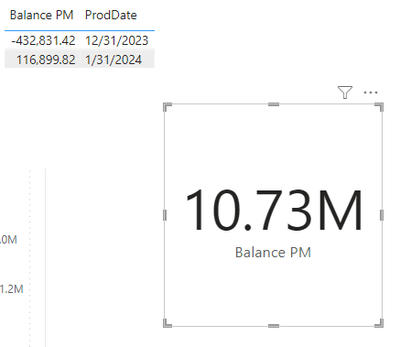
It returns this. I want the 116,899.82 to show up in the card but it shows the grand total instead in the card which is way off by the way.
Helpful resources

Power BI Monthly Update - November 2025
Check out the November 2025 Power BI update to learn about new features.

Fabric Data Days
Advance your Data & AI career with 50 days of live learning, contests, hands-on challenges, study groups & certifications and more!

FabCon Atlanta 2026
Join us at FabCon Atlanta, March 16-20, for the ultimate Fabric, Power BI, AI and SQL community-led event. Save $200 with code FABCOMM.


