cancel
Showing results for 
Search instead for 
Did you mean: 

View all the Fabric Data Days sessions on demand. View schedule

Reply
iamriz
Helper II
Helper II

How can we place more than one matrix visual on one scrollbar or visual?

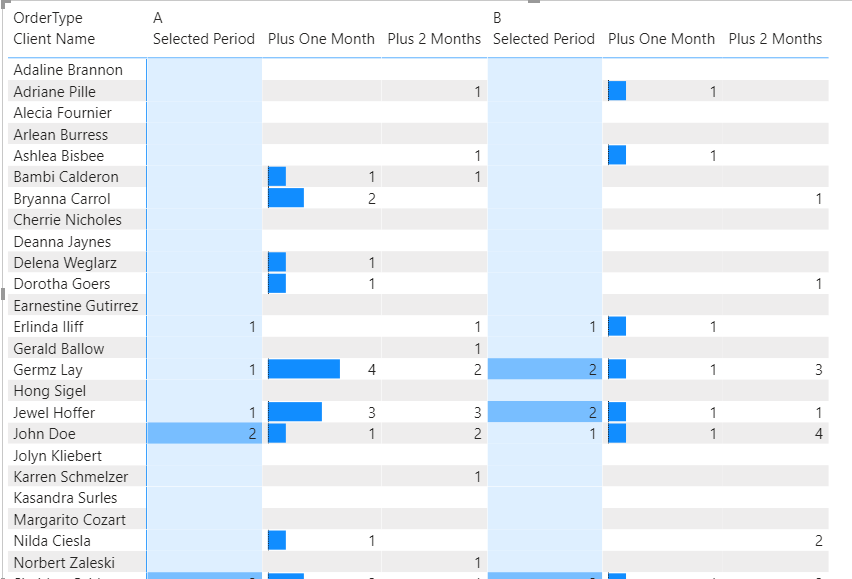
Hello, is it possible to have one panel that would contain one scrollbar for 3 matrix visuals?

Here is a sample PBIX file with scenario showing 3 matrix tables with conditional formats to compare data for past 3 months.

Scrolling down each of the scrollbar is not user-friendly.

Hence, any clue/idea on how to achieve showing monthly counts on one table/visual with only one scrollbar will be much appreciated.

Thank you very much.

1 REPLY 1
Nathaniel_C
Community Champion
Community Champion

Hi @iamriz ,

Is there any reason why you cannot drop the other measures on the first table, rename the measures, and format each column as you like? The first column is the same on all three tables.


Let me know if you have any questions.

If this solves your issues, please mark it as the solution, so that others can find it easily. Kudos 👍are nice too.
Nathaniel

1 tab.PNG


Did I answer your question? Mark my post as a solution!

Proud to be a Super User!


Helpful resources

Announcements
November Power BI Update Carousel

Power BI Monthly Update - November 2025

Check out the November 2025 Power BI update to learn about new features.

Fabric Data Days Carousel

Fabric Data Days

Advance your Data & AI career with 50 days of live learning, contests, hands-on challenges, study groups & certifications and more!

FabCon Atlanta 2026 carousel

FabCon Atlanta 2026

Join us at FabCon Atlanta, March 16-20, for the ultimate Fabric, Power BI, AI and SQL community-led event. Save $200 with code FABCOMM.

Top Solution Authors
Top Kudoed Authors