Get certified for free when you join Fabric Data Days 2026 and dive into Fabric, Power BI, SQL, AI, and other essential data skills.
Join nowJuly 7 - July 17 | Round 2 of the Power BI Dataviz World Championships. Don't miss your chance! Learn more
Hello
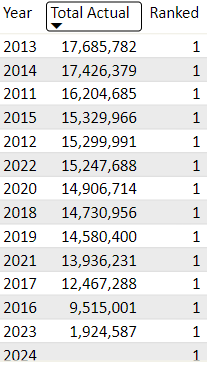
I am having issue with getting the RANKX to work, it might be that each year is a consolidation of multiple transaction.
Ranked =
RANKX('Daily Metric',
'Daily Metric'[Total Actual])
How do i fix this?
Cheers
Solved! Go to Solution.
@Anonymous , Try like
Ranked =
RANKX(allselected('Daily Metric'[Year]) ,'Daily Metric'[Total Actual])
Measure Rank: https://www.youtube.com/watch?v=DZb_6j6WuZ0&list=PLPaNVDMhUXGaaqV92SBD5X2hk3TMNlHhb&index=40
https://www.youtube.com/watch?v=cN8AO3_vmlY&t=25627s
For Rank Refer these links
https://radacad.com/how-to-use-rankx-in-dax-part-2-of-3-calculated-measures
https://radacad.com/how-to-use-rankx-in-dax-part-1-of-3-calculated-columns
Thanks its working, just had to change it to:
@Anonymous , Try like
Ranked =
RANKX(allselected('Daily Metric'[Year]) ,'Daily Metric'[Total Actual])
Measure Rank: https://www.youtube.com/watch?v=DZb_6j6WuZ0&list=PLPaNVDMhUXGaaqV92SBD5X2hk3TMNlHhb&index=40
https://www.youtube.com/watch?v=cN8AO3_vmlY&t=25627s
For Rank Refer these links
https://radacad.com/how-to-use-rankx-in-dax-part-2-of-3-calculated-measures
https://radacad.com/how-to-use-rankx-in-dax-part-1-of-3-calculated-columns
Join us in Barcelona for FabCon and SQLCon, the Fabric, Power BI, SQL, and AI community event. Save €200 with code FABCMTY200.
If you love stickers, then you will definitely want to check out our community sticker challenge, Barcelona edition!
Check out the July 2026 Power BI update to learn about new features.
| User | Count |
|---|---|
| 29 | |
| 23 | |
| 23 | |
| 22 | |
| 14 |
| User | Count |
|---|---|
| 48 | |
| 33 | |
| 20 | |
| 18 | |
| 16 |