Join us at FabCon Atlanta from March 16 - 20, 2026, for the ultimate Fabric, Power BI, AI and SQL community-led event. Save $200 with code FABCOMM.
Register now!The Power BI Data Visualization World Championships is back! Get ahead of the game and start preparing now! Learn more
Hi, I'm new to this tool.
I tried to create a container(in this case I used a rectangle shape with "Fill" set to off) to place my widgets/visuals inside them. But when I tried to hover the visuals I can't access them and I can only access the shape. Is there a setting/option I need to set to make this work.
Any help is much appretiated.
Thanks
Solved! Go to Solution.
Hi @Anonymous ,
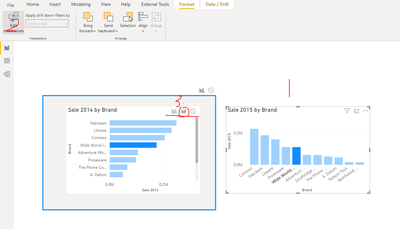
Like this?
The 'Edit interactions' feature is used to handle the interaction of multiple visuals.
Change how visuals interact in a Power BI report
Best regards,
Lionel Chen
If this post helps, then please consider Accept it as the solution to help the other members find it more quickly.
@Anonymous , The information you have provided is not making the problem clear to me. Can you please explain with an example.
Are you looking for a report tooltip page -https://docs.microsoft.com/en-us/power-bi/desktop-tooltips
Appreciate your Kudos.
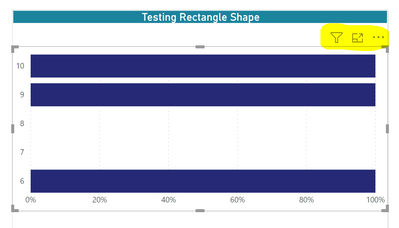
Thanks for the response. No I'm not asking about the tooltip. I can understand why its not clear. Basically I have a group of widgets/visuals which is grouped under "selection pane". The widgets are placed inside the "Rectangle" shape and when I "Hover" over the visuals like shown below, I should be able to see the option highlighted and be able to select the visuals to make changes. But the below highlighted option is not been available when the widgets are placed inside the shape and I'm not sure what settings/options need to be done.
Hi @Anonymous ,
Like this?
The 'Edit interactions' feature is used to handle the interaction of multiple visuals.
Change how visuals interact in a Power BI report
Best regards,
Lionel Chen
If this post helps, then please consider Accept it as the solution to help the other members find it more quickly.
The Power BI Data Visualization World Championships is back! Get ahead of the game and start preparing now!
Check out the November 2025 Power BI update to learn about new features.
| User | Count |
|---|---|
| 59 | |
| 43 | |
| 42 | |
| 23 | |
| 17 |
| User | Count |
|---|---|
| 190 | |
| 122 | |
| 96 | |
| 66 | |
| 47 |