Join us at FabCon Atlanta from March 16 - 20, 2026, for the ultimate Fabric, Power BI, AI and SQL community-led event. Save $200 with code FABCOMM.
Register now!The Power BI Data Visualization World Championships is back! Get ahead of the game and start preparing now! Learn more
Hi,
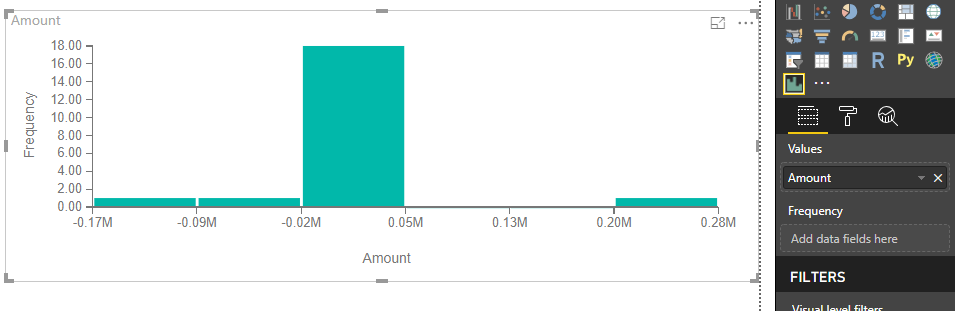
im trying to produce a histogram, works with other values, however the value in one of the frequencies is not appearing.
Here is the data set, 277763.7 is not appearing
| Date | Amount |
| 20190501 | 17710.17 |
| 20190504 | 277763.7 |
| 20190505 | -12079.9 |
| 20190506 | 39279.71 |
| 20190507 | 42009.08 |
| 20190508 | 25476.85 |
| 20190511 | -1 |
| 20190512 | 25836.73 |
| 20190513 | 2049.053 |
| 20190514 | -15212 |
| 20190515 | -56219.8 |
| 20190518 | 21556.88 |
| 20190519 | -168305 |
| 20190520 | 17892.1 |
| 20190521 | 36001.34 |
| 20190522 | -13357.1 |
| 20190525 | 34533.23 |
| 20190526 | 3294.711 |
| 20190527 | 22346.02 |
| 20190528 | 9280.91 |
| 20190529 | 7714.698 |
It cant be down to my filters, the histogram has been working fine for all other months.
anybody know why?
Solved! Go to Solution.
Hi @shivenra ,
Based on my test, it works normally on my machine, I would suggest you upgrading PowerBI desktop and this visual to the latest version.
Best Regards,
Teige
Hi @shivenra ,
Based on my test, it works normally on my machine, I would suggest you upgrading PowerBI desktop and this visual to the latest version.
Best Regards,
Teige
@shivenra seems like last value on your x-axis 278 is the value you are saying is missing.
Subscribe to the @PowerBIHowTo YT channel for an upcoming video on List and Record functions in Power Query!!
Learn Power BI and Fabric - subscribe to our YT channel - Click here: @PowerBIHowTo
If my solution proved useful, I'd be delighted to receive Kudos. When you put effort into asking a question, it's equally thoughtful to acknowledge and give Kudos to the individual who helped you solve the problem. It's a small gesture that shows appreciation and encouragement! ❤
Did I answer your question? Mark my post as a solution. Proud to be a Super User! Appreciate your Kudos 🙂
Feel free to email me with any of your BI needs.
Hi, yes you are correct, as you can see it causes the x axis to populate that far, but doesnt populate the frequency of 1.
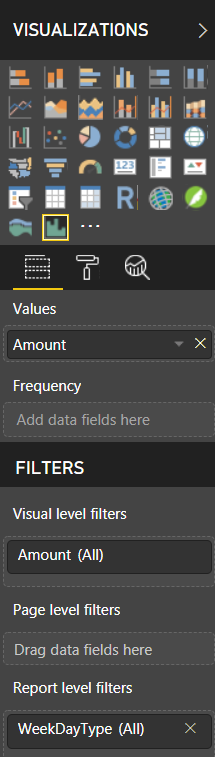
@shivenra what you use for frequency?
Subscribe to the @PowerBIHowTo YT channel for an upcoming video on List and Record functions in Power Query!!
Learn Power BI and Fabric - subscribe to our YT channel - Click here: @PowerBIHowTo
If my solution proved useful, I'd be delighted to receive Kudos. When you put effort into asking a question, it's equally thoughtful to acknowledge and give Kudos to the individual who helped you solve the problem. It's a small gesture that shows appreciation and encouragement! ❤
Did I answer your question? Mark my post as a solution. Proud to be a Super User! Appreciate your Kudos 🙂
Feel free to email me with any of your BI needs.
Check out the November 2025 Power BI update to learn about new features.
Advance your Data & AI career with 50 days of live learning, contests, hands-on challenges, study groups & certifications and more!
| User | Count |
|---|---|
| 58 | |
| 45 | |
| 40 | |
| 21 | |
| 18 |