FabCon is coming to Atlanta
Join us at FabCon Atlanta from March 16 - 20, 2026, for the ultimate Fabric, Power BI, AI and SQL community-led event. Save $200 with code FABCOMM.
Register now!- Power BI forums
- Get Help with Power BI
- Desktop
- Service
- Report Server
- Power Query
- Mobile Apps
- Developer
- DAX Commands and Tips
- Custom Visuals Development Discussion
- Health and Life Sciences
- Power BI Spanish forums
- Translated Spanish Desktop
- Training and Consulting
- Instructor Led Training
- Dashboard in a Day for Women, by Women
- Galleries
- Data Stories Gallery
- Themes Gallery
- Contests Gallery
- QuickViz Gallery
- Quick Measures Gallery
- Visual Calculations Gallery
- Notebook Gallery
- Translytical Task Flow Gallery
- TMDL Gallery
- R Script Showcase
- Webinars and Video Gallery
- Ideas
- Custom Visuals Ideas (read-only)
- Issues
- Issues
- Events
- Upcoming Events
The Power BI Data Visualization World Championships is back! Get ahead of the game and start preparing now! Learn more
- Power BI forums
- Forums
- Get Help with Power BI
- Desktop
- Re: HierarchyID display
- Subscribe to RSS Feed
- Mark Topic as New
- Mark Topic as Read
- Float this Topic for Current User
- Bookmark
- Subscribe
- Printer Friendly Page

- Mark as New
- Bookmark
- Subscribe
- Mute
- Subscribe to RSS Feed
- Permalink
- Report Inappropriate Content
HierarchyID display
Hello
I have a table with a standard Microsoft hierarchyID column positioning parts with a product Bill of Materials.
I can display the BoM parts in Excel tabbomng across and back for each level using code such as
SELECT
CAST(REPLICATE (@tab , b.Hid.GetLevel()) + b.Component as nvarchar(100)) +
' , ' +b.[Description] + ' qty' + Convert(varchar(20), b.QtyPer) as listing
I would like to use the table directly in PowerBI and have indedented columns by simply adding the hierarchyID column. I've found nothing to do this.
Has PowerBI not kept up with SQL data types or am I missing something?
Thanks in advance for any help

- Mark as New
- Bookmark
- Subscribe
- Mute
- Subscribe to RSS Feed
- Permalink
- Report Inappropriate Content
Have you found a good solution for that? I met the same issue. It will be great if you can share how to use sql hierarchyid in power BI.
Thank you.
- Mark as New
- Bookmark
- Subscribe
- Mute
- Subscribe to RSS Feed
- Permalink
- Report Inappropriate Content
Well there is a glitch in the matrix.
I connected PowerBI to Adventureworks2014 and entered the simple string
SELECT * FROM [HumanResources].[Employee] in the advanced options/sql statement
and get a messgae - incompatible data type OrganisationNode.
Doing the same with my tables - no error - hierarchyID comes through as if GetString() applied
PowerBI - the software that is almost good.


- Mark as New
- Bookmark
- Subscribe
- Mute
- Subscribe to RSS Feed
- Permalink
- Report Inappropriate Content
Can't answer your question without knowing what a sample row of data actually looks like.
Follow on LinkedIn
@ me in replies or I'll lose your thread!!!
Instead of a Kudo, please vote for this idea
Become an expert!: Enterprise DNA
External Tools: MSHGQM
YouTube Channel!: Microsoft Hates Greg
Latest book!: DAX For Humans
DAX is easy, CALCULATE makes DAX hard...
- Mark as New
- Bookmark
- Subscribe
- Mute
- Subscribe to RSS Feed
- Permalink
- Report Inappropriate Content
I appreciate your attemp to help, but as I have said and implied in each post its to do with the standard (since 2008) hierarchicalID data type. The rest of the data in the row is irrelevant
And as said in my penultimate post:
"The raw data is exactly as you'll see if you do a select * from AdventureWorks2014.HumanResources.Employee"
Just look at a line in the AdventureWorks2014.HumanResources.Employee table and you will see what I see. My own columns are different headings etc but the hierarchical data is exactly the same.
If someone can tell me how to get that Employee table into a PowerBI Visualisation so the OrganizationNode controls the indentents I'd be happy
- Mark as New
- Bookmark
- Subscribe
- Mute
- Subscribe to RSS Feed
- Permalink
- Report Inappropriate Content
OK, that's great, but to do that, I have to go out and find the AdventureWorks database in question, download it, potentially install SQL Server Management Studio and do a bunch of other investigation. Versus, you just post example data from that row or column and viola, you might get an answer to your question.
Follow on LinkedIn
@ me in replies or I'll lose your thread!!!
Instead of a Kudo, please vote for this idea
Become an expert!: Enterprise DNA
External Tools: MSHGQM
YouTube Channel!: Microsoft Hates Greg
Latest book!: DAX For Humans
DAX is easy, CALCULATE makes DAX hard...
- Mark as New
- Bookmark
- Subscribe
- Mute
- Subscribe to RSS Feed
- Permalink
- Report Inappropriate Content
OK - try this
Use adventureworks2014;
Go
CREATE TABLE SimpleDemo
(Level hierarchyid NOT NULL,
Location nvarchar(30) NOT NULL,
LocationType nvarchar(9) NULL);
Go
--- sample dataInsert
INSERT SimpleDemo
VALUES
('/1/', 'Europe', 'Continent'),
('/2/', 'South America', 'Continent'),
('/1/1/', 'France', 'Country'),
('/1/1/1/', 'Paris', 'City'),
('/1/2/1/', 'Madrid', 'City'),
('/1/2/', 'Spain', 'Country'),
('/0/', 'World', 'Planet'),
('/3/', 'Antarctica', 'Continent'),
('/2/1/', 'Brazil', 'Country'),
('/2/1/1/', 'Brasilia', 'City'),
('/2/1/2/', 'Bahia', 'State'),
('/2/1/2/1/', 'Salvador', 'City'),
('/3/1/', 'McMurdo Station', 'City');
Go
I'd like the grid visual to show the the levels indented by their relative hier value
Ie world not indented, continents indented by 1, then countries indented under their continent. The icing on the cake would be for vertical lines to indicate the 'leading edges' of each hierarchy level. Other informational fileds just hang off the end of the row.
I can do all of this in SQL and in Excel but I want a super simple one touch solution - preferably in PowerBI
- Mark as New
- Bookmark
- Subscribe
- Mute
- Subscribe to RSS Feed
- Permalink
- Report Inappropriate Content
Dude, I fail to see why it is so difficult to copy and paste a value out of a cell, or type a value from a cell into this little edit box versus a bunch of SQL code that assumes someone has the AdventureWorks database installed along with something like SQL Server Management Studio and the like, which means that the people trying to help you have to jump through hoops and since we are all volunteers on here, time is precious.
But, what you want is to replace your slashes (/) with piples (|) and then use PATH and PATHITEM. See my Quick Measure here:
https://community.powerbi.com/t5/Quick-Measures-Gallery/Duration-to-Seconds-Converter/m-p/342279
Also, I suggest you read my blog post here on how to get your question answered quickly:
https://community.powerbi.com/t5/Community-Blog/How-to-Get-Your-Question-Answered-Quickly/ba-p/38490
Follow on LinkedIn
@ me in replies or I'll lose your thread!!!
Instead of a Kudo, please vote for this idea
Become an expert!: Enterprise DNA
External Tools: MSHGQM
YouTube Channel!: Microsoft Hates Greg
Latest book!: DAX For Humans
DAX is easy, CALCULATE makes DAX hard...
- Mark as New
- Bookmark
- Subscribe
- Mute
- Subscribe to RSS Feed
- Permalink
- Report Inappropriate Content
You do not need AdvW - choose whatever databse you wish
Dont need Manager - can be run in Vis Studio or at a command prompt.
The idea is to get a table that could be used - as is requested frequently on Stackoverflow.
Finally your answer does not meet my criterial. The hierarchyid is helds as hex - you see it as / delimited here as the PowerBI is automatically doing something like
Convert(varchar(25), level) as lev
on the hex.
If you choose to run my code you would see how the data is held in teh table.
Your code is manipulating a text string, which does not exist unless explicity created in a select statement.
The aim was not to write code as I don't want people to do anything - just drag data into a grid or something better.
I'll stick to the code which I posted in the first post - it works in Excel very well
Interestingly if one searchs for hierarchyid and PowerBi in the search engine of your choice, this is the only reasonably relevant entry that appears.
I'm guessing my requirement has not been approached by others.
- Mark as New
- Bookmark
- Subscribe
- Mute
- Subscribe to RSS Feed
- Permalink
- Report Inappropriate Content
I'm still not even sure of your initial question honestly. And you can't just use any database, it has to have the kind of information you are dealing with, which I'm still not sure of quite honestly.
But, I took the time to install SQL Server. And I installed SQL Server Management Studio (I didn't have either that or Visual Studio) and then I installed the AdventureWorks database.
So, then from this query:
SELECT E.BusinessEntityID, P.FirstName + ' ' + P.LastName as 'Name',
OrganizationNode, OrganizationNode.ToString() as 'HierarchyID.ToString()',
OrganizationLevel
FROM HumanResources.Employee E
JOIN Person.Person P
ON E.BusinessEntityID = P.BusinessEntityID
order by OrganizationNode
I get rows like this:
1 Ken Sánchez NULL NULL NULL
2 Terri Duffy 0x58 /1/ 1
3 Roberto Tamburello 0x5AC0 /1/1/ 2
Which, incidently was what I was asking for in the first place.
Then, let's see, from this query,
SELECT * FROM [HumanResources].[Employee]
I get data like this::
And from this query:
DECLARE @tab CHAR(2)
SET @tab = CHAR(9)
SELECT
Convert(nvarchar(100),REPLICATE(@tab , b.OrganizationNode.GetLevel()) )
+ b.LoginID + '--- '
+ Convert(nvarchar(25),b.OrganizationNode.GetLevel() )
as listing
FROM [HumanResources].[Employee] AS b
order by OrganizationNode
I get data like this:
adventure-works\terri0--- 1
adventure-works\roberto0--- 2
adventure-works\rob0--- 3
adventure-works\gail0--- 3
adventure-works\jossef0--- 3
adventure-works\dylan0--- 3
adventure-works\diane1--- 4
So, the question becomes, what format is your data in (input) and what format do you want it to be in (output).
Also, this thread might help.
https://community.powerbi.com/t5/Desktop/Creating-a-Hierarchy-in-Power-BI/td-p/49093
Follow on LinkedIn
@ me in replies or I'll lose your thread!!!
Instead of a Kudo, please vote for this idea
Become an expert!: Enterprise DNA
External Tools: MSHGQM
YouTube Channel!: Microsoft Hates Greg
Latest book!: DAX For Humans
DAX is easy, CALCULATE makes DAX hard...
- Mark as New
- Bookmark
- Subscribe
- Mute
- Subscribe to RSS Feed
- Permalink
- Report Inappropriate Content
To explain how I am currently displaying is to use my Excel example
I use the data you created in the final table (either through a direct query or a stored proc ) but esentially comes down to looking like a csv file into PowerQry and use the colum splitter function on the single column which contains all my tab characters to push the components out to a new column compatible with their hierarchy depth
A snippet of my code in PowerQry
let
PartNo = Excel.CurrentWorkbook(){[Name="Partparam"]}[Content], <--(comment - this allows me to select which block of data we are displaying - not relevant for this discussion
Source = Sql.Database("uksqldemo", "Adventureworks2014", [Query="exec dbo.TabbedList
@Partno = " & "'" & PartNo[Sparams]{0} & "'" ]
)
,
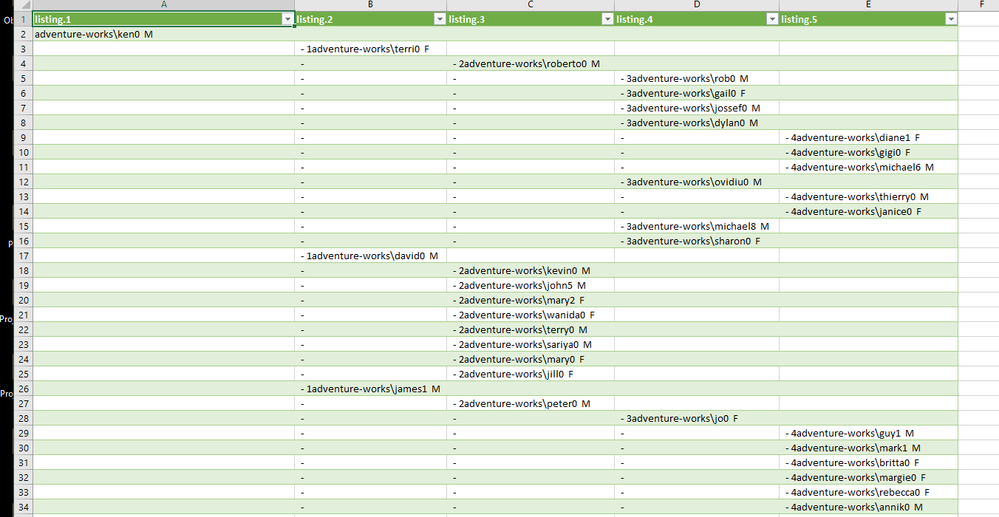
#"Split Column by Delimiter" = Table.SplitColumn(Source, "listing", Splitter.SplitTextByDelimiter("#(tab)", QuoteStyle.Csv), {"listing.1", "listing.2", "listing.3", "listing.4", "listing.5", "listing.6"}),
#"Changed Type" = Table.TransformColumnTypes(#"Split Column by Delimiter",{{"listing.1", type text}, {"listing.2", type text}, {"listing.3", type text}, {"listing.4", type text}, {"listing.5", type text}, {"listing.6", type text}}),
The result after splitting the column is as follows. Which is eaxctly how we need it. Note the M or F is the gender column I have added for further modifications.
My ideal would be for vertical and horizontal lines joining up the parts so people can follow the levels and even better drill through the details of, in this case, the login info.
If we could do this on one or two drag and drops in PowerBI we would be v happy and I reckon another useful tool for PBI
Thanks
- Mark as New
- Bookmark
- Subscribe
- Mute
- Subscribe to RSS Feed
- Permalink
- Report Inappropriate Content
Hmm, I think what you really want to do is to fill in all of your values instead of having nulls. Take a look at the table created by this query:
let
    Source = Table.FromRows(Json.Document(Binary.Decompress(Binary.FromText("i45Wci9KTVfSUXLKzMkBUsGlVZVAyqc0GUR5JSZn6ybq5uQXpCrF6hBQm5mblE9YVX5GXl6lglN+JUGlAaklqUUEVbkk5hFU40uEu1KLizNRPOlclFhVqeCRX1ScClKdkZqTAzYrNScxLxMk5FKalkaSBo/8XFQP4dDhlJ8EcSYoPGMB", BinaryEncoding.Base64), Compression.Deflate)), let _t = ((type text) meta [Serialized.Text = true]) in type table [tier1 = _t, tier2 = _t, tier3 = _t, tier4 = _t, tier5 = _t]),
    #"Changed Type" = Table.TransformColumnTypes(Source,{{"tier1", type text}, {"tier2", type text}, {"tier3", type text}, {"tier4", type text}, {"tier5", type text}}),
in
    #"Changed Type"
Once you have that, you can just build a hierarchy by draggin tier2 into tier1 and then tier3, tier4 and tier5. Then, if you use that hierarchy in a matrix, you get a really nice way to drill down and up into the hierarchy if you use the expanding drill down (branching down arrows).
Follow on LinkedIn
@ me in replies or I'll lose your thread!!!
Instead of a Kudo, please vote for this idea
Become an expert!: Enterprise DNA
External Tools: MSHGQM
YouTube Channel!: Microsoft Hates Greg
Latest book!: DAX For Humans
DAX is easy, CALCULATE makes DAX hard...
- Mark as New
- Bookmark
- Subscribe
- Mute
- Subscribe to RSS Feed
- Permalink
- Report Inappropriate Content
Not sure what a "standard Microsoft hierarchyID column positioning parts" means. Can you show some example/sample data?
I am likely way off, but Power BI has PATH, PATHITEM, etc. functions to deal with parent-child values.
Follow on LinkedIn
@ me in replies or I'll lose your thread!!!
Instead of a Kudo, please vote for this idea
Become an expert!: Enterprise DNA
External Tools: MSHGQM
YouTube Channel!: Microsoft Hates Greg
Latest book!: DAX For Humans
DAX is easy, CALCULATE makes DAX hard...
- Mark as New
- Bookmark
- Subscribe
- Mute
- Subscribe to RSS Feed
- Permalink
- Report Inappropriate Content
OK.
Rather than use my daya - I'll use teh data from the HumanResources.Employee table in SQL 2016
SELECT E.BusinessEntityID, P.FirstName + ' ' + P.LastName as 'Name',
OrganizationNode, OrganizationNode.ToString() as 'HierarchyID.ToString()',
OrganizationLevel
FROM HumanResources.Employee E
JOIN Person.Person P
ON E.BusinessEntityID = P.BusinessEntityID
order by OrganizationNode
That will produce a listing of employees sorted by OrganizationalNode You can see the relationship between lines through the ToString() column. I would like to display the data in the correct hierarchy order, with the hierarchys offset dependant on level.
Does this help?
- Mark as New
- Bookmark
- Subscribe
- Mute
- Subscribe to RSS Feed
- Permalink
- Report Inappropriate Content
Not entirely, what would an actual row of data look like? I don't need your data, just a representation of a data row.
Follow on LinkedIn
@ me in replies or I'll lose your thread!!!
Instead of a Kudo, please vote for this idea
Become an expert!: Enterprise DNA
External Tools: MSHGQM
YouTube Channel!: Microsoft Hates Greg
Latest book!: DAX For Humans
DAX is easy, CALCULATE makes DAX hard...
- Mark as New
- Bookmark
- Subscribe
- Mute
- Subscribe to RSS Feed
- Permalink
- Report Inappropriate Content
Run this
DECLARE @tab CHAR(2)
SET @tab = CHAR(9)
SELECT
Convert(nvarchar(100),REPLICATE(@tab , b.OrganizationNode.GetLevel()) )
+ b.LoginID + '--- '
+ Convert(nvarchar(25),b.OrganizationNode.GetLevel() )
as listing
FROM [HumanResources].[Employee] AS b
order by OrganizationNode
#
The output is a single column - with a number of tabs before teh text. If you output to file and load into Excel the tabs will spread the text across the XLS, one column of each tab.
The raw data is exactly as you'll see if you do a select * from AdventureWorks2014.HumanResources.Employee
Helpful resources

Power BI Dataviz World Championships
The Power BI Data Visualization World Championships is back! Get ahead of the game and start preparing now!

Power BI Monthly Update - December 2025
Check out the December 2025 Power BI Holiday Recap!

FabCon Atlanta 2026
Join us at FabCon Atlanta, March 16-20, for the ultimate Fabric, Power BI, AI and SQL community-led event. Save $200 with code FABCOMM.

| User | Count |
|---|---|
| 38 | |
| 37 | |
| 33 | |
| 32 | |
| 29 |


| User | Count |
|---|---|
| 132 | |
| 88 | |
| 82 | |
| 68 | |
| 64 |


