Forum Discussion

Anonymous's avatar
Anonymous
Not applicable
8 years ago
Solved

Hierarchy from a list

Hi All,


I have an issue with a hierarchy creation task. There is a list in Excel with two columns. The first one contains Organization IDs, where the first character is the level 1 of hierarchy, the second the level 2, and the last three is the level 3. In the second column there are the names of company divisions, business units, offices, etc. (also there are no logical structure in name, but in this example I used some kind of logic for the better understand).


Organization IDName
1000-000A
1100-000AA
1100-100AAA
1100-200AAB
1200-000AB
1200-100ABA
1200-200ABB
1200-300ABC
2000-000D
2100-000DD
2100-100DDD
2100-200DDE


Also from this two columns I would like to create a similar table as this below, where the first three columns contains the names of divisions which are over the lowest one.


Level1Level2Level3Organization ID
AAAAAA1100-100
AAAAAB1100-200
AABABA1200-100
AABABB1200-200
AABABC1200-300
DDDDDD2100-100
DDDDDE2100-200


Is it possible to solve this issue only with Power BI? 


Thanks for your help!

  • Anonymous's avatar
    Anonymous
    8 years ago

    Anonymous,

    You can get the above result by performing several steps in Query Editor of Power BI Desktop(Unpivot column, insert three new columns, add custom column….).
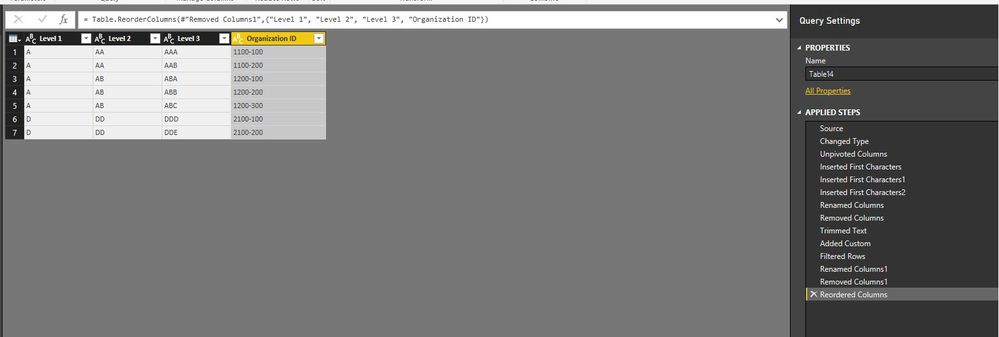

    The steps generate the following code in Advanced Editor of the query, you can add a new blank query in Power BI Desktop, copy the following code and paste it to the Advanced Editor of  the blank query, then check the result.

    let
        Source = Table.FromRows(Json.Document(Binary.Decompress(Binary.FromText("Tc7BCQAxCETRXjxnQd0K4iZVBPtvI2Ez4By8PPwwa4mp6nNOmnTJdsAKSAxC5KC45NWRoItehC7o6wV9P3ltGhdq0yAxCJGDpmRu", BinaryEncoding.Base64), Compression.Deflate)), let _t = ((type text) meta [Serialized.Text = true]) in type table [#"Organization ID" = _t, Name = _t]),
        #"Changed Type" = Table.TransformColumnTypes(Source,{{"Organization ID", type text}, {"Name", type text}}),
        #"Unpivoted Columns" = Table.UnpivotOtherColumns(#"Changed Type", {"Name"}, "Attribute", "Value"),
        #"Inserted First Characters" = Table.AddColumn(#"Unpivoted Columns", "First Characters", each Text.Start([Name], 1), type text),
        #"Inserted First Characters1" = Table.AddColumn(#"Inserted First Characters", "First Characters.1", each Text.Start([Name], 2), type text),
        #"Inserted First Characters2" = Table.AddColumn(#"Inserted First Characters1", "First Characters.2", each Text.Start([Name], 3), type text),
        #"Renamed Columns" = Table.RenameColumns(#"Inserted First Characters2",{{"First Characters", "Level 1"}, {"First Characters.1", "Level 2"}, {"First Characters.2", "Level 3"}}),
        #"Removed Columns" = Table.RemoveColumns(#"Renamed Columns",{"Name"}),
        #"Trimmed Text" = Table.TransformColumns(#"Removed Columns",{{"Level 2", Text.Trim}, {"Level 3", Text.Trim}}),
        #"Added Custom" = Table.AddColumn(#"Trimmed Text", "Custom", each if [Level 2]=[Level 3] then 1 else 0),
        #"Filtered Rows" = Table.SelectRows(#"Added Custom", each ([Custom] = 0)),
        #"Renamed Columns1" = Table.RenameColumns(#"Filtered Rows",{{"Value", "Organization ID"}}),
        #"Removed Columns1" = Table.RemoveColumns(#"Renamed Columns1",{"Attribute", "Custom"}),
        #"Reordered Columns" = Table.ReorderColumns(#"Removed Columns1",{"Level 1", "Level 2", "Level 3", "Organization ID"})
    in
        #"Reordered Columns"


    Regards,
    Lydia

1 Reply

  • Anonymous's avatar
    Anonymous
    Not applicable

    Anonymous,

    You can get the above result by performing several steps in Query Editor of Power BI Desktop(Unpivot column, insert three new columns, add custom column….).


    The steps generate the following code in Advanced Editor of the query, you can add a new blank query in Power BI Desktop, copy the following code and paste it to the Advanced Editor of  the blank query, then check the result.

    let
        Source = Table.FromRows(Json.Document(Binary.Decompress(Binary.FromText("Tc7BCQAxCETRXjxnQd0K4iZVBPtvI2Ez4By8PPwwa4mp6nNOmnTJdsAKSAxC5KC45NWRoItehC7o6wV9P3ltGhdq0yAxCJGDpmRu", BinaryEncoding.Base64), Compression.Deflate)), let _t = ((type text) meta [Serialized.Text = true]) in type table [#"Organization ID" = _t, Name = _t]),
        #"Changed Type" = Table.TransformColumnTypes(Source,{{"Organization ID", type text}, {"Name", type text}}),
        #"Unpivoted Columns" = Table.UnpivotOtherColumns(#"Changed Type", {"Name"}, "Attribute", "Value"),
        #"Inserted First Characters" = Table.AddColumn(#"Unpivoted Columns", "First Characters", each Text.Start([Name], 1), type text),
        #"Inserted First Characters1" = Table.AddColumn(#"Inserted First Characters", "First Characters.1", each Text.Start([Name], 2), type text),
        #"Inserted First Characters2" = Table.AddColumn(#"Inserted First Characters1", "First Characters.2", each Text.Start([Name], 3), type text),
        #"Renamed Columns" = Table.RenameColumns(#"Inserted First Characters2",{{"First Characters", "Level 1"}, {"First Characters.1", "Level 2"}, {"First Characters.2", "Level 3"}}),
        #"Removed Columns" = Table.RemoveColumns(#"Renamed Columns",{"Name"}),
        #"Trimmed Text" = Table.TransformColumns(#"Removed Columns",{{"Level 2", Text.Trim}, {"Level 3", Text.Trim}}),
        #"Added Custom" = Table.AddColumn(#"Trimmed Text", "Custom", each if [Level 2]=[Level 3] then 1 else 0),
        #"Filtered Rows" = Table.SelectRows(#"Added Custom", each ([Custom] = 0)),
        #"Renamed Columns1" = Table.RenameColumns(#"Filtered Rows",{{"Value", "Organization ID"}}),
        #"Removed Columns1" = Table.RemoveColumns(#"Renamed Columns1",{"Attribute", "Custom"}),
        #"Reordered Columns" = Table.ReorderColumns(#"Removed Columns1",{"Level 1", "Level 2", "Level 3", "Organization ID"})
    in
        #"Reordered Columns"


    Regards,
    Lydia