cancel
Showing results for 
Search instead for 
Did you mean: 

Try your skills in the Power BI Dataviz World Championship! Round one ends June 26. Join now

Reply
Anonymous
Not applicable

Hierarchy created using different (yet connected) tables not working

Hi everyone. I am trying to use a date hierarchy (YEAR --> Quarter --> Month --> Day) using fields from 2 different tables (both date related). The first 3 fields (i.e. YEAR, Quarter & Month) come from a DQ called Calendar and last field comes from a table called Dates (out of the two tables, only Dates table has individual dates in proper format). The two tables are connected with each other like below:


theDarkPrince_0-1619084844776.png

And I am trying to use the mentioned fields in a visual like below:


theDarkPrince_1-1619085095610.png

Please note that I have drilled down into 2020 --> Q2 --> Apr-20 but when I drill down to the last level (Day), this is what I get. I'm unable to figure out how to get this to work. All help is appreciated. Thanks in advance.

1 REPLY 1
v-deddai1-msft
Community Support
Community Support

Hi @Anonymous ,


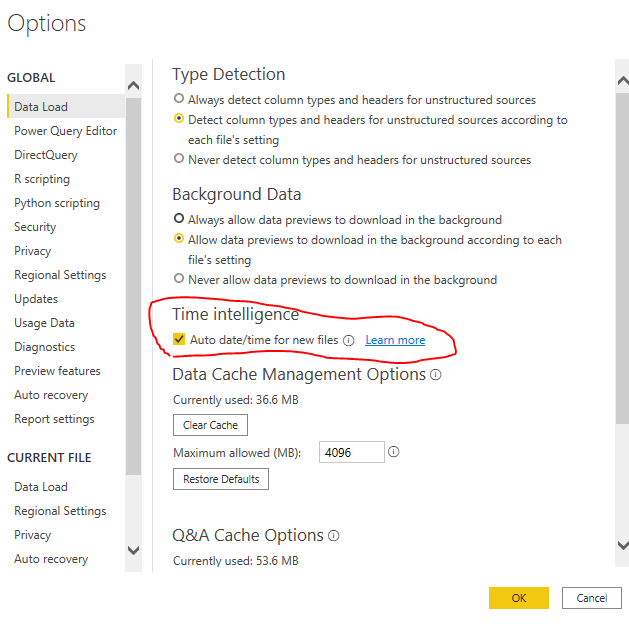
I suggest you use build-in hierarchy for date in power bi. You can enable auto date/time function in power bi desktop:


Capture.PNG


Capture1.PNG


Please refer to https://docs.microsoft.com/en-us/power-bi/transform-model/desktop-auto-date-time

'

If this post helps, then please consider Accept it as the solution to help the other members find it more quickly.


Best Regards,

Dedmon Dai


Helpful resources

Announcements
Fabric Data Days is here Carousel

Fabric Data Days 2026

Don't miss out on Data Days, June 15 through August 7. Learn Fabric, Power BI, SQL, AI and more.

May Power BI Update Carousel

Power BI Monthly Update - May 2026

Check out the May 2026 Power BI update to learn about new features.

Power BI DataViz World Championships carousel

Power BI DataViz World Championships - June 2026

A new Power BI DataViz World Championship is coming this June! Don't miss out on submitting your entry.