Don't miss your chance to take the Fabric Data Engineer (DP-600) exam for FREE! Find out how by attending the DP-600 session on April 23rd (pacific time), live or on-demand.
Learn moreNext up in the FabCon + SQLCon recap series: The roadmap for Microsoft SQL and Maximizing Developer experiences in Fabric. All sessions are available on-demand after the live show. Register now
Hello,
I am working through a report where we are trying to compare customers so we can work with them to show how they are stacking up. What I want to be able to is show only the name of the customer I have selected in the chart while showing other customers in the chart and how they compare. I have some examples below.
Tables of customers
| Company | Company ID | Pay Rate |
| Jones Inc | Customer 1 | 12.5 |
| Apple Products | Customer 2 | 22.75 |
| Samsung | Customer 3 | 18.65 |
| Best Buy | Customer 4 | 13.25 |
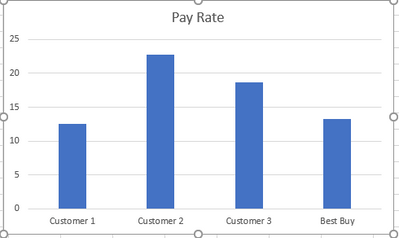
View if Best Buy is selected:
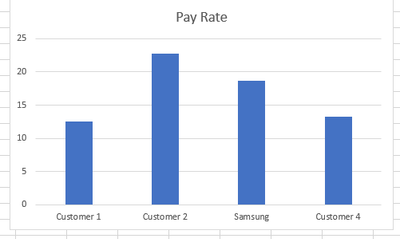
View is Samsung is selected:
Any help would be greatly appreciated!
isn't there a solution yet ?
thanks
This might not be the easiest way...
but you could create a nearly identical query and only change the names of the cutomers. Then add that data to the chart and create a new slicer.
So you would end up with a chart with 2 slicers. One to display the company name and the other to display Customer X, Y, and Z.
Make sure you do not relate the queries or else the slicers will work on both sets.
Let me know if this is works
Hello!
Can you please clarify this solution? Maybe some screenshots of what you meant.
Thanks
This probably would work but I dont like the idea of having to have 2 slicers in order to show the data in one chart correclty.
I'm trying to do the exact same thing. Did you manage to find a solution?
If you have recently started exploring Fabric, we'd love to hear how it's going. Your feedback can help with product improvements.
A new Power BI DataViz World Championship is coming this June! Don't miss out on submitting your entry.
| User | Count |
|---|---|
| 45 | |
| 43 | |
| 39 | |
| 19 | |
| 15 |
| User | Count |
|---|---|
| 67 | |
| 66 | |
| 31 | |
| 28 | |
| 24 |