FabCon is coming to Atlanta
Join us at FabCon Atlanta from March 16 - 20, 2026, for the ultimate Fabric, Power BI, AI and SQL community-led event. Save $200 with code FABCOMM.
Register now!- Power BI forums
- Get Help with Power BI
- Desktop
- Service
- Report Server
- Power Query
- Mobile Apps
- Developer
- DAX Commands and Tips
- Custom Visuals Development Discussion
- Health and Life Sciences
- Power BI Spanish forums
- Translated Spanish Desktop
- Training and Consulting
- Instructor Led Training
- Dashboard in a Day for Women, by Women
- Galleries
- Data Stories Gallery
- Themes Gallery
- Contests Gallery
- QuickViz Gallery
- Quick Measures Gallery
- Visual Calculations Gallery
- Notebook Gallery
- Translytical Task Flow Gallery
- TMDL Gallery
- R Script Showcase
- Webinars and Video Gallery
- Ideas
- Custom Visuals Ideas (read-only)
- Issues
- Issues
- Events
- Upcoming Events
The Power BI Data Visualization World Championships is back! Get ahead of the game and start preparing now! Learn more
- Power BI forums
- Forums
- Get Help with Power BI
- Desktop
- Re: Hide/Remove row based on criteria
- Subscribe to RSS Feed
- Mark Topic as New
- Mark Topic as Read
- Float this Topic for Current User
- Bookmark
- Subscribe
- Printer Friendly Page

- Mark as New
- Bookmark
- Subscribe
- Mute
- Subscribe to RSS Feed
- Permalink
- Report Inappropriate Content
Hide/Remove row based on criteria
I am working on a change management dashboard for my company, and I am trying to create an automated process to hide/remove rows once all of the tasks related to the change have a complete status AND the effective date has passed. I already have a measure written to assign a number to each of the status options if that helps. (Does Not Apply =1, Not Started=2,In Process=3, Complete=4) I am relatively new to DAX, so any help would be greatly appreciated. 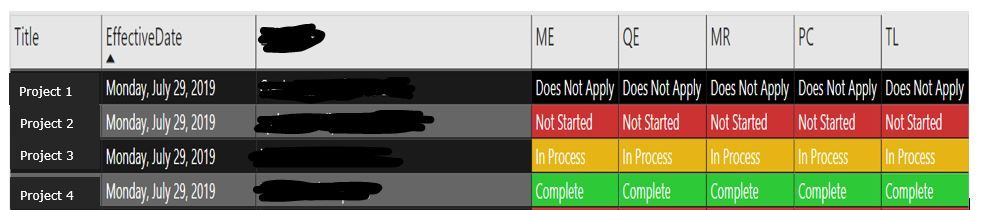
Solved! Go to Solution.


- Mark as New
- Bookmark
- Subscribe
- Mute
- Subscribe to RSS Feed
- Permalink
- Report Inappropriate Content
You shouldn't need to use VALUE with the measures. That just converts strings to numerical values. If the status number measure actually returns "4" instead of 4, you can add quotations around the comparison value to keep it simple.
ECMFilter2 =
IF (
SELECTEDVALUE('Project1)'[EffectiveDate]) < TODAY() &&
[ME Status Number] = 4 &&
[QE Status Number] = 4 &&
[MR Status Number] = 4 &&
[PC Status Number] = 4 &&
[TL Status Number] = 4,
TRUE(),
FALSE()
)
Nothing's changed for the date conditional. Does it still return true in all instances?
- Mark as New
- Bookmark
- Subscribe
- Mute
- Subscribe to RSS Feed
- Permalink
- Report Inappropriate Content
The easiest way to do this is to create a measure that returns True/False based on the conditions you want.
HideProject =
IF (
    SELECTEDVALUE(Projects[EffectiveDate]) < NOW() &&
        SELECTEDVALUE(Projects[ME] = Complete) &&
        SELECTEDVALUE(Projects[QE] = Complete) &&
        SELECTEDVALUE(Projects[MR] = Complete) &&
        SELECTEDVALUE(Projects[PC] = Complete) &&
        SELECTEDVALUE(Projects[TL] = Complete),
    TRUE(),
    FALSE()
)
And then you can add this measure into a visual level filter, and hide results where this is true. Depending on how your tables are set up, this may not be the exact syntax, but it should get you started in the right direction.
- Mark as New
- Bookmark
- Subscribe
- Mute
- Subscribe to RSS Feed
- Permalink
- Report Inappropriate Content
I keep receiving an error message that says a single value for column ME cannot be determined. How do I look at this row by row for each project?

- Mark as New
- Bookmark
- Subscribe
- Mute
- Subscribe to RSS Feed
- Permalink
- Report Inappropriate Content
That would be becasue I forgot the closing parenthesis in part of the expression. That's what I get for not testing this directly in PBI first.
HideProject =
IF (
    SELECTEDVALUE(Projects[EffectiveDate]) < NOW() &&
        SELECTEDVALUE(Projects[ME]) = Complete &&
        SELECTEDVALUE(Projects[QE]) = Complete &&
        SELECTEDVALUE(Projects[MR]) = Complete &&
        SELECTEDVALUE(Projects[PC]) = Complete &&
        SELECTEDVALUE(Projects[TL]) = Complete,
    TRUE(),
    FALSE()
)
- Mark as New
- Bookmark
- Subscribe
- Mute
- Subscribe to RSS Feed
- Permalink
- Report Inappropriate Content
The formula isn't erroring out anymore, but it is not working properly. I have a project which meets all of the criteria of the formula, but is returning as False. Any suggestions?
- Mark as New
- Bookmark
- Subscribe
- Mute
- Subscribe to RSS Feed
- Permalink
- Report Inappropriate Content

- Mark as New
- Bookmark
- Subscribe
- Mute
- Subscribe to RSS Feed
- Permalink
- Report Inappropriate Content
I may have messed up again and forgotten quotation marks around each of the Complete values. Did it not give you some sort of warning that it didn't know what Complete was?
Try this update:
HideProject =
IF (
    SELECTEDVALUE(Projects[EffectiveDate]) < NOW() &&
        SELECTEDVALUE(Projects[ME]) = "Complete" &&
        SELECTEDVALUE(Projects[QE]) = "Complete" &&
        SELECTEDVALUE(Projects[MR]) = "Complete" &&
        SELECTEDVALUE(Projects[PC]) = "Complete" &&
        SELECTEDVALUE(Projects[TL]) = "Complete",
    TRUE(),
    FALSE()
)
If this still doesn't work, create another measure to test each condition for true. If you can narrow down which part is evaluating to false, you can fix that and hopefully fix the measure.
- Mark as New
- Bookmark
- Subscribe
- Mute
- Subscribe to RSS Feed
- Permalink
- Report Inappropriate Content
I had already added the qutations. I will test each condition and let you know what I find. Thank you for your help!
- Mark as New
- Bookmark
- Subscribe
- Mute
- Subscribe to RSS Feed
- Permalink
- Report Inappropriate Content
Tested each indvidually. The condition for effective date returned all "True" values even if the effective date had not passed yet. The conditions for the indvidual role columns returned all "False" values even if the status was set to complete. Not really sure whats going on.
- Mark as New
- Bookmark
- Subscribe
- Mute
- Subscribe to RSS Feed
- Permalink
- Report Inappropriate Content
Huh. That depends on how the visual's values are calculated then. Do each of these rows represent a single row in a data table, or are they aggregations of multiple rows? SELECTEDVALUE returns blank by default when there is more than one possible value in the given context. The results you're seeing are what I'd expect if SELECTEDVALUE is returning blank every time.
You may be able to use the measure you spoke about earlier that returns 4 when the status is Complete instead of checking the status directly. At this point, it seems that I just don't know enough about your data model to do anything but guess at the problem.
- Mark as New
- Bookmark
- Subscribe
- Mute
- Subscribe to RSS Feed
- Permalink
- Report Inappropriate Content
All of the data sourced for the report is from a SharePoint list. In the SharePoint list each role has a dropdown menu to select their status. (Not Started, In Process, etc..) Would that be causing these issues?
- Mark as New
- Bookmark
- Subscribe
- Mute
- Subscribe to RSS Feed
- Permalink
- Report Inappropriate Content
Got it working. Used the measure I created previously that assigned a number to each status (1=Does Not Apply, 2=Not Started, etc...) then used value instead of selectedvalue.
- Mark as New
- Bookmark
- Subscribe
- Mute
- Subscribe to RSS Feed
- Permalink
- Report Inappropriate Content
You shouldn't need to use VALUE with the measures. That just converts strings to numerical values. If the status number measure actually returns "4" instead of 4, you can add quotations around the comparison value to keep it simple.
ECMFilter2 =
IF (
SELECTEDVALUE('Project1)'[EffectiveDate]) < TODAY() &&
[ME Status Number] = 4 &&
[QE Status Number] = 4 &&
[MR Status Number] = 4 &&
[PC Status Number] = 4 &&
[TL Status Number] = 4,
TRUE(),
FALSE()
)
Nothing's changed for the date conditional. Does it still return true in all instances?
- Mark as New
- Bookmark
- Subscribe
- Mute
- Subscribe to RSS Feed
- Permalink
- Report Inappropriate Content
I switched the effective date to value as well instead of selectedvalue. Everything is functioning exactly as I want it to. I've been testing different scenarios to make sure it won't fail and it seems to be working correctly.


- Mark as New
- Bookmark
- Subscribe
- Mute
- Subscribe to RSS Feed
- Permalink
- Report Inappropriate Content
Hi @Anonymous ,
Please kindly mark the most helpful solution as answer to finish the thread and help others to find it more quickly. thanks!
If this post helps, then please consider Accept it as the solution to help the other members find it more
quickly.
- Mark as New
- Bookmark
- Subscribe
- Mute
- Subscribe to RSS Feed
- Permalink
- Report Inappropriate Content
Well, I'm not sure why it's working as well as it is, but if it gives the correct result, I'm not going to argue. Congrats on figuring it out!
Helpful resources

Power BI Dataviz World Championships
The Power BI Data Visualization World Championships is back! Get ahead of the game and start preparing now!

Power BI Monthly Update - December 2025
Check out the December 2025 Power BI Holiday Recap!

FabCon Atlanta 2026
Join us at FabCon Atlanta, March 16-20, for the ultimate Fabric, Power BI, AI and SQL community-led event. Save $200 with code FABCOMM.

| User | Count |
|---|---|
| 38 | |
| 36 | |
| 33 | |
| 31 | |
| 28 |


| User | Count |
|---|---|
| 129 | |
| 88 | |
| 79 | |
| 68 | |
| 63 |


