Join us at FabCon Atlanta from March 16 - 20, 2026, for the ultimate Fabric, Power BI, AI and SQL community-led event. Save $200 with code FABCOMM.
Register now!Get Fabric Certified for FREE during Fabric Data Days. Don't miss your chance! Request now
Hi Team,
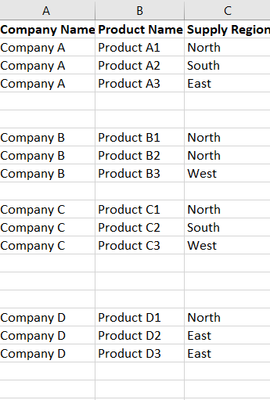
Below is a screenshot of what the data looks like.
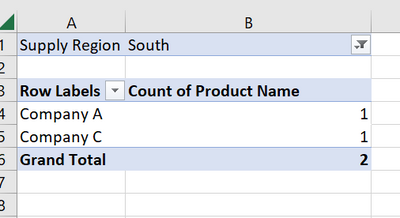
Now if you select "South Region", you will get below screenshot:
However what I am trying to acheieve is that it should also show Company B as 0 and Company D as 0, just like below.
How to acheieve this in Power BI?
Solved! Go to Solution.
Hi,
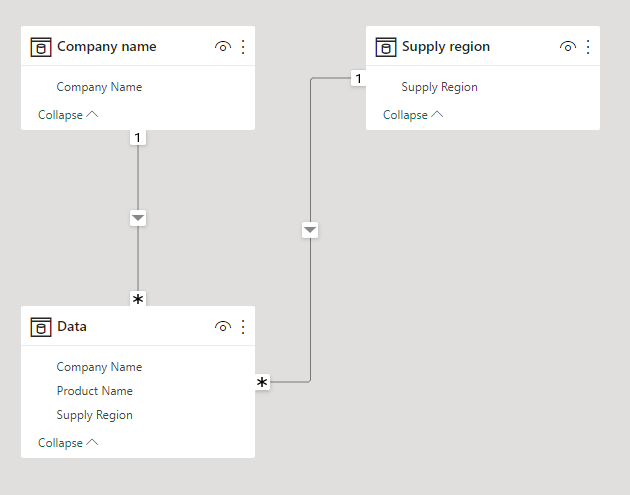
I am not sure how your dataset looks like, but please check the below picture and the attached pbix file.
Product count: =
COUNTROWS(Data) + 0
Hi,
I am not sure how your dataset looks like, but please check the below picture and the attached pbix file.
Product count: =
COUNTROWS(Data) + 0
Thanks @Jihwan_Kim . My data model is slightly complicated and all my measures are working well. Without making many changes , the coalesce function helped me get 0's.
Check out the November 2025 Power BI update to learn about new features.
Advance your Data & AI career with 50 days of live learning, contests, hands-on challenges, study groups & certifications and more!