Hello colleagues,
could you please help with a basic (fundamental) understanding of how joins work in the PBI (Power BI) data model.
I have two related tables - parts and assemblies, which consist of parts.
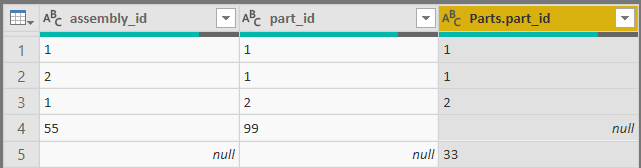
Parts table
Assemblies table
| assembly_id | part_id |
| 1 | 1 |
| 1 | 2 |
| 2 | 1 |
| 55 | 99 |
I load and connect tables in Power BI, using part_id to define a relationship.
Then I create two very basic pivot tables for analysis:
1) to calculate the count of parts in assemblies and
2) the count of assemblies "in" parts.
I don't exactly understand the result I see, though. What I want to see is what was done in another (similar) BI software, but which uses full outer join (kind of, they use a different terminology for relationships) by default.
It looks, like Power BI uses only inner join to relate tables in the relationship screen? Is it possible to define left or right outer join in the relationship view? Or maybe DAX is required? I can't use the Power query or SQL or Pandas, where I can define the outer or negative joins - because I need these datatables to be in a memory (RAM) for faster analysis.
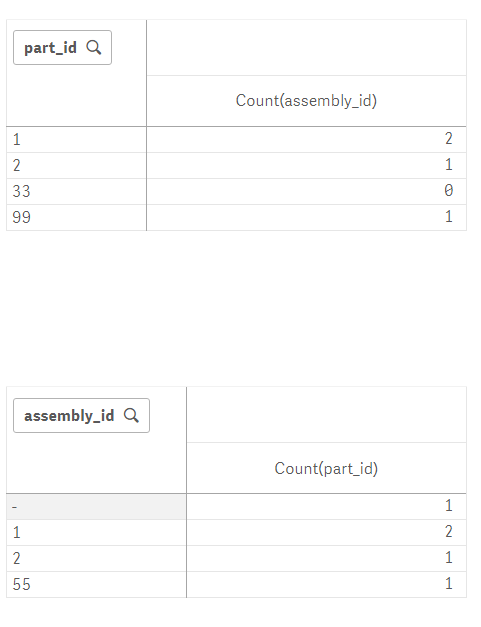 Screenshot from another software, not PBI
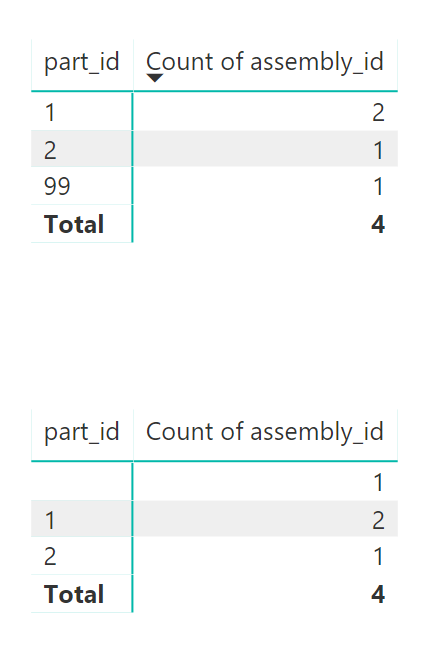 Screenshot from PBI