Jumpstart your career with the Fabric Career Hub
Find everything you need to get certified on Fabric—skills challenges, live sessions, exam prep, role guidance, and a 50 percent discount on exams.
Get started- Power BI forums
- Updates
- News & Announcements
- Get Help with Power BI
- Desktop
- Service
- Report Server
- Power Query
- Mobile Apps
- Developer
- DAX Commands and Tips
- Custom Visuals Development Discussion
- Health and Life Sciences
- Power BI Spanish forums
- Translated Spanish Desktop
- Power Platform Integration - Better Together!
- Power Platform Integrations (Read-only)
- Power Platform and Dynamics 365 Integrations (Read-only)
- Training and Consulting
- Instructor Led Training
- Dashboard in a Day for Women, by Women
- Galleries
- Community Connections & How-To Videos
- COVID-19 Data Stories Gallery
- Themes Gallery
- Data Stories Gallery
- R Script Showcase
- Webinars and Video Gallery
- Quick Measures Gallery
- 2021 MSBizAppsSummit Gallery
- 2020 MSBizAppsSummit Gallery
- 2019 MSBizAppsSummit Gallery
- Events
- Ideas
- Custom Visuals Ideas
- Issues
- Issues
- Events
- Upcoming Events
- Community Blog
- Power BI Community Blog
- Custom Visuals Community Blog
- Community Support
- Community Accounts & Registration
- Using the Community
- Community Feedback
Earn a 50% discount on the DP-600 certification exam by completing the Fabric 30 Days to Learn It challenge.
- Power BI forums
- Forums
- Get Help with Power BI
- Desktop
- Re: Help with Filters and Slicers
- Subscribe to RSS Feed
- Mark Topic as New
- Mark Topic as Read
- Float this Topic for Current User
- Bookmark
- Subscribe
- Printer Friendly Page

- Mark as New
- Bookmark
- Subscribe
- Mute
- Subscribe to RSS Feed
- Permalink
- Report Inappropriate Content
Help with Filters and Slicers
All,
I currently have a measure Total Orders:= DISTINCTCOUNT( 'Orders'[Order ID]) that gives me the total number of orders in the fact table below. I have a slicer built off field marked 1. in the screenshot which has a number of categories. This successfully filters all visuals on a page using the Total Orders measure.
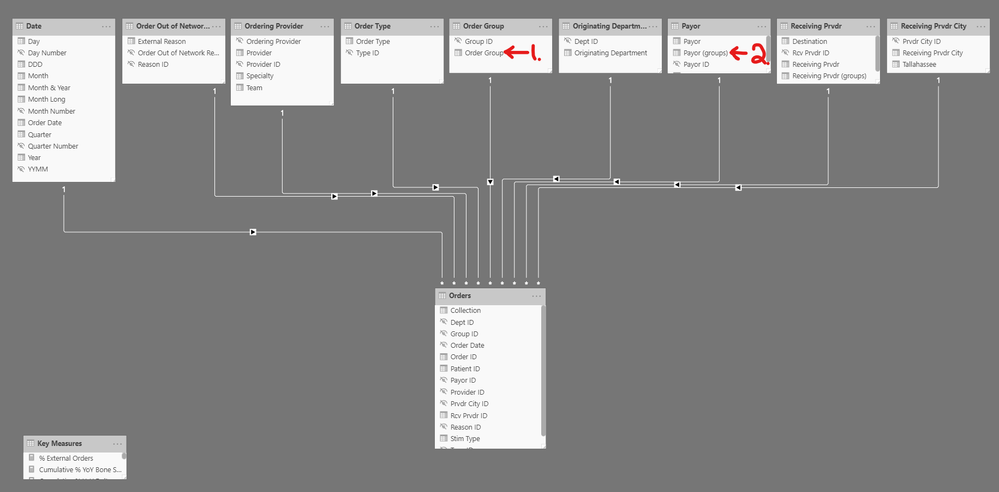
My issue is that some of the categories from that slicer have only specific Payors applicable and should be filtered out when selected. These payors are grouped in the calculated column marked 2. I tried modifying my measure to include this criteria using
Total Orders Modified:=
SWITCH(
    TRUE(),
    SELECTEDVALUE( 'Order Group'[Order Group] ) = "Category A", CALCULATE( DISTINCTCOUNT( 'Orders'[Order ID] ), AND( 'Payor'[Payor Groups] = "X", 'Payor'[Payor Groups] = "Y" ) ),
    SELECTEDVALUE( 'Order Group'[Order Group] ) = "Category B", CALCULATE( DISTINCTCOUNT( 'Orders'[Order ID] ), 'Payor'[Payor Groups] = "Z",
    DISTINCTCOUNT( 'Orders'[Order ID]
)
The modified measure works most of the time, but when placed against a set of items, instead of giving the breakdown total for each item, it gives the same amount for each. It's as though there's no relationship even though I have the relationships set up. What am I overlooking?
Thank you in advance for your time.
Solved! Go to Solution.
- Mark as New
- Bookmark
- Subscribe
- Mute
- Subscribe to RSS Feed
- Permalink
- Report Inappropriate Content
@amitchandak , Kudos and thank you for your reply. I tried this version but it still caused the unwanted sum of the entire column regardless of the categories.
In working through this, however, I did realize that the filter I wanted to apply when a slicer value was selected would not flow back up the chain to the dimension table. Therefore, I was able to rectify this by bringing the grouped Categories into the Fact table instead. The resulting code I used simply referenced the category column in the fact table, thus filtering the results.


- Mark as New
- Bookmark
- Subscribe
- Mute
- Subscribe to RSS Feed
- Permalink
- Report Inappropriate Content
Try like
SWITCH(
    TRUE(),
    _max = "Category A", CALCULATE( DISTINCTCOUNT( 'Orders'[Order ID] ), 'Payor'[Payor Groups] in{ "X", "Y" } ),
    _max = "Category B", CALCULATE( DISTINCTCOUNT( 'Orders'[Order ID] ), 'Payor'[Payor Groups] = "Z"),
    DISTINCTCOUNT( 'Orders'[Order ID])
)Microsoft Power BI Learning Resources, 2023 !!
Learn Power BI - Full Course with Dec-2022, with Window, Index, Offset, 100+ Topics !!
Did I answer your question? Mark my post as a solution! Appreciate your Kudos !! Proud to be a Super User! !!
- Mark as New
- Bookmark
- Subscribe
- Mute
- Subscribe to RSS Feed
- Permalink
- Report Inappropriate Content
@amitchandak , Kudos and thank you for your reply. I tried this version but it still caused the unwanted sum of the entire column regardless of the categories.
In working through this, however, I did realize that the filter I wanted to apply when a slicer value was selected would not flow back up the chain to the dimension table. Therefore, I was able to rectify this by bringing the grouped Categories into the Fact table instead. The resulting code I used simply referenced the category column in the fact table, thus filtering the results.
- Mark as New
- Bookmark
- Subscribe
- Mute
- Subscribe to RSS Feed
- Permalink
- Report Inappropriate Content
If you can post the correct fomrula, that will help other users.
Microsoft Power BI Learning Resources, 2023 !!
Learn Power BI - Full Course with Dec-2022, with Window, Index, Offset, 100+ Topics !!
Did I answer your question? Mark my post as a solution! Appreciate your Kudos !! Proud to be a Super User! !!

- Mark as New
- Bookmark
- Subscribe
- Mute
- Subscribe to RSS Feed
- Permalink
- Report Inappropriate Content
Really difficult to tell without some sample data to test with. Please see this post regarding How to Get Your Question Answered Quickly: https://community.powerbi.com/t5/Community-Blog/How-to-Get-Your-Question-Answered-Quickly/ba-p/38490
Follow on LinkedIn
@ me in replies or I'll lose your thread!!!
Instead of a Kudo, please vote for this idea
Become an expert!: Enterprise DNA
External Tools: MSHGQM
YouTube Channel!: Microsoft Hates Greg
Latest book!: The Definitive Guide to Power Query (M)
DAX is easy, CALCULATE makes DAX hard...
- Mark as New
- Bookmark
- Subscribe
- Mute
- Subscribe to RSS Feed
- Permalink
- Report Inappropriate Content
@Greg_Deckler , Kudos and thank you for the tip! I will definitely streamline my future questions based on this article.

Helpful resources

New forum boards available in Real-Time Intelligence.
Ask questions in Eventhouse and KQL, Eventstream, and Reflex.

Power BI Monthly Update - May 2024
Check out the May 2024 Power BI update to learn about new features.


| User | Count |
|---|---|
| 88 | |
| 74 | |
| 69 | |
| 65 | |
| 58 |


| User | Count |
|---|---|
| 106 | |
| 97 | |
| 76 | |
| 63 | |
| 60 |


