Don't miss your chance to take the Fabric Data Engineer (DP-600) exam for FREE! Find out how by attending the DP-600 session on April 23rd (pacific time), live or on-demand.
Learn moreNext up in the FabCon + SQLCon recap series: The roadmap for Microsoft SQL and Maximizing Developer experiences in Fabric. All sessions are available on-demand after the live show. Register now
Good day,
I am attempting to build a matrix to show data imported from snowflake.
The relationships between the data are as follows:
Person ----1..*------->Policy
Policy -----1..*-------> Code
I would like to first show the Person's name and then have the expansion to the different records for the policies. Please see the sample below.
| Person | Branch | Code | Status | Date |
| Jon Doe | ||||
| Policy 1 | 1 | ABC | Ordered | |
| Policy 1 | 1 | CDE | Received | 31/1/23 |
| Jane Doe | ||||
| Policy 1 | 3 | FGH | Ordered | |
| Policy 1 | 3 | IJK | Ordered | |
| Policy 2 | 3 | LMN | Ordered | |
| Policy 3 | 3 | OPQ | Ordered |
Please advise if this is possible and if so, how to achieve it.
Thanks in advance for your assistance.
Solved! Go to Solution.
Hi @KCarlton96 ,
Please try:
Status' = IF(ISINSCOPE('Table'[Requirement]),MAX('Table'[Status]))
Date' = IF(ISINSCOPE('Table'[Requirement]),MAX('Table'[Date]))
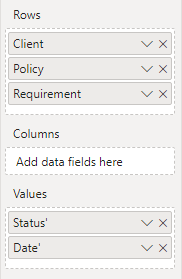
Then apply it to the matrix visual:
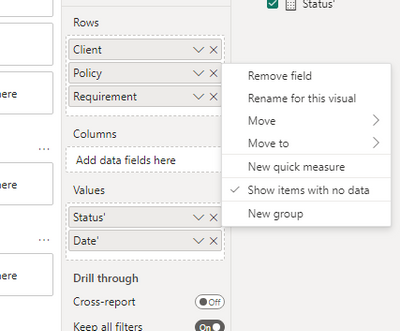
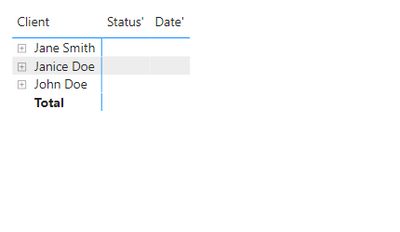
Turn on "Show items with no data":
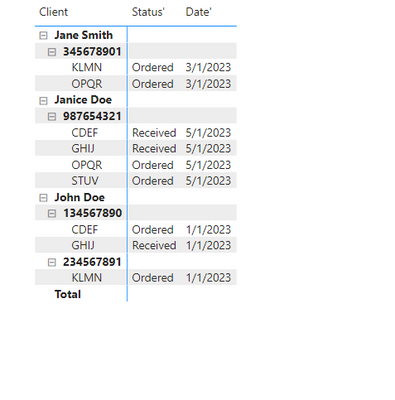
Final output:
Best Regards,
Jianbo Li
If this post helps, then please consider Accept it as the solution to help the other members find it more quickly.
Hi @KCarlton96 ,
Please try:
Status' = IF(ISINSCOPE('Table'[Requirement]),MAX('Table'[Status]))
Date' = IF(ISINSCOPE('Table'[Requirement]),MAX('Table'[Date]))
Then apply it to the matrix visual:
Turn on "Show items with no data":
Final output:
Best Regards,
Jianbo Li
If this post helps, then please consider Accept it as the solution to help the other members find it more quickly.
Thank you so much!
Hi @KCarlton96 ,
What are the fields that you associate between these tables? What are the fields from each of the tables in the matrix you want to create? Can you please share more details to help us clarify your scenario?
Please provide me with more details about your table and your problem or share me with your pbix file after removing sensitive data.
Refer to:
How to provide sample data in the Power BI Forum
How to Get Your Question Answered Quickly
Best Regards,
Jianbo Li
If this post helps, then please consider Accept it as the solution to help the other members find it more quickly.
Hi good day,
Thank you for your response.
The data is stored in one table.
A sample of the day would be like below:
| Client | Policy | Branch | Company | Requirement | Status | Date |
| John Doe | 134567890 | 10001 | ABC | CDEF | Ordered | 1/1/23 |
| John Doe | 134567890 | 10001 | ABC | GHIJ | Received | 1/1/23 |
| John Doe | 234567891 | 10001 | ABC | KLMN | Ordered | 1/1/23 |
| Jane Smith | 345678901 | 20000 | XYZ | OPQR | Ordered | 3/1/23 |
| Jane Smith | 345678901 | 20000 | XYZ | KLMN | Ordered | 3/1/23 |
| Janice Doe | 987654321 | 30004 | XYZ | CDEF | Received | 5/1/23 |
| Janice Doe | 987654321 | 30004 | XYZ | GHIJ | Received | 5/1/23 |
| Janice Doe | 987654321 | 30004 | XYZ | OPQR | Ordered | 5/1/23 |
| Janice Doe | 987654321 | 30004 | XYZ | STUV | Ordered | 5/1/23 |
So a Client can have multiple Policies and Policies can have multiple Requirements ordered for it.
What I would want is to show the Name of the client, which would then expand into the policies for that client which would then expand to the Requirements for that Policy. Status and Date are the requirement status and date.
So the visual hierarchy I'm looking for is:
Client
Please let me know if you need any more information.
Thank you again for being willing to assist.
Regards,
Katrina
If you have recently started exploring Fabric, we'd love to hear how it's going. Your feedback can help with product improvements.
A new Power BI DataViz World Championship is coming this June! Don't miss out on submitting your entry.
| User | Count |
|---|---|
| 46 | |
| 43 | |
| 39 | |
| 19 | |
| 15 |
| User | Count |
|---|---|
| 68 | |
| 65 | |
| 31 | |
| 28 | |
| 24 |