Join us at FabCon Atlanta from March 16 - 20, 2026, for the ultimate Fabric, Power BI, AI and SQL community-led event. Save $200 with code FABCOMM.
Register now!The Power BI Data Visualization World Championships is back! It's time to submit your entry. Live now!
Hello, everyone!
I'm trying to reach a formula that will sum up the number of approvals a paper has had until it reached its current step of analysis. The logic is rather simple: if, for example, a paper is in step 7, it has had 6 approvals before it (that is, it got approved in all 6 previous steps until it got where it is).
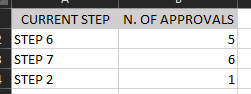
However I got stuck trying to make the formula return not the number of previous approvals, but an incremental counting of all approvals the papers have had. My goal is to plot a funnel visual that looks like this (in the example of the 3 papers I shared above):
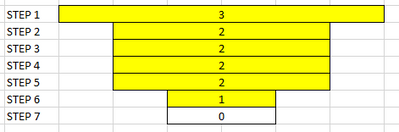
What functions would you use for such a formula? No problem if it needs 2 or more 🙂
Thank you very much in advance!
Thanks for the clarifying answer! I'm trying to add a custom column that references CURRENT STEP but CURRENT STEP is a calculated column in itself and therefore I don't know how to reference it in Power Query. Is there any way to do that?
I think you have 2 options:
1. Work out a formula for a measure which calculates the implied steps from the above data. Might involve a hardcoded list of integers and a calculation to count the number of steps which are equal to or greater than each integer
or
2. Generate additional lines (which are implied in the data) for each maximum step, making the visual easier to think about. If this is done in Power Query, just add a custom column {1..[current step as an integer]} then Expand that column 'To Rows'. The column [current step as an integer] will have to be numeric and that can be calculated in a reasonably straightforward manner.
The Power BI Data Visualization World Championships is back! It's time to submit your entry.
Check out the January 2026 Power BI update to learn about new features.
| User | Count |
|---|---|
| 60 | |
| 49 | |
| 30 | |
| 25 | |
| 23 |
| User | Count |
|---|---|
| 130 | |
| 103 | |
| 58 | |
| 39 | |
| 31 |