Join us at FabCon Vienna from September 15-18, 2025
The ultimate Fabric, Power BI, SQL, and AI community-led learning event. Save €200 with code FABCOMM.
Get registered- Power BI forums
- Get Help with Power BI
- Desktop
- Service
- Report Server
- Power Query
- Mobile Apps
- Developer
- DAX Commands and Tips
- Custom Visuals Development Discussion
- Health and Life Sciences
- Power BI Spanish forums
- Translated Spanish Desktop
- Training and Consulting
- Instructor Led Training
- Dashboard in a Day for Women, by Women
- Galleries
- Data Stories Gallery
- Themes Gallery
- Contests Gallery
- Quick Measures Gallery
- Notebook Gallery
- Translytical Task Flow Gallery
- TMDL Gallery
- R Script Showcase
- Webinars and Video Gallery
- Ideas
- Custom Visuals Ideas (read-only)
- Issues
- Issues
- Events
- Upcoming Events
Enhance your career with this limited time 50% discount on Fabric and Power BI exams. Ends September 15. Request your voucher.
- Power BI forums
- Forums
- Get Help with Power BI
- Desktop
- Re: Grouping dates in a matrix
- Subscribe to RSS Feed
- Mark Topic as New
- Mark Topic as Read
- Float this Topic for Current User
- Bookmark
- Subscribe
- Printer Friendly Page

- Mark as New
- Bookmark
- Subscribe
- Mute
- Subscribe to RSS Feed
- Permalink
- Report Inappropriate Content
Grouping dates in a matrix
Hello everyone,
I've been trying to get my matrix to aggregate data for years prior or later than this year together. While data from this year is broken down to months Like this:
| 2022 | 2022 | 2022 | 2022 | 2022 | 2022 | 2022 | 2022 | 2022 | 2022 | 2022 | 2022 | |||
| Prior to 2022 | January | February | March | April | May | June | July | August | September | October | November | December | later than 2022 |
| SC | 2 | 2 | 9 | 1 | 1 | 1 | 5 | 5 | 11 | 4 | 11 | 4 | 5 | |
| WA | 28 | 3 | 0 | 0 | 4 | 1 | 0 | 1 | 0 | 6 | 4 | 9 | 7 |
Is this even a possibility?
Solved! Go to Solution.

- Mark as New
- Bookmark
- Subscribe
- Mute
- Subscribe to RSS Feed
- Permalink
- Report Inappropriate Content
See if this works for you. You need to create a table which has the layout you need. In my example I have a date table, so I am creating the Matrix Layout table referencing the Date Table and adding the Prior and After rows as follows:
Matrix Layout =
VAR _Current =
    CALCULATETABLE (
        SUMMARIZE (
            'Date Table',
            'Date Table'[Year],
            'Date Table'[Month],
            'Date Table'[MonthNum]
        ),
        'Date Table'[Year] = YEAR ( TODAY () )
    )
VAR _otherPeriods =
    { ( "Prior to", YEAR ( TODAY () ), 0 ), ( "After", YEAR ( TODAY () ), 13 ) }
RETURN
    UNION ( _Current, _otherPeriods )
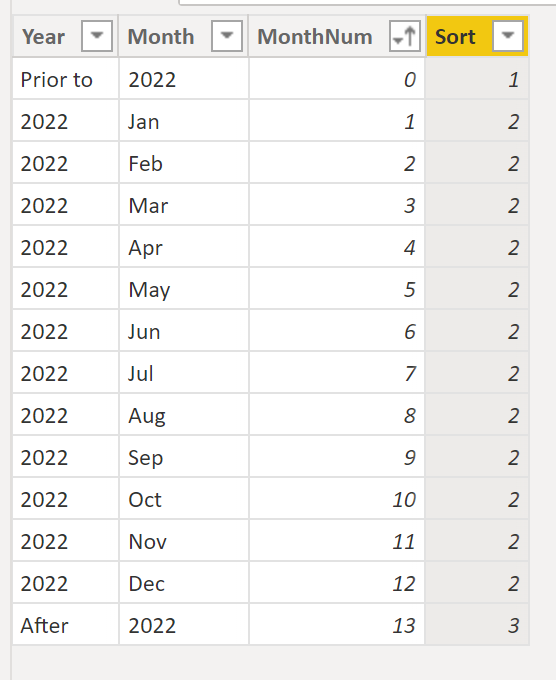
Once the table is loaded, I'm adding a sorting order for the "Year" column using:
Sort =
SWITCH(
    'Matrix Layout'[MonthNum],
    0,1,
    13, 3,
    2)
To get:
The model is as follows:
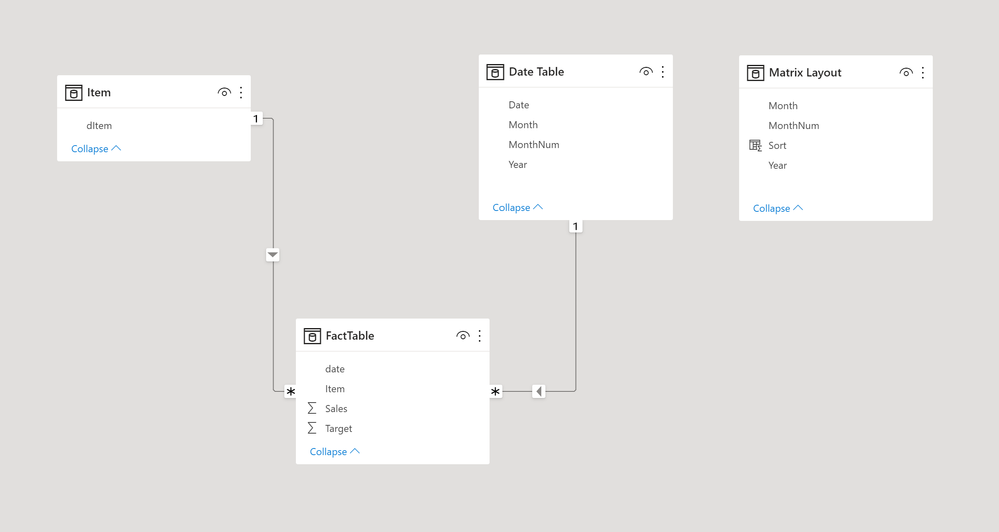
Sort the "Year" column by "Sort"; Sort the "Month" column by "MonthNum" column.
Create the following measure (I'm using a simple SUM for the calculations, so use whatever you need)
Final Measure =
VAR _Prior =
    CALCULATE (
        [Sum Sales],
        FILTER ( ALL ( 'Date Table' ), 'Date Table'[Year] < YEAR ( TODAY () ) )
    )
VAR _After =
    CALCULATE (
        [Sum Sales],
        FILTER ( ALL ( 'Date Table' ), 'Date Table'[Year] > YEAR ( TODAY () ) )
    )
VAR _Current =
    CALCULATE (
        [Sum Sales],
        TREATAS ( VALUES ( 'Matrix Layout'[Month] ), 'Date Table'[Month] ),
        FILTER ( 'Date Table', 'Date Table'[Year] = YEAR ( TODAY () ) )
    )
RETURN
    SWITCH (
        SELECTEDVALUE ( 'Matrix Layout'[MonthNum] ),
        0, _Prior,
        13, _After,
        _Current
    )
Now create the matrix visual with the fields from the Matrix Layout table, whatever you need as rows and the [Final measure] to get:
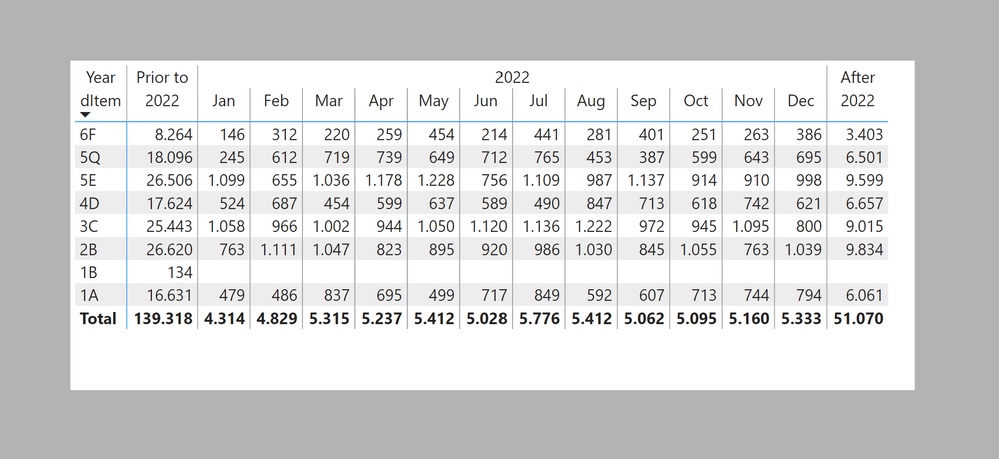
I've attached the sample PBIX file
Did I answer your question? Mark my post as a solution!
In doing so, you are also helping me. Thank you!
Proud to be a Super User!
Paul on Linkedin.
- Mark as New
- Bookmark
- Subscribe
- Mute
- Subscribe to RSS Feed
- Permalink
- Report Inappropriate Content
Does the year selection need to be dynamic or is it always going to be the current year?
Did I answer your question? Mark my post as a solution!
In doing so, you are also helping me. Thank you!
Proud to be a Super User!
Paul on Linkedin.
- Mark as New
- Bookmark
- Subscribe
- Mute
- Subscribe to RSS Feed
- Permalink
- Report Inappropriate Content
Hi Paul,
So the current year will always be the one broken down into months. So by the next year 2023 would be broken down and 2022 will be aggregated with the previous years (2021, 2020, etc).
Thanks for trying to help out
- Mark as New
- Bookmark
- Subscribe
- Mute
- Subscribe to RSS Feed
- Permalink
- Report Inappropriate Content
See if this works for you. You need to create a table which has the layout you need. In my example I have a date table, so I am creating the Matrix Layout table referencing the Date Table and adding the Prior and After rows as follows:
Matrix Layout =
VAR _Current =
    CALCULATETABLE (
        SUMMARIZE (
            'Date Table',
            'Date Table'[Year],
            'Date Table'[Month],
            'Date Table'[MonthNum]
        ),
        'Date Table'[Year] = YEAR ( TODAY () )
    )
VAR _otherPeriods =
    { ( "Prior to", YEAR ( TODAY () ), 0 ), ( "After", YEAR ( TODAY () ), 13 ) }
RETURN
    UNION ( _Current, _otherPeriods )
Once the table is loaded, I'm adding a sorting order for the "Year" column using:
Sort =
SWITCH(
    'Matrix Layout'[MonthNum],
    0,1,
    13, 3,
    2)
To get:
The model is as follows:
Sort the "Year" column by "Sort"; Sort the "Month" column by "MonthNum" column.
Create the following measure (I'm using a simple SUM for the calculations, so use whatever you need)
Final Measure =
VAR _Prior =
    CALCULATE (
        [Sum Sales],
        FILTER ( ALL ( 'Date Table' ), 'Date Table'[Year] < YEAR ( TODAY () ) )
    )
VAR _After =
    CALCULATE (
        [Sum Sales],
        FILTER ( ALL ( 'Date Table' ), 'Date Table'[Year] > YEAR ( TODAY () ) )
    )
VAR _Current =
    CALCULATE (
        [Sum Sales],
        TREATAS ( VALUES ( 'Matrix Layout'[Month] ), 'Date Table'[Month] ),
        FILTER ( 'Date Table', 'Date Table'[Year] = YEAR ( TODAY () ) )
    )
RETURN
    SWITCH (
        SELECTEDVALUE ( 'Matrix Layout'[MonthNum] ),
        0, _Prior,
        13, _After,
        _Current
    )
Now create the matrix visual with the fields from the Matrix Layout table, whatever you need as rows and the [Final measure] to get:
I've attached the sample PBIX file
Did I answer your question? Mark my post as a solution!
In doing so, you are also helping me. Thank you!
Proud to be a Super User!
Paul on Linkedin.
- Mark as New
- Bookmark
- Subscribe
- Mute
- Subscribe to RSS Feed
- Permalink
- Report Inappropriate Content
Hi Paul!
Thank you so very much, It worked!
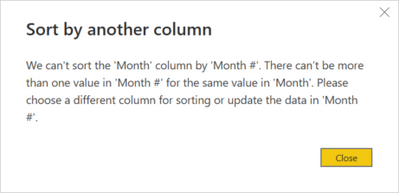
One small thing though, I couldn't sort the month name by month number. Cause the value "2022" is repeated twice in column Month name. I get this error:
This is what the final table looks like:
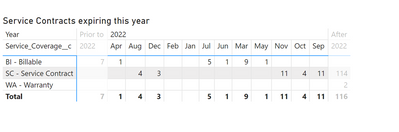
How did you get your to sort?
- Mark as New
- Bookmark
- Subscribe
- Mute
- Subscribe to RSS Feed
- Permalink
- Report Inappropriate Content
Of course...you're right. It cannot sort beacuase there are two rows with 2022. This may actually be a bug. Let me explain. Originally I built the Matrix Layout with both the "Prior to 2022" and "after 2022" in the Month column. I did the sorting to see the visual. I then decided to move the "pior to" and "After " texts to the Year column, That's probably why it is still sorting the months correctly.
Anyway, an easy fix. Use this codefor the Matrix Layout table and you should be able to sort the months correctly (you also need the "sort" column for the years)
Matrix Layout =
VAR _Current =
    CALCULATETABLE (
        SUMMARIZE (
            'Date Table',
            'Date Table'[Year],
            'Date Table'[Month],
            'Date Table'[MonthNum]
        ),
        'Date Table'[Year] = YEAR ( TODAY () )
    )
VAR _otherPeriods =
    {
        ( "Prior", "to " & YEAR ( TODAY () ), 0 ),
        ( "After", YEAR ( TODAY () ), 13 )
    }
RETURN
    UNION ( _Current, _otherPeriods )
Did I answer your question? Mark my post as a solution!
In doing so, you are also helping me. Thank you!
Proud to be a Super User!
Paul on Linkedin.
- Mark as New
- Bookmark
- Subscribe
- Mute
- Subscribe to RSS Feed
- Permalink
- Report Inappropriate Content
That explains it. Thanks again for your support!
- Mark as New
- Bookmark
- Subscribe
- Mute
- Subscribe to RSS Feed
- Permalink
- Report Inappropriate Content
You know what I just changed things up a little to make it work:
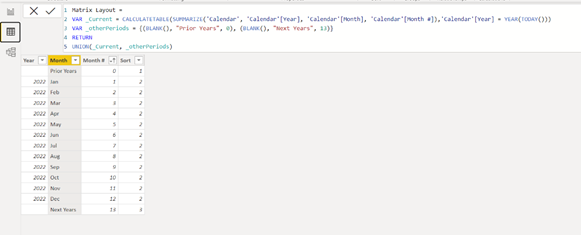
Final matrix:
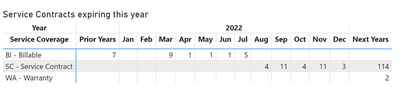
Thanks a lot

Helpful resources

Power BI Monthly Update - August 2025
Check out the August 2025 Power BI update to learn about new features.

Fabric Community Update - August 2025
Find out what's new and trending in the Fabric community.

| User | Count |
|---|---|
| 69 | |
| 68 | |
| 66 | |
| 55 | |
| 28 |


| User | Count |
|---|---|
| 112 | |
| 82 | |
| 66 | |
| 48 | |
| 43 |


