Join us at FabCon Atlanta from March 16 - 20, 2026, for the ultimate Fabric, Power BI, AI and SQL community-led event. Save $200 with code FABCOMM.
Register now!The Power BI Data Visualization World Championships is back! Get ahead of the game and start preparing now! Learn more
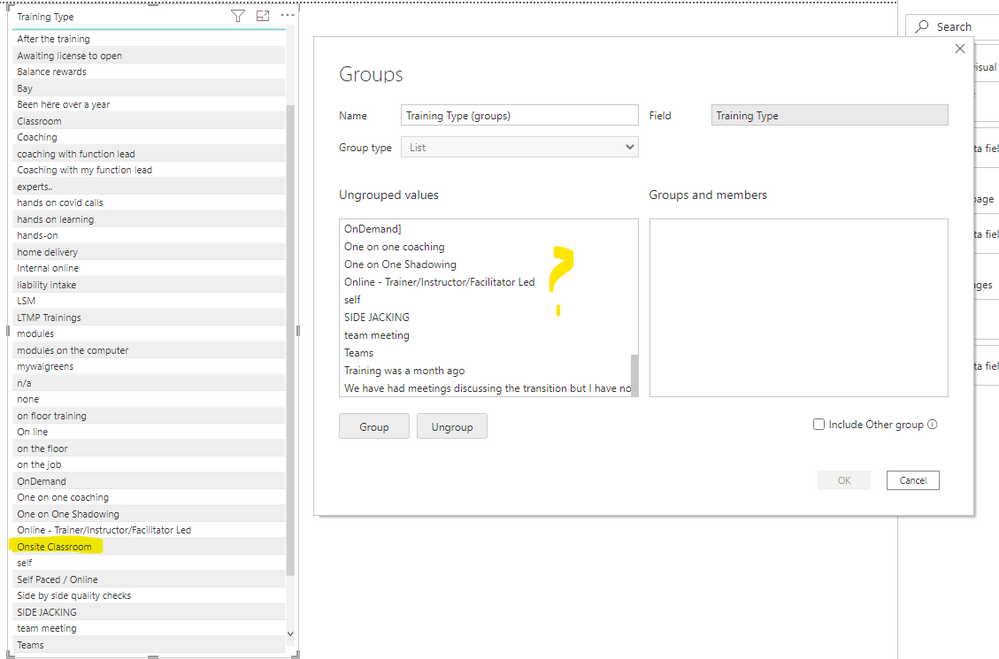
Need help to explain why some values are not showing up in the grouping. Field is called training type and I see that some random values are not showing up. For example, Onsite Classroom
I had the same issue. It was with a list of usernames that worked on a dataset. It did not refresh the 'username' list in the ungrouped values. I initially used the activity table with all the activities that those users worked on. I've created a separate user table and connected that to the activity table (from the same source) and it actually now updates the ungrouped list fine.
Hi @jcastr02 ,
Does your source have null or empty string / filled field ? Maybe this is the difference between them.
Also you can replace this value by a value for missing.
Best Regards
Community Support Team _ polly
If this post helps, then please consider Accept it as the solution to help the other members find it more quickly.
The Power BI Data Visualization World Championships is back! Get ahead of the game and start preparing now!
| User | Count |
|---|---|
| 39 | |
| 38 | |
| 38 | |
| 28 | |
| 27 |
| User | Count |
|---|---|
| 124 | |
| 88 | |
| 73 | |
| 66 | |
| 65 |