Forum Discussion

Anonymous's avatar
Anonymous
Not applicable
3 years ago
Solved

Group several columns

Hello everyone,

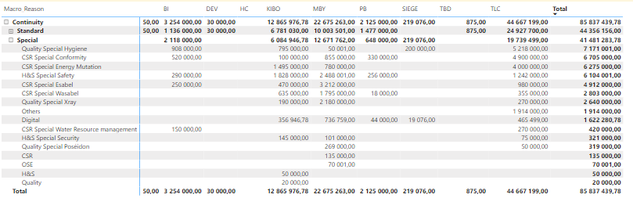
I have a question: do you know how to group several rows of a table together? Here is my table:

It turns out that the databases have been a little mismanaged and it's not very clear so all the CSRs should be grouped together to make it easier to read.

To be more precise, I would like "CSR Energy Mutation", "CSR Special Conformity", "CSR Special Wasabel", "CSR Special Esabel" and "CSR Special Water Resource management" to be grouped together under the name "CSR".

Thank you for your help, 

Emilie ❤️

  • You can customize group name in Query Editor/Power Query.


    Try conditional column. All that begins with "CSR" put it under CSR. Then drag the new group to your visual.

4 Replies

  • You can customize group name in Query Editor/Power Query.


    Try conditional column. All that begins with "CSR" put it under CSR. Then drag the new group to your visual.

    • Anonymous's avatar
      Anonymous
      Not applicable

      Yes thanks for taking time to respond to me, it worked ! 

  • Anonymous's avatar
    Anonymous
    Not applicable

    Hi


    If you want to preserve your data and dont user powerquery you can create list groups and group all the values so that you can use them in visuals.


    Check this video on minute 2.18 in order to understand the feature

    https://youtu.be/D1LO8syugMA?t=138


    Kind regards,
    José
    Please mark this answer as the solution if it resolves your issue.
    Appreciate your kudos! 🙂