cancel
Showing results for 
Search instead for 
Did you mean: 

View all the Fabric Data Days sessions on demand. View schedule

Reply
javiercmh
Regular Visitor

Group columns by dimension, having created a relationship with columns

Hi, 

I have the data from a survey which contains the items as columns like so (sorry this forum deleted my html tables 😞 😞

id, it1, it2, it3

online1, 4, 2, 5

online2, 1, 3, 4


Then I have a relationships table that looks like this:

it, Dimension

t1, Openness to experience

t2, Openness to experience

t3, Extraversion


Now, what I'd like to do is to somehow relate table 1 with table 2, so that when I visualize the survey results, I could easily filter by dimension.


Thanks in advance!


Javier 

1 ACCEPTED SOLUTION
Anonymous
Not applicable

Hi @javiercmh,


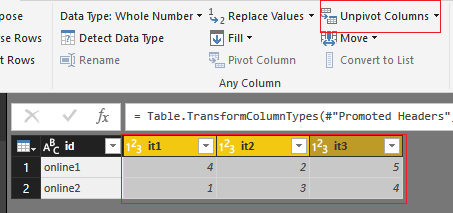
I think you can enter into query editor and use unpivot column feature to convert these column, then use the transfer column to build relationship.

5.PNG6.PNG


Regards,

Xiaoxin Sheng

View solution in original post

1 REPLY 1
Anonymous
Not applicable

Hi @javiercmh,


I think you can enter into query editor and use unpivot column feature to convert these column, then use the transfer column to build relationship.

5.PNG6.PNG


Regards,

Xiaoxin Sheng

Helpful resources

Announcements
November Power BI Update Carousel

Power BI Monthly Update - November 2025

Check out the November 2025 Power BI update to learn about new features.

Fabric Data Days Carousel

Fabric Data Days

Advance your Data & AI career with 50 days of live learning, contests, hands-on challenges, study groups & certifications and more!

FabCon Atlanta 2026 carousel

FabCon Atlanta 2026

Join us at FabCon Atlanta, March 16-20, for the ultimate Fabric, Power BI, AI and SQL community-led event. Save $200 with code FABCOMM.

Top Solution Authors
Top Kudoed Authors