cancel
Showing results for 
Search instead for 
Did you mean: 

Get Fabric Certified for FREE during Fabric Data Days. Don't miss your chance! Request now

Reply
Vanessa250919
Helper V
Helper V

Graph & Scrool

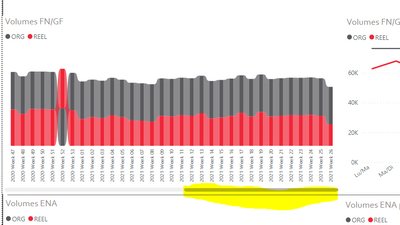
Hello, I try to create this graph but with one fixed view not with scroll ... It's possible to compressed this graph ?  


Vanessa250919_0-1626166445982.png


1 ACCEPTED SOLUTION
v-henryk-mstf
Community Support
Community Support

Hi @Vanessa250919 ,


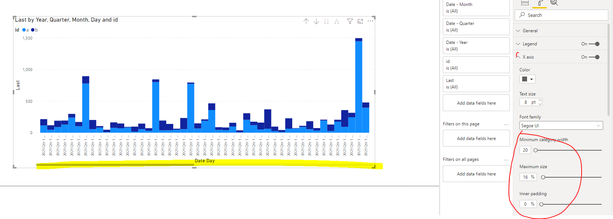
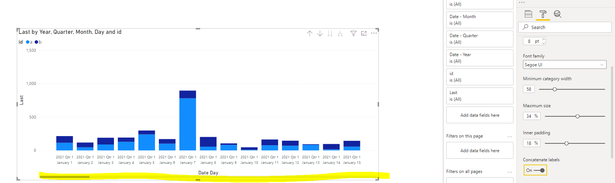
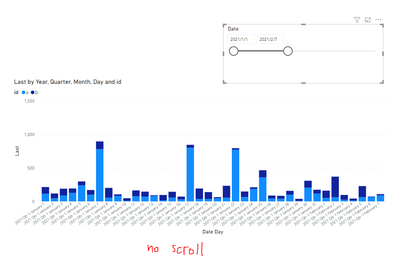
For your confusion, it is impossible to add or delete the scroll function in the created visual, because whether to scroll depends on the range on the x-axis. When it is large enough, the unshown part can only be displayed through the front and back scroll. We can only make the following modifications in the x-axis settings to adjust the magnitude of the scroll. Or you can try to use the slicer to filter the date or adjust the hierarchy to reduce the range of the x-axis in order to display the complete visual.

vhenrykmstf_0-1626318173656.png

vhenrykmstf_1-1626318219238.png

add slicer

vhenrykmstf_2-1626318272191.png


Hope to help you solve the problem.


Best Regards,
Henry


If this post helps, then please consider Accept it as the solution to help the other members find it more quickly.

View solution in original post

3 REPLIES 3
v-henryk-mstf
Community Support
Community Support

Hi @Vanessa250919 ,


For your confusion, it is impossible to add or delete the scroll function in the created visual, because whether to scroll depends on the range on the x-axis. When it is large enough, the unshown part can only be displayed through the front and back scroll. We can only make the following modifications in the x-axis settings to adjust the magnitude of the scroll. Or you can try to use the slicer to filter the date or adjust the hierarchy to reduce the range of the x-axis in order to display the complete visual.

vhenrykmstf_0-1626318173656.png

vhenrykmstf_1-1626318219238.png

add slicer

vhenrykmstf_2-1626318272191.png


Hope to help you solve the problem.


Best Regards,
Henry


If this post helps, then please consider Accept it as the solution to help the other members find it more quickly.

amitchandak
Super User
Super User

@Vanessa250919 , With scroll added, I doubt still there option to reduce the size much. Padding and max-width are limited to a few visuals.  May we have some TOP N filter

Share with Power BI Enthusiasts: Full Power BI Video (20 Hours) YouTube
Microsoft Fabric Series 60+ Videos YouTube
Microsoft Fabric Hindi End to End YouTube

@amitchandak  and it's possible to not added the scroll ? 

Helpful resources

Announcements
Fabric Data Days Carousel

Fabric Data Days

Advance your Data & AI career with 50 days of live learning, contests, hands-on challenges, study groups & certifications and more!

October Power BI Update Carousel

Power BI Monthly Update - October 2025

Check out the October 2025 Power BI update to learn about new features.

FabCon Atlanta 2026 carousel

FabCon Atlanta 2026

Join us at FabCon Atlanta, March 16-20, for the ultimate Fabric, Power BI, AI and SQL community-led event. Save $200 with code FABCOMM.

Top Solution Authors
Top Kudoed Authors