- Power BI forums
- Updates
- News & Announcements
- Get Help with Power BI
- Desktop
- Service
- Report Server
- Power Query
- Mobile Apps
- Developer
- DAX Commands and Tips
- Custom Visuals Development Discussion
- Health and Life Sciences
- Power BI Spanish forums
- Translated Spanish Desktop
- Power Platform Integration - Better Together!
- Power Platform Integrations (Read-only)
- Power Platform and Dynamics 365 Integrations (Read-only)
- Training and Consulting
- Instructor Led Training
- Dashboard in a Day for Women, by Women
- Galleries
- Community Connections & How-To Videos
- COVID-19 Data Stories Gallery
- Themes Gallery
- Data Stories Gallery
- R Script Showcase
- Webinars and Video Gallery
- Quick Measures Gallery
- 2021 MSBizAppsSummit Gallery
- 2020 MSBizAppsSummit Gallery
- 2019 MSBizAppsSummit Gallery
- Events
- Ideas
- Custom Visuals Ideas
- Issues
- Issues
- Events
- Upcoming Events
- Community Blog
- Power BI Community Blog
- Custom Visuals Community Blog
- Community Support
- Community Accounts & Registration
- Using the Community
- Community Feedback
Earn a 50% discount on the DP-600 certification exam by completing the Fabric 30 Days to Learn It challenge.
- Power BI forums
- Forums
- Get Help with Power BI
- Desktop
- Re: Getting the highest average per month
- Subscribe to RSS Feed
- Mark Topic as New
- Mark Topic as Read
- Float this Topic for Current User
- Bookmark
- Subscribe
- Printer Friendly Page


- Mark as New
- Bookmark
- Subscribe
- Mute
- Subscribe to RSS Feed
- Permalink
- Report Inappropriate Content
Getting the highest average per month
Hi there,
I am a newbie with power bi and having some problems on how I can show the highest average per month per cateogry.
Maybe you can help on this.
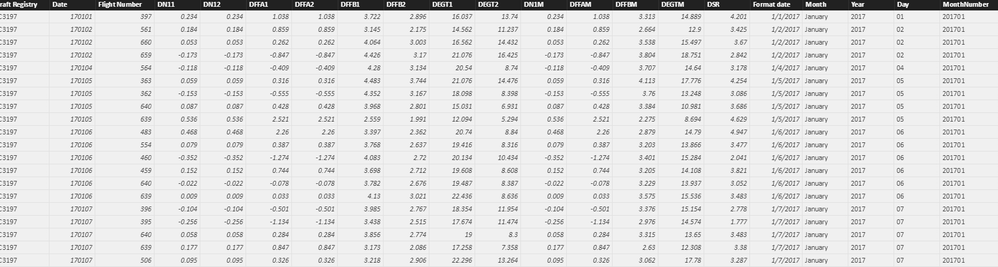
I want to get the highest DFFAM per month per aircraft.
Solved! Go to Solution.


- Mark as New
- Bookmark
- Subscribe
- Mute
- Subscribe to RSS Feed
- Permalink
- Report Inappropriate Content
Hi @rendalignacio,
I create the sample table you posted, name it as 'Test'.
First, create a summary table by clicking "New Table" under Modeling on Home page, type the following formula.
Table = SUMMARIZE(Test,Test[month],Test[Registry],"Average",AVERAGE(Test[DFFFAM]))
You will get the table below.
Create a calculated column using the fomrula.

highest DFFAM = CALCULATE(MAX('Table'[Average]),ALLEXCEPT('Table','Table'[month]))
Finally, create another new table to get expected table.
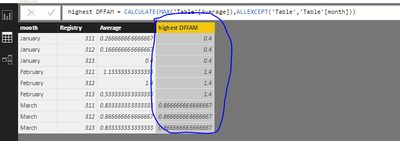
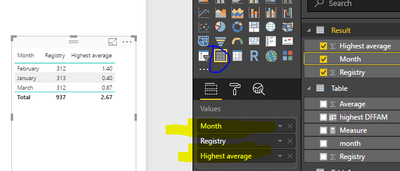
Result = SELECTCOLUMNS(FILTER('Table','Table'[Average]='Table'[highest DFFAM]),"Month",'Table'[month],"Registry",'Table'[Registry],"Highest average",'Table'[highest DFFAM
You can create a table visual to display the result as follows.
Best Regards,
Angelia



- Mark as New
- Bookmark
- Subscribe
- Mute
- Subscribe to RSS Feed
- Permalink
- Report Inappropriate Content
try this:
in a table visual; drag in your 3 key fields: Registry, MonthDate, DFFAM .... and then choose the DFFAM value to be MAX
although there is a little discrepancy in your post as you whether you want the highest or the highest average....both are stated..... so this maybe is not what you seek....
- Mark as New
- Bookmark
- Subscribe
- Mute
- Subscribe to RSS Feed
- Permalink
- Report Inappropriate Content
What i would actually want would be the highest average.
Then maybe show the registry with the highest average per month.


- Mark as New
- Bookmark
- Subscribe
- Mute
- Subscribe to RSS Feed
- Permalink
- Report Inappropriate Content
Hi,
Share the link from where we can download your workbook. Also, show the expected result.
Regards,
Ashish Mathur
http://www.ashishmathur.com
https://www.linkedin.com/in/excelenthusiasts/
- Mark as New
- Bookmark
- Subscribe
- Mute
- Subscribe to RSS Feed
- Permalink
- Report Inappropriate Content
Hi,
Sorry, i cannot give the access to my workbook.
But what i would like is to get the highest DFFAM average per month per registry (here is a sample below).
| Registry | month | DFFFAM |
| 311 | January | 0.1 |
| 311 | January | 0.3 |
| 311 | January | 0.4 |
| 312 | January | 0.1 |
| 312 | January | 0.2 |
| 312 | January | 0.2 |
| 313 | January | 0.5 |
| 313 | January | 0.4 |
| 313 | January | 0.3 |
| 311 | February | 1.1 |
| 311 | February | 1.1 |
| 311 | February | 1.2 |
| 312 | February | 1.3 |
| 312 | February | 1.4 |
| 312 | February | 1.5 |
| 313 | February | 0.3 |
| 313 | February | 0.5 |
| 313 | February | 0.8 |
| 311 | March | 0.9 |
| 311 | March | 1.1 |
| 311 | March | 0.5 |
| 312 | March | 0.1 |
| 312 | March | 1.2 |
| 312 | March | 1.3 |
| 313 | March | 1.7 |
| 313 | March | 0.3 |
| 313 | March | 0.5 |
Also, in the dashboard, an indicator as shown below:
| Month | Registry | Highest average |
Hope you can help me with this.
Thank you
- Mark as New
- Bookmark
- Subscribe
- Mute
- Subscribe to RSS Feed
- Permalink
- Report Inappropriate Content
Hi,
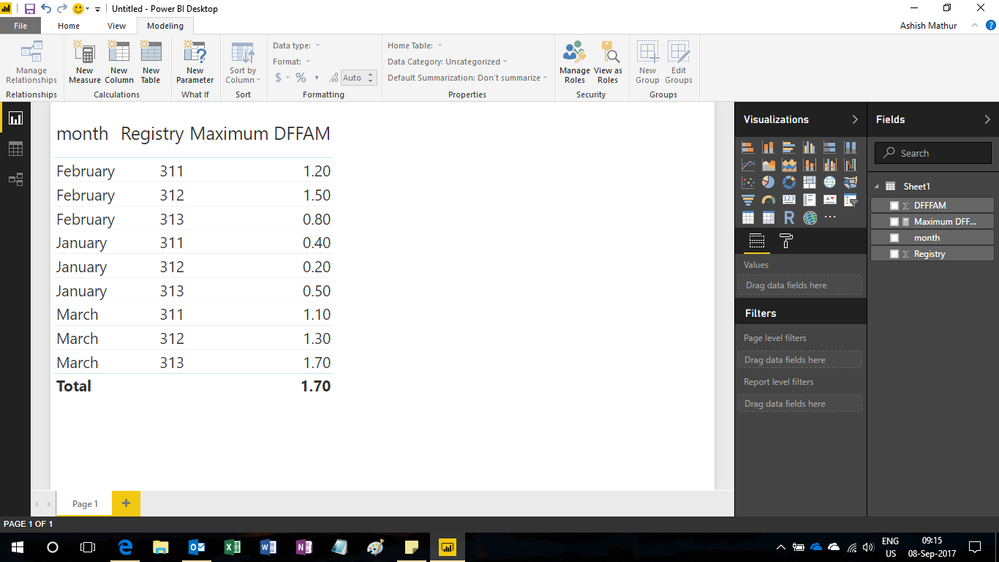
I am still not clear of what you want, but here is the DAX formula i wrote for computing Maximum DFFAM
= MAX([DFFFAM])
Here's the result i got
Regards,
Ashish Mathur
http://www.ashishmathur.com
https://www.linkedin.com/in/excelenthusiasts/
- Mark as New
- Bookmark
- Subscribe
- Mute
- Subscribe to RSS Feed
- Permalink
- Report Inappropriate Content
Hi,
Actually, thats only the max... what i would want is to have the highest average per registry per month..
- Mark as New
- Bookmark
- Subscribe
- Mute
- Subscribe to RSS Feed
- Permalink
- Report Inappropriate Content
Hi,
If this is still not your expected result, then please share a screenshot of your expected result.
Regards,
Ashish Mathur
http://www.ashishmathur.com
https://www.linkedin.com/in/excelenthusiasts/
- Mark as New
- Bookmark
- Subscribe
- Mute
- Subscribe to RSS Feed
- Permalink
- Report Inappropriate Content
Hi,
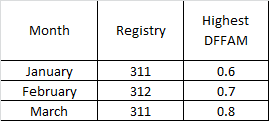
So Basically, in the dashboard, i want to show this.
So in the table, this will have the summary of which registry per month have the highest average DFFAM.
- Mark as New
- Bookmark
- Subscribe
- Mute
- Subscribe to RSS Feed
- Permalink
- Report Inappropriate Content
With respect to the data that you have shared, please share how did you arrive at the numbers 0.6,0.7 and 0.8. Please share the actual numbers that you want to see in that column with respect to the data that you shared earlier.
Regards,
Ashish Mathur
http://www.ashishmathur.com
https://www.linkedin.com/in/excelenthusiasts/
- Mark as New
- Bookmark
- Subscribe
- Mute
- Subscribe to RSS Feed
- Permalink
- Report Inappropriate Content
Hi,
That is only a sample of something i want to get in power bi.
I cannot figure out on how i can get the Registry with the highest average per month.
- Mark as New
- Bookmark
- Subscribe
- Mute
- Subscribe to RSS Feed
- Permalink
- Report Inappropriate Content
Hi,
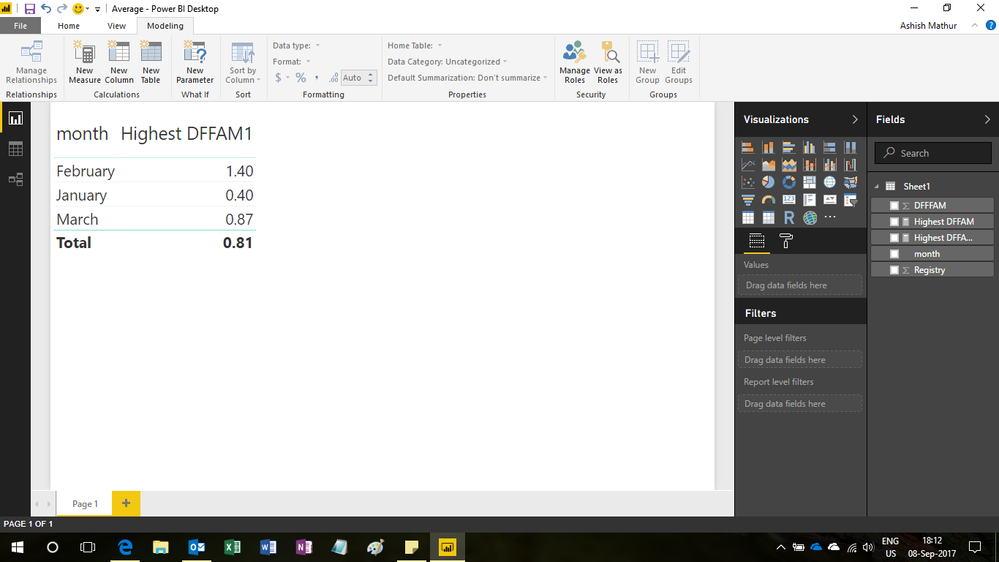
Let's divide the solution into two parts. First is to get the monthwise highest average DFFAM (see screenshot below). Is this result correct. If it is, then let me know and we will then get the Registry as well.
Regards,
Ashish Mathur
http://www.ashishmathur.com
https://www.linkedin.com/in/excelenthusiasts/
- Mark as New
- Bookmark
- Subscribe
- Mute
- Subscribe to RSS Feed
- Permalink
- Report Inappropriate Content
Hi,
I think this is what I would want then get the registry as well corresponding to the highest DFFAM.
Can you please show me the DAX code for this?
Thank you
- Mark as New
- Bookmark
- Subscribe
- Mute
- Subscribe to RSS Feed
- Permalink
- Report Inappropriate Content
Hi,
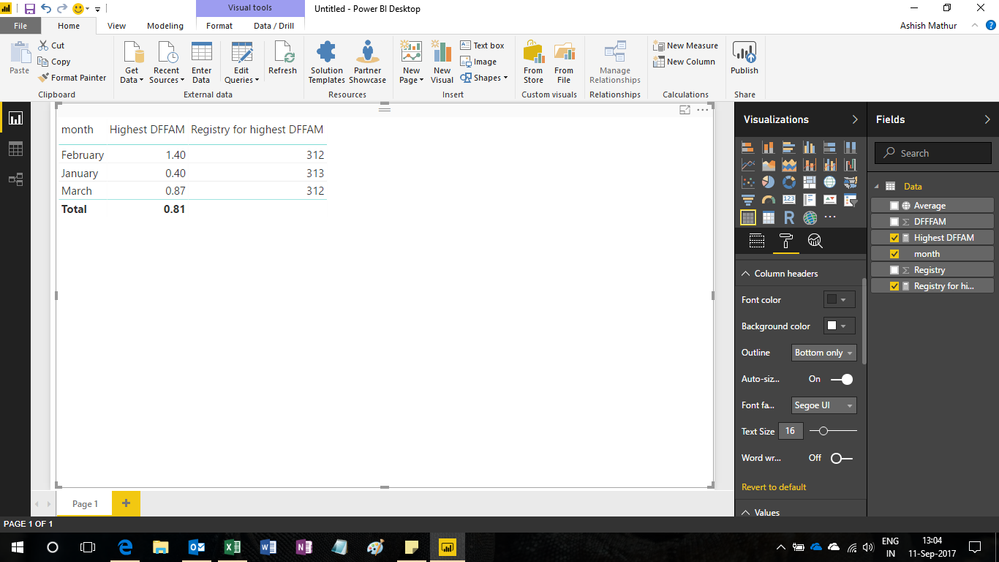
This is what i did.
Calculated field formula for computing Highest DFFAM
Highest DFFAM = MAXX(SUMMARIZE(Data,Data[Registry],"ABCD",average([DFFFAM])),[ABCD])
Calculated column formula for computing Average
=CALCULATE(AVERAGE([DFFFAM]),FILTER(Data,[Registry]=EARLIER([Registry])&&[month]=EARLIER([month])))
Calculated field formula for computing Registry for highest DFFAM
=LOOKUPVALUE([Registry],[Average],[Highest DFFAM])
Hope this helps.
Regards,
Ashish Mathur
http://www.ashishmathur.com
https://www.linkedin.com/in/excelenthusiasts/
- Mark as New
- Bookmark
- Subscribe
- Mute
- Subscribe to RSS Feed
- Permalink
- Report Inappropriate Content
Hi,
Will try also this solution and will give a feedback regarding this.
Thank you very much
- Mark as New
- Bookmark
- Subscribe
- Mute
- Subscribe to RSS Feed
- Permalink
- Report Inappropriate Content
Hi @rendalignacio,
I create the sample table you posted, name it as 'Test'.
First, create a summary table by clicking "New Table" under Modeling on Home page, type the following formula.
Table = SUMMARIZE(Test,Test[month],Test[Registry],"Average",AVERAGE(Test[DFFFAM]))
You will get the table below.
Create a calculated column using the fomrula.
highest DFFAM = CALCULATE(MAX('Table'[Average]),ALLEXCEPT('Table','Table'[month]))
Finally, create another new table to get expected table.
Result = SELECTCOLUMNS(FILTER('Table','Table'[Average]='Table'[highest DFFAM]),"Month",'Table'[month],"Registry",'Table'[Registry],"Highest average",'Table'[highest DFFAM
You can create a table visual to display the result as follows.
Best Regards,
Angelia
- Mark as New
- Bookmark
- Subscribe
- Mute
- Subscribe to RSS Feed
- Permalink
- Report Inappropriate Content
Hi,
Will try this later... This looks good.
Will update you later if it works on my end.
Thank you
- Mark as New
- Bookmark
- Subscribe
- Mute
- Subscribe to RSS Feed
- Permalink
- Report Inappropriate Content
Hi,
Replace the MAX with the AVERAGE function in the formula bar
Regards,
Ashish Mathur
http://www.ashishmathur.com
https://www.linkedin.com/in/excelenthusiasts/
- Mark as New
- Bookmark
- Subscribe
- Mute
- Subscribe to RSS Feed
- Permalink
- Report Inappropriate Content
Hi,
Doing so would only get the average for all registry.
The goal is to have an average per registry per month....

Helpful resources


Power BI Monthly Update - April 2024
Check out the April 2024 Power BI update to learn about new features.

Fabric Community Update - April 2024
Find out what's new and trending in the Fabric Community.

| User | Count |
|---|---|
| 98 | |
| 91 | |
| 84 | |
| 72 | |
| 67 |


| User | Count |
|---|---|
| 114 | |
| 103 | |
| 100 | |
| 72 | |
| 64 |


