FabCon is coming to Atlanta
Join us at FabCon Atlanta from March 16 - 20, 2026, for the ultimate Fabric, Power BI, AI and SQL community-led event. Save $200 with code FABCOMM.
Register now!- Power BI forums
- Get Help with Power BI
- Desktop
- Service
- Report Server
- Power Query
- Mobile Apps
- Developer
- DAX Commands and Tips
- Custom Visuals Development Discussion
- Health and Life Sciences
- Power BI Spanish forums
- Translated Spanish Desktop
- Training and Consulting
- Instructor Led Training
- Dashboard in a Day for Women, by Women
- Galleries
- Data Stories Gallery
- Themes Gallery
- Contests Gallery
- Quick Measures Gallery
- Notebook Gallery
- Translytical Task Flow Gallery
- TMDL Gallery
- R Script Showcase
- Webinars and Video Gallery
- Ideas
- Custom Visuals Ideas (read-only)
- Issues
- Issues
- Events
- Upcoming Events
To celebrate FabCon Vienna, we are offering 50% off select exams. Ends October 3rd. Request your discount now.
- Power BI forums
- Forums
- Get Help with Power BI
- Desktop
- Re: Getting current folder of the PBIX file
- Subscribe to RSS Feed
- Mark Topic as New
- Mark Topic as Read
- Float this Topic for Current User
- Bookmark
- Subscribe
- Printer Friendly Page

- Mark as New
- Bookmark
- Subscribe
- Mute
- Subscribe to RSS Feed
- Permalink
- Report Inappropriate Content
Getting current folder of the PBIX file
Hi there,
I have a process that creates bunch of CSV data of predictable shape and contents. I have a report that makes it all pretty.
To do so, I have created PBIX file where I defined a string parameter called ReportDataFolderPath. I am using it to load CSV from it using File.Open:
let
    Source = Csv.Document(File.Contents(ReportDataFolderPath & "\RELATIVE\file.csv"),[Delimiter=",", Columns=19, Encoding=65001, QuoteStyle=QuoteStyle.Csv]),
...
I save the PBIX design file as PBIT template, then open template, it prompts me for the path to the new location of the files, and loads the data just like I want to.
I am now wondering, is there a way for me to somehow figure out a path to where the PBIT or PBIX file is being opened from, and automatically set the relative path to the CSV files.
If this was possible, I can pre-copy my PBIT or PBIX file into the location where my CSV files are created and just automatically open it.
I tried doing this:
let Source = Csv.Document(File.Contents("\RELATIVE\file.csv"),[Delimiter=",", Columns=19, Encoding=65001, QuoteStyle=QuoteStyle.Csv]),...
But it does not work as the File.Open needs an absolute path.
Any idea of whether this is possible?
Solved! Go to Solution.


- Mark as New
- Bookmark
- Subscribe
- Mute
- Subscribe to RSS Feed
- Permalink
- Report Inappropriate Content
Hi @Anonymous,
Based on my research, I am afraid you could not achieve this feature currently, I suggest you submit an idea in ideas forum:
https://ideas.powerbi.com/forums/265200-power-bi-ideas
Regards,
Daniel He
If this post helps, then please consider Accept it as the solution to help the other members find it more quickly.


- Mark as New
- Bookmark
- Subscribe
- Mute
- Subscribe to RSS Feed
- Permalink
- Report Inappropriate Content
Did you every figure this out? Hoping that in 5 years, PBI would implement a solution to achieve this.

- Mark as New
- Bookmark
- Subscribe
- Mute
- Subscribe to RSS Feed
- Permalink
- Report Inappropriate Content
It is possible by using python script:
https://bizkapish.com/power-query/discover-relative-path-to-power-bi-desktop-file/
- Mark as New
- Bookmark
- Subscribe
- Mute
- Subscribe to RSS Feed
- Permalink
- Report Inappropriate Content
PBIT template solution works well for me:
I save the PBIX design file as PBIT template, then open template, it prompts me for the path to the new location of the files, and loads the data just like I want to.
- Mark as New
- Bookmark
- Subscribe
- Mute
- Subscribe to RSS Feed
- Permalink
- Report Inappropriate Content
Hi @Anonymous,
Based on my test, I have created a parameter and it seemed you need to use the full file path to set the parameter:
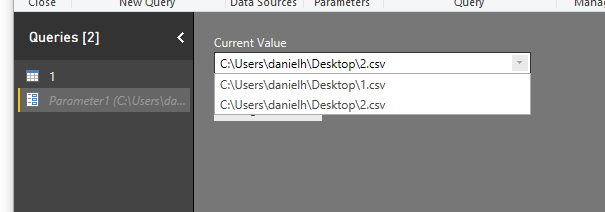
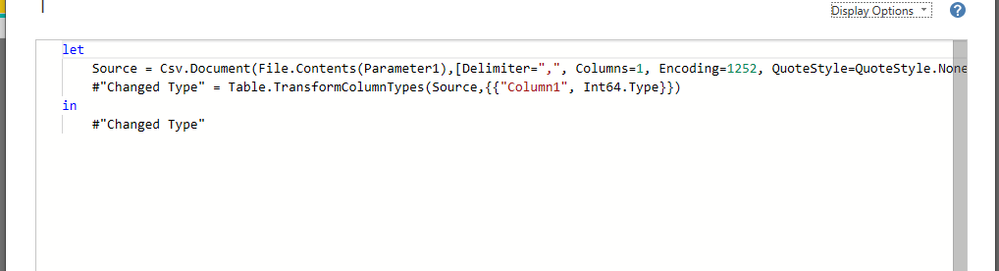
Regards,
Daniel He
If this post helps, then please consider Accept it as the solution to help the other members find it more quickly.
- Mark as New
- Bookmark
- Subscribe
- Mute
- Subscribe to RSS Feed
- Permalink
- Report Inappropriate Content
Daniel, not sure what this proves - I already know that one must use absolute path to those functions
My question is - is it possible to retrieve the path to where PBIX/PBIT file is stored so that it can be used as input to functions to construct other paths?
- Mark as New
- Bookmark
- Subscribe
- Mute
- Subscribe to RSS Feed
- Permalink
- Report Inappropriate Content
Hi @Anonymous,
Based on my research, I am afraid you could not achieve this feature currently, I suggest you submit an idea in ideas forum:
https://ideas.powerbi.com/forums/265200-power-bi-ideas
Regards,
Daniel He
If this post helps, then please consider Accept it as the solution to help the other members find it more quickly.
Helpful resources

Power BI Monthly Update - September 2025
Check out the September 2025 Power BI update to learn about new features.

Fabric Community Update - August 2025
Find out what's new and trending in the Fabric community.


