Hey guys, I'm new to powerBI and I can't figure out the solution to my problem. The probem is the Line chart X axis that is MonthYear is showing the separate amounts of each month, instead of the total. What I want to do is like this in excel. Excel LTM total displayed over 12 months
The excel above is always showing the total of last 12 months. So the total in January 2020 was like this over 12 months, and we see the total of the last 12 months from December was a little less, and so on.
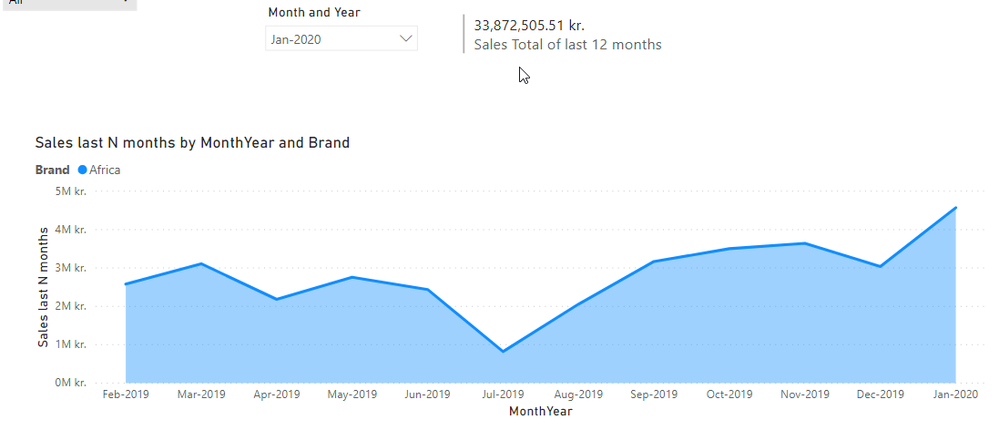
Right now I want to show the total that is in the card at the Jan-2020, and below I am showing the total from December 2019 which is a little less. And I want to display this in the X axis line chart, just like in excel.
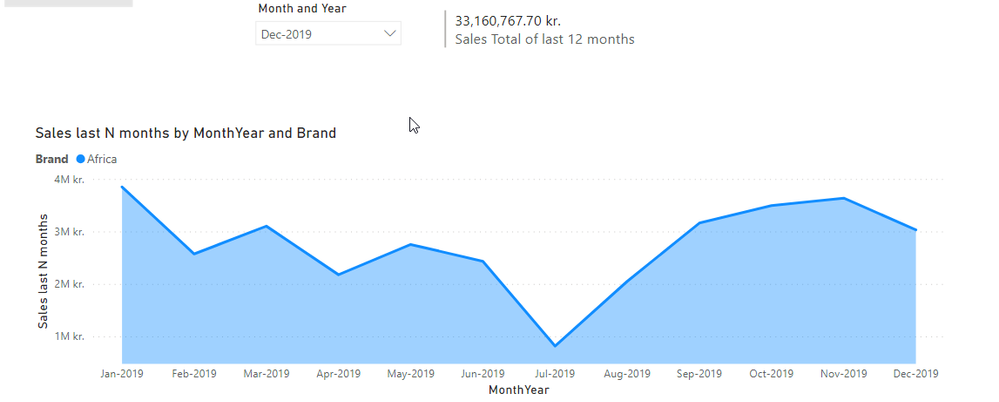
The measure I am using to get the 12 months sum is this:
Sales last N months = CALCULATE(SUM(InvoiceLines[SellPriceExclVAT]), DATESINPERIOD('Date'[Date], MAX('Date'[Date]), - 12, MONTH))
My problem is, instead of showing the total for that selected month in the line chart, it is splitting the sales into 12 months that create that 12 months back total. Any help would be really appreciated!
PROBLEM SOLVED!
It is possible to solve this total calculation with the measure I have created with a relative date slicer.
The problem was I was using the invoiceDate from the fact table, not the actual date dimension.
I took the Date attribute from the Date dimension and used it as a relative date slicer and everything works perfectly!


