Join us at FabCon Atlanta from March 16 - 20, 2026, for the ultimate Fabric, Power BI, AI and SQL community-led event. Save $200 with code FABCOMM.
Register now!View all the Fabric Data Days sessions on demand. View schedule
Hi there,
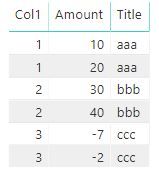
I am looking to put a sum of some value into a separate column on a specific row in a table visual. This is my raw table and the expected result in table visual:
Col1 Amount Col1 SumAmount MinusAmount 1 10 1 30 - 7 1 20 2 70 2 30 3 -7 2 40 3 - 7
I thought a simple measure like this will do the trick but it doesn't :
MinusAmount = IF ( MAX (Table[Col1] = 1, CALCULATE ( SUM ( Table[Amount] ), Col1 = 3 ) )
Would appreciate any hints. Thanks.
Solved! Go to Solution.
Hi @gvg
Your code's logic is sound. It should work with very minor changes:
MinusAmount =
IF (
MAX ( 'Table'[Col1] ) = 1,
CALCULATE ( SUM ( 'Table'[Amount] ), 'Table'[Col1] = 3 )
)
Hi @gvg
Your code's logic is sound. It should work with very minor changes:
MinusAmount =
IF (
MAX ( 'Table'[Col1] ) = 1,
CALCULATE ( SUM ( 'Table'[Amount] ), 'Table'[Col1] = 3 )
)
OK, thanks @AlB. I happen to have some more columns in my visual and it looks that I need to use measure with ALLSELECTED:
MinusAmount =
IF (
MAX ( Table1[Col1] ) = 1,
CALCULATE ( SUM ( Table1[ Amount] ), FILTER(ALLSELECTED(Table1),Table1[Col1] = 3 ) )
)
OK, it works in this simple table, but it doesn't if I add another column, like here:
I get this:
Check out the November 2025 Power BI update to learn about new features.
Advance your Data & AI career with 50 days of live learning, contests, hands-on challenges, study groups & certifications and more!