cancel
Showing results for 
Search instead for 
Did you mean: 

The Power BI Data Visualization World Championships is back! Get ahead of the game and start preparing now! Learn more

Reply
Anonymous
Not applicable

Get the category Name with the MIN value

I am trying to place a card highlighting the facility with the biggest net loss on a report.  The net loss is a Measure calculation, _Net New, and the lowest value is the biggest 'loss'. 

I used a quick measure to calculate the smallest gain, but am stumped how to tie this back to the category name to display in a card.

The measure for calculating biggest drop:

_Largest Net Loss by Facility = 
MINX(
    KEEPFILTERS(VALUES('Facilities'[FacilityName])),
    CALCULATE(_Measures[_Net New])
)
1 ACCEPTED SOLUTION
Icey
Community Support
Community Support

Hi @Anonymous ,

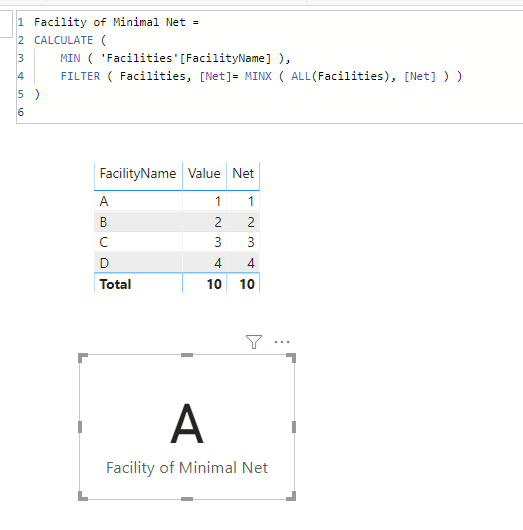
I create a simple example. Is this what you want?

Facility of Minimal Net = 
CALCULATE (
    MIN ( 'Facilities'[FacilityName] ),
    FILTER ( Facilities, [Net]= MINX ( ALL(Facilities), [Net] ) )
)

facility.PNG


Best Regards,

Icey


If this post helps, then please consider Accept it as the solution to help the other members find it more quickly.

View solution in original post

4 REPLIES 4
Icey
Community Support
Community Support

Hi @Anonymous ,

I create a simple example. Is this what you want?

Facility of Minimal Net = 
CALCULATE (
    MIN ( 'Facilities'[FacilityName] ),
    FILTER ( Facilities, [Net]= MINX ( ALL(Facilities), [Net] ) )
)

facility.PNG


Best Regards,

Icey


If this post helps, then please consider Accept it as the solution to help the other members find it more quickly.

Anonymous
Not applicable

Hi @Icey thank you for the solution . Can you please guide what changes need to be taken in order to have second lowest value. In this case it should return 'B'? Many thanks in advance. 

Anonymous
Not applicable

Hi @Anonymous ,

You will have to identify the second lowest value - either with TOPN (with ASC sort) or a RANK method - and then perform a similiar matching operation as @Icey recommended.

See https://community.powerbi.com/t5/Desktop/Return-second-biggest-value/td-p/688506 for example of TOPN.


hth!

-mbixby

Ashish_Mathur
Super User
Super User

Hi,

Share some data and show the expected result.


Regards,
Ashish Mathur
http://www.ashishmathur.com
https://www.linkedin.com/in/excelenthusiasts/

Helpful resources

Announcements
November Power BI Update Carousel

Power BI Monthly Update - November 2025

Check out the November 2025 Power BI update to learn about new features.

Fabric Data Days Carousel

Fabric Data Days

Advance your Data & AI career with 50 days of live learning, contests, hands-on challenges, study groups & certifications and more!

FabCon Atlanta 2026 carousel

FabCon Atlanta 2026

Join us at FabCon Atlanta, March 16-20, for the ultimate Fabric, Power BI, AI and SQL community-led event. Save $200 with code FABCOMM.

Top Solution Authors
Top Kudoed Authors