Join us at FabCon Atlanta from March 16 - 20, 2026, for the ultimate Fabric, Power BI, AI and SQL community-led event. Save $200 with code FABCOMM.
Register now!The Power BI Data Visualization World Championships is back! Get ahead of the game and start preparing now! Learn more
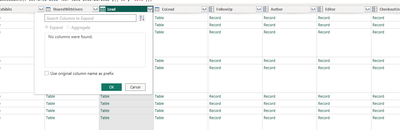
How can I get the name(s) from a field in SharePoint for Power BI? I see that the problem with this being a Table instead of a record is due to the fact that in SharePoint, this can contain more than one person, understandably. How do I get this data and represent it into a report where I can slice data on these results? Thanks for the information.
Solved! Go to Solution.
Hi @guyatisk ,
In the Power Query editor, locate the column with the Multiple Choice Person field. Click the expand icon (two arrows) on the column header to expand the field. If the name is in a nested table within the expanded column, you will also need to expand those tables.
You can refer to the similar posts that may be helpful to you:
Using Power BI to Report on Person Fields in SharePoint – The White Pages (bifocal.show)
Sharepoint person column with no fields? - Microsoft Fabric Community
How to retrieve "correct" column names from ShareP... - Microsoft Fabric Community
SharePoint Online List column with multiple person... - Microsoft Fabric Community
Best Regards,
Neeko Tang
If this post helps, then please consider Accept it as the solution to help the other members find it more quickly.
Hi @guyatisk ,
In the Power Query editor, locate the column with the Multiple Choice Person field. Click the expand icon (two arrows) on the column header to expand the field. If the name is in a nested table within the expanded column, you will also need to expand those tables.
You can refer to the similar posts that may be helpful to you:
Using Power BI to Report on Person Fields in SharePoint – The White Pages (bifocal.show)
Sharepoint person column with no fields? - Microsoft Fabric Community
How to retrieve "correct" column names from ShareP... - Microsoft Fabric Community
SharePoint Online List column with multiple person... - Microsoft Fabric Community
Best Regards,
Neeko Tang
If this post helps, then please consider Accept it as the solution to help the other members find it more quickly.
The Power BI Data Visualization World Championships is back! Get ahead of the game and start preparing now!
| User | Count |
|---|---|
| 41 | |
| 38 | |
| 36 | |
| 30 | |
| 28 |
| User | Count |
|---|---|
| 128 | |
| 88 | |
| 79 | |
| 67 | |
| 62 |