cancel
Showing results for 
Search instead for 
Did you mean: 

Get Fabric Certified for FREE during Fabric Data Days. Don't miss your chance! Request now

Reply
Anonymous
Not applicable

Get he fields and Check for each individual field selected in Multi select filter

Hi All,


I have a multi select filter of countries.


Jimy123_0-1605448553655.png


Is there any way through which I can check another condition for the selected items individually

For Ex:  Currently germany, Italy and India are selected

So, I need to get the values selected  (Germany, India, Italy )and check a condition on the values individually based on the selected values

Like this condition  :  (value of Germany is blank or value of Italy is blank or Value of India is blank) seperately.


This condition for checking blank will b dynamically based on the selected countries in the filter.

Any help?


1 ACCEPTED SOLUTION
Anonymous
Not applicable

@v-easonf-msft  Yes It is solvd. I used CONCATENX  and VALUE function to get the selcted values combined in a text and then usd IFERROR and SEARCH function to chck for the selecte values using IF ELSE statements

View solution in original post

3 REPLIES 3
v-easonf-msft
Community Support
Community Support

Hi, @Anonymous 
Could you please tell me whether your problem has been solved?
If yes, you could accept the helpful answer as solution. You also could share your own solution here. For now, there is no content of description in the thread. If you still need help, please share more details to us.


Best Regards,
Community Support Team _ Eason
If this post helps, then please consider Accept it as the solution to help the other members find it more quickly.

Anonymous
Not applicable

@v-easonf-msft  Yes It is solvd. I used CONCATENX  and VALUE function to get the selcted values combined in a text and then usd IFERROR and SEARCH function to chck for the selecte values using IF ELSE statements

DavisBI
Solution Specialist
Solution Specialist

Hi, @Anonymous 


Try this:

Filter_Test = 
VAR Filters_Limit = 5
RETURN
   IF ( 
   ISFILTERED ( 'Table'[Column1] ), 
   VAR ___f = FILTERS (  'Table'[Column1] ) 
   VAR ___f2 = EXCEPT(ALL('Table'),___f)
   VAR ___t = TOPN ( Filters_Limit, ___f,  'Table'[Column1])
   VAR ___t2 = TOPN ( Filters_Limit, ___f2,  'Table'[Column1])
   VAR ___d = CONCATENATEX ( ___t,  'Table'[Column1], ", " )
   VAR ___d2 = CONCATENATEX ( ___t2,  'Table'[Column1], ", " )
   VAR ___x = "[Selected]: " & ___d 
   VAR ___X2 = "[Blank]: " & ___d2
   RETURN ___x & UNICHAR(13) & UNICHAR(10) & ___X2   
)


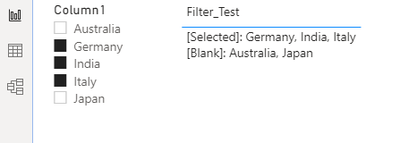
Result as shown below:


DavisBI_1-1605458070755.png


Mark this post as solution if this helps, thanks!


Helpful resources

Announcements
November Power BI Update Carousel

Power BI Monthly Update - November 2025

Check out the November 2025 Power BI update to learn about new features.

Fabric Data Days Carousel

Fabric Data Days

Advance your Data & AI career with 50 days of live learning, contests, hands-on challenges, study groups & certifications and more!

FabCon Atlanta 2026 carousel

FabCon Atlanta 2026

Join us at FabCon Atlanta, March 16-20, for the ultimate Fabric, Power BI, AI and SQL community-led event. Save $200 with code FABCOMM.

Top Solution Authors
Top Kudoed Authors