
cancel
Showing results for 
Search instead for 
Did you mean: 

The Power BI Data Visualization World Championships is back! Get ahead of the game and start preparing now! Learn more

Reply
Anonymous
Not applicable

Get a header in my desktop


Skärmavbild 2020-08-14 kl. 12.23.11.png


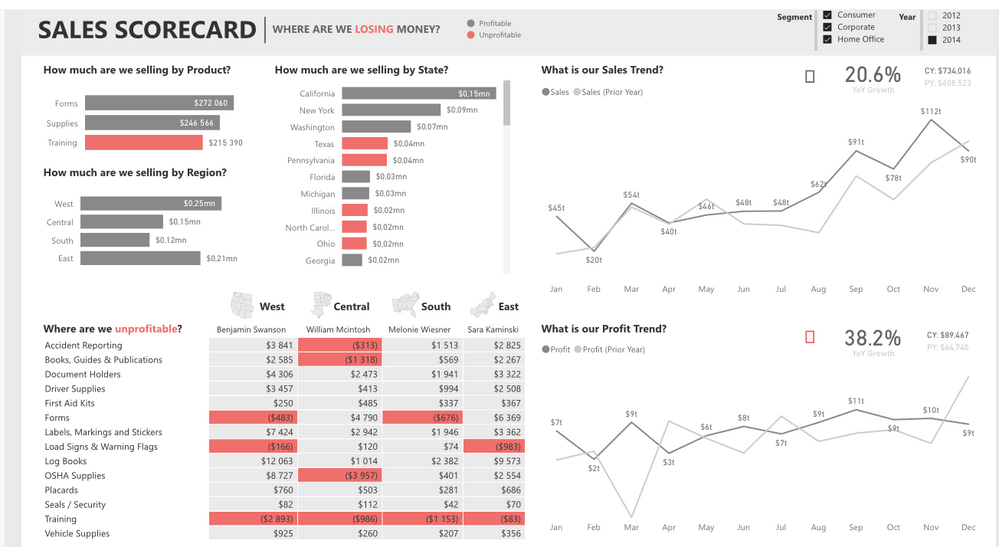
I want to add an header like this picture above, (source: https://community.powerbi.com/t5/Data-Stories-Gallery/Sales-Scorecard-Where-are-we-losing-money-by-D...) how do I get it?

1 ACCEPTED SOLUTION
v-diye-msft
Community Support
Community Support

Hi @Anonymous 


Please kindly refer to my below dummy obix, could probably preovide you some hints. if you'd like to get the detailed prodecure, you might contact the author:

001.PNG


Community Support Team _ Dina Ye
If this post helps, then please consider Accept it as the solution to help the other members find it more
quickly.

View solution in original post

3 REPLIES 3
v-diye-msft
Community Support
Community Support

Hi @Anonymous 


Please kindly refer to my below dummy obix, could probably preovide you some hints. if you'd like to get the detailed prodecure, you might contact the author:

001.PNG


Community Support Team _ Dina Ye
If this post helps, then please consider Accept it as the solution to help the other members find it more
quickly.
amitchandak
Super User
Super User

@Anonymous , not sure. but the left side (TOP) one is an image. You can add an image too


Image of south , north are above table with header text is of same color as background

Share with Power BI Enthusiasts: Full Power BI Video (20 Hours) YouTube
Microsoft Fabric Series 60+ Videos YouTube
Microsoft Fabric Hindi End to End YouTube
lousegers
Resolver I
Resolver I

Hi @Anonymous ,


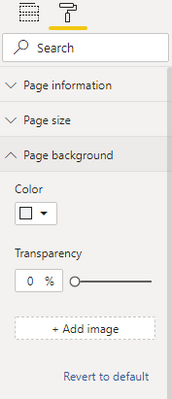
What I suggest you to do is to create a background image in a third-party tool, can even be PowerPoint.

Afterwards you can set this image as the background image of your Power BI report & can enrich it with data specific filters/data.


lousegers_0-1597401067605.png


Was my answer anywhere helpful?

Show your appreciation by simply marking my reply as solution or throw it a kudo.


Hop on the data train and get connected @LouSegers


Helpful resources

Announcements
November Power BI Update Carousel

Power BI Monthly Update - November 2025

Check out the November 2025 Power BI update to learn about new features.

Fabric Data Days Carousel

Fabric Data Days

Advance your Data & AI career with 50 days of live learning, contests, hands-on challenges, study groups & certifications and more!

FabCon Atlanta 2026 carousel

FabCon Atlanta 2026

Join us at FabCon Atlanta, March 16-20, for the ultimate Fabric, Power BI, AI and SQL community-led event. Save $200 with code FABCOMM.