Join us at FabCon Atlanta from March 16 - 20, 2026, for the ultimate Fabric, Power BI, AI and SQL community-led event. Save $200 with code FABCOMM.
Register now!The Power BI Data Visualization World Championships is back! It's time to submit your entry. Live now!
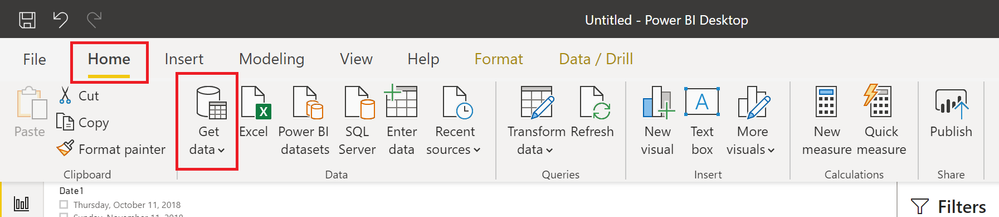
When trying to use PowerBI, there is no evident way to ever reach a section or button which says "Get Data", although all of the tutorials and examples online tell users to simply go to "Get Data". Why is not not a front-level feature? Why is PowerBI UI not optimized for using data? What type of usability testing has been conducted? Please reply with a complete list of reports on testing with non-expert users. You have 24 hours.
Solved! Go to Solution.
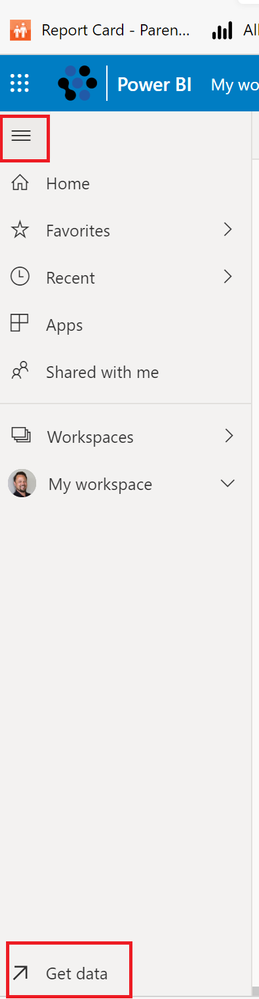
Ah, no worries @benoahUR , you are safe! 🙂 In the Service, it is a bit obscure, you have to expand your menu, see image:
Hi,
Make sure your file is not connected to the dataset. If the file is connected to power bi dataset then get data option is disabled.
@benoahUR , did your account get hacked?
Thank you! I was using the online version. Stay away!
Ah, no worries @benoahUR , you are safe! 🙂 In the Service, it is a bit obscure, you have to expand your menu, see image:
LOL 😞 😞 (sad usability face) - I never saw that. I actually gave up even with your screenshot and decided to scroll down, after several scrolls I discover your red box at the bottom left corner. The placement is an effectively invisible element UI trap, it is a common usability challenge, the button is behaving the same way as if it were completely invisible. I thought I was going crazy as a user.
The Power BI Data Visualization World Championships is back! It's time to submit your entry.
| User | Count |
|---|---|
| 50 | |
| 43 | |
| 36 | |
| 33 | |
| 30 |
| User | Count |
|---|---|
| 138 | |
| 120 | |
| 60 | |
| 59 | |
| 56 |