Join us at FabCon Atlanta from March 16 - 20, 2026, for the ultimate Fabric, Power BI, AI and SQL community-led event. Save $200 with code FABCOMM.
Register now!The Power BI Data Visualization World Championships is back! Get ahead of the game and start preparing now! Learn more
Hi,
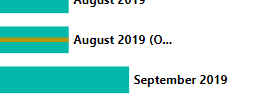
Is there any way at all to show the entire Resource of the Gantt chart? Even though my resource is not even long, Power BI automatically just puts a "..." rather than showing the entire word. I know theres a way to expand the width of the task, but is this possible with Resource?
As you can see, it just shows 'August 2019 (O...) when I would like to expand the entire text, which again, is not long at all and more than enough room for it to show and fit.
Thank you
Solved! Go to Solution.
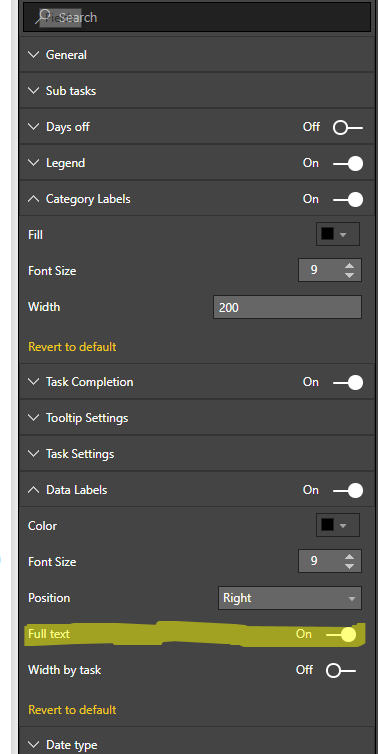
I looked and it appars the option for "Full text" in the Data Labels Sections does what you want.
That's so interesting! I tried that earlier and it wasn't working but it works now. Maybe a minor temporary bug- I keep running into those lately. Thank you!
The Power BI Data Visualization World Championships is back! Get ahead of the game and start preparing now!
| User | Count |
|---|---|
| 38 | |
| 36 | |
| 33 | |
| 31 | |
| 28 |
| User | Count |
|---|---|
| 129 | |
| 88 | |
| 79 | |
| 68 | |
| 63 |