Don't miss your chance to take the Fabric Data Engineer (DP-700) exam on us!
Learn moreWe've captured the moments from FabCon & SQLCon that everyone is talking about, and we are bringing them to the community, live and on-demand. Starts on April 14th. Register now
Hi All,
Not sure if it's possible but I am trying to create a calculation where in I can view the average prices of each sub-type.
Condition:
-Table 1, 2, and 3 are connected together.
-All but one product is based on supplier 1 column. Tomatoes are based on supplier 2 column.
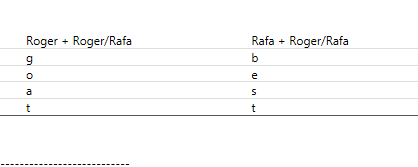
This is the visual that I want to show, but not exactly sure how to create a formula that would give me the correct values. It would have been easier if the they all have the same supplier just so that I can create a basic filter, but then it's complicated having multiple supplier column.
Many thanks,
| Sub-Type | Roger + Roger/Rafa | Rafa + Roger/Rafa |
| Lettuce | g | b |
| Apples | o | e |
| Tomatoes | a | s |
| Carrots | t | t |
---------------------------------------------
Table 1: Product
| Type | Sub-Type |
| Vegetables | Carrots |
| Fruits | Apples |
| Fruits | Mangoes |
| Vegetables | Tomatoes |
| Vegetables | Lettuce |
Table 2: Supplier
| Supplier 1 (All Products) | Supplier 2 (Tomatoes Only) |
| Roger | Rafa |
| Rafa | Roger |
| Roger/Rafa | Roger/Rafa |
Table 3: Price
| Prices |
5.50 |
| 3.20 |
| 1.16 |
| 3.14 |
Hi @Anonymous ,
It's a bit confused : 1. what does the letters in the table mean?
2. How do the prices match the sub-category?
If you have recently started exploring Fabric, we'd love to hear how it's going. Your feedback can help with product improvements.
A new Power BI DataViz World Championship is coming this June! Don't miss out on submitting your entry.
Share feedback directly with Fabric product managers, participate in targeted research studies and influence the Fabric roadmap.
| User | Count |
|---|---|
| 55 | |
| 40 | |
| 35 | |
| 19 | |
| 18 |
| User | Count |
|---|---|
| 73 | |
| 72 | |
| 38 | |
| 35 | |
| 26 |