Forum Discussion

 Helper I
Format the average of a duration

- 9 years ago
This is something that I talked extensively with the Power BI product group about a couple weeks ago at the MVP Summit in Seattle. After a lot of discussion about the issue, I believe we finally settled on the correct owner and established a way to move forward. You can vote for the Idea here:
https://ideas.powerbi.com/forums/265200-power-bi-ideas/suggestions/8814178-field-of-duration-type
The big use case blocker is for call centers or anything like a call center where durations are critically important.

 Helper I
Thanks for your answers. I already know Greg_Deckler's solution but it doesn't work for me. No matter what I do, as soon as I try to use text formatting functions as "concat" or simple an "&", my whole table goes crazy.
I'm simply showing the duration in minutes as an integer now. Not really nice, but at least it works.
Just have the problem, that I want to calculate the average over all entrys of an item, but since the table contains dates and times for every item, the avarage is calculated for each occurence of the item on its own. Which is basically the same as ne normal runtime... I need to make this measure ignore the filter of the date and time columns.
- Greg_Deckler9 years ago
Community Champion
Can you share some sample data and possibly how your table is laid out, the results you are getting and the results that you would like to get?
Without seeing the data and everything behind it, I would think that the solution would be to use an ALLEXCEPT clause in your measure calculation, so something like:
MyMeasure = CALCULATE(AVERAGE(Table[Duration]),ALLEXCEPT(Table[ItemID]))
- Talvien9 years ago
Sure, my data in this table looks like this:
You can see that it is all the same item with differen runtimes. For the average I would like the average of all thes items in every line.
This:
Average Duration (min) = CALCULATE(AVERAGE('Job Execution History'[RunDurationMinutes]);ALLEXCEPT('Job Information';'Job Information'[JobName]))is what the formula in the "Average Duration" column looks like. So it doesn't work :/
 dshah9 years agoFrequent Visitor
Hi Talvien
Below might help with averaging time duration
First convert the data into seconds. Then divide the data by 86400 (60 min x 60 secs x 24 hours) to get output that can be converted to time.
Then use below to get time equivalent
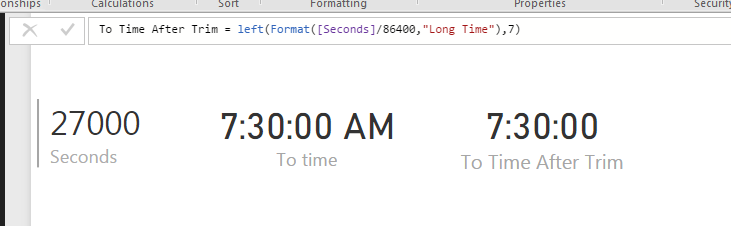
FORMAT([seconds]/86400,"Long Time") (Note: You can divide it further to get the average time duration here)
This gives time equivalent with AM / PM at end. You can use Left to trim it.
Left(FORMAT([seconds]/86400,"Long Time"),7)
This solves the averaging problem and other time duration related problems.
Additional Date/Time formats in DAX can be find below
https://technet.microsoft.com/en-us/library/ee634813(v=sql.105).aspx
Hope this helps.
Thanks