Forum Discussion

 Helper I
Format the average of a duration

- 9 years ago
This is something that I talked extensively with the Power BI product group about a couple weeks ago at the MVP Summit in Seattle. After a lot of discussion about the issue, I believe we finally settled on the correct owner and established a way to move forward. You can vote for the Idea here:
https://ideas.powerbi.com/forums/265200-power-bi-ideas/suggestions/8814178-field-of-duration-type
The big use case blocker is for call centers or anything like a call center where durations are critically important.


Hi Talvien
Below might help with averaging time duration
First convert the data into seconds. Then divide the data by 86400 (60 min x 60 secs x 24 hours) to get output that can be converted to time.
Then use below to get time equivalent
FORMAT([seconds]/86400,"Long Time") (Note: You can divide it further to get the average time duration here)
This gives time equivalent with AM / PM at end. You can use Left to trim it.
Left(FORMAT([seconds]/86400,"Long Time"),7)
This solves the averaging problem and other time duration related problems.
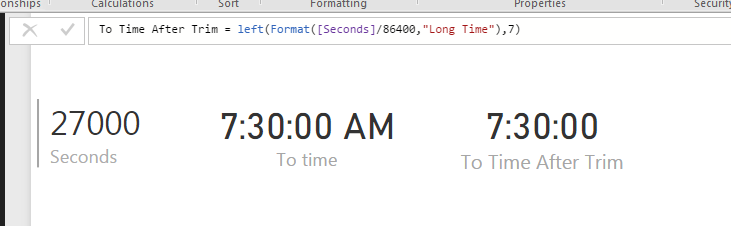
Additional Date/Time formats in DAX can be find below
https://technet.microsoft.com/en-us/library/ee634813(v=sql.105).aspx
Hope this helps.
Thanks

 Advocate III
Well it's 2018 and we still don't have durations. Duration should be a fundamental data type and have suitable formatting options. If someting took one day, twenty hours, seventeen minutes and thirty two seconds I want to see it as 1d 20:17:32 not 1.84551
Equally I expect charts to be able to understand duration data points and display suitable axis values, and for values to allow automatic selection of average, min or max.