Get Fabric or SQL Certified for Free.
Get certified for free when you join Fabric Data Days 2026 and dive into Fabric, Power BI, SQL, AI, and other essential data skills.
Join now- Power BI forums
- Get Help with Power BI
- Desktop
- Service
- Report Server
- Power Query
- Mobile Apps
- Developer
- DAX Commands and Tips
- Custom Visuals Development Discussion
- Health and Life Sciences
- Power BI Spanish forums
- Translated Spanish Desktop
- Training and Consulting
- Instructor Led Training
- Dashboard in a Day for Women, by Women
- Galleries
- Data Stories Gallery
- Themes Gallery
- Contests Gallery
- QuickViz Gallery
- Quick Measures Gallery
- Visual Calculations Gallery
- Notebook Gallery
- Translytical Task Flow Gallery
- TMDL Gallery
- R Script Showcase
- Webinars and Video Gallery
- Ideas
- Custom Visuals Ideas (read-only)
- Issues
- Issues
- Events
- Upcoming Events
July 7 - July 17 | Round 2 of the Power BI Dataviz World Championships. Don't miss your chance! Learn more
- Power BI forums
- Forums
- Get Help with Power BI
- Desktop
- Focus Mode Issue
- Subscribe to RSS Feed
- Mark Topic as New
- Mark Topic as Read
- Float this Topic for Current User
- Bookmark
- Subscribe
- Printer Friendly Page


- Mark as New
- Bookmark
- Subscribe
- Mute
- Subscribe to RSS Feed
- Permalink
- Report Inappropriate Content
Focus Mode Issue
Hi All,
I have come across quite a bizarre issue. I have a Power BI report which has a single page. The page size is 1600 X 4000 px.
I have several charts in the page including bar charts, pie charts and tables. Below is a glimpse of my report (with dummy data).
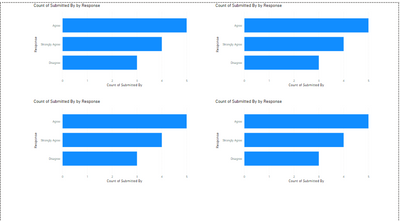
When I click on the Focus Mode of a bar chart, the bar chart gets focused, which is fine. However, when I click on the back button and go back to the normal view, the other bar charts disappear looking like below.
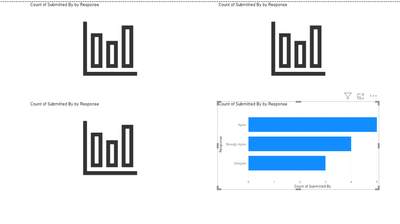
When I try the same in another page with the default page size, everything works fine.
I am suspecting that this issue is because of the page size.
Has anyone encountered this issue before? How did you solve it?
Best Regards
Simran Tuli
Solved! Go to Solution.
- Mark as New
- Bookmark
- Subscribe
- Mute
- Subscribe to RSS Feed
- Permalink
- Report Inappropriate Content
I have reported this issue.
Link: https://community.powerbi.com/t5/Issues/Focus-Mode-Issue/idi-p/1384337#M60891
Please vote guys.
- Mark as New
- Bookmark
- Subscribe
- Mute
- Subscribe to RSS Feed
- Permalink
- Report Inappropriate Content
I have found a temporary solution to this problem.
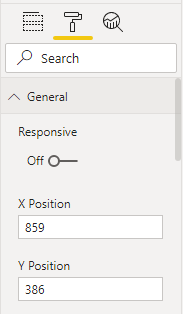
If we turn off the 'Responsive' option under the General tab for all the visuals, the issue doesn't occur.
Best Regards
Simran Tuli

- Mark as New
- Bookmark
- Subscribe
- Mute
- Subscribe to RSS Feed
- Permalink
- Report Inappropriate Content
I have the same issue.
I think that it is dimensions and format of the report page.
Format 16:9 => no problem
I try personal size 1280 x 2000 => problem
Also changing page mode.
The max "no issue" size is ~ 1280 x 1800-1900.
I don't try to modify width.
- Mark as New
- Bookmark
- Subscribe
- Mute
- Subscribe to RSS Feed
- Permalink
- Report Inappropriate Content
I have found a temporary solution to this problem.
If we turn off the 'Responsive' option under the General tab for all the visuals, the issue doesn't occur.
Best Regards
Simran Tuli
- Mark as New
- Bookmark
- Subscribe
- Mute
- Subscribe to RSS Feed
- Permalink
- Report Inappropriate Content
I have reported this issue.
Link: https://community.powerbi.com/t5/Issues/Focus-Mode-Issue/idi-p/1384337#M60891
Please vote guys.

- Mark as New
- Bookmark
- Subscribe
- Mute
- Subscribe to RSS Feed
- Permalink
- Report Inappropriate Content
hi @simrantuli, @Naveen_SV - I have sometimes encountered this challenge but not consistently and I have attributed it to memory issues on my laptop. You can check the same on your end as well when the issue occurs.
But I would wait for someone from the Microsoft team to comment. Thanks!


- Mark as New
- Bookmark
- Subscribe
- Mute
- Subscribe to RSS Feed
- Permalink
- Report Inappropriate Content
Hi,
Memory which i am using very less hardly 10 MB file i am seeing in many other users
- Mark as New
- Bookmark
- Subscribe
- Mute
- Subscribe to RSS Feed
- Permalink
- Report Inappropriate Content
I am also facing the same issue regarding Focus mode when we turn off focus mode this issue appers i am using 2.84.981.0 64 bit version.


- Mark as New
- Bookmark
- Subscribe
- Mute
- Subscribe to RSS Feed
- Permalink
- Report Inappropriate Content
@simrantuli , if it has happened on power bi service. Clear cache and try.
In the case of desktop. Close all power bi files and open and try again. Make sure you are on the latest version. if the issue continues, report it on : https://community.powerbi.com/t5/Issues/idb-p/Issues
- Mark as New
- Bookmark
- Subscribe
- Mute
- Subscribe to RSS Feed
- Permalink
- Report Inappropriate Content
Helpful resources

FabCon & SQLCon – Barcelona 2026
Join us in Barcelona for FabCon and SQLCon, the Fabric, Power BI, SQL, and AI community event. Save €200 with code FABCMTY200.

Data Days 2026
Join Data Days 2026: 60 days of free live/on-demand sessions, challenges, study groups, and certification opportunities.

Power BI DataViz World Championships - June 2026
A new Power BI DataViz World Championship is coming this June! Don't miss out on submitting your entry.

| User | Count |
|---|---|
| 29 | |
| 27 | |
| 26 | |
| 24 | |
| 16 |


| User | Count |
|---|---|
| 53 | |
| 47 | |
| 39 | |
| 31 | |
| 21 |


