Join us at FabCon Atlanta from March 16 - 20, 2026, for the ultimate Fabric, Power BI, AI and SQL community-led event. Save $200 with code FABCOMM.
Register now!The Power BI Data Visualization World Championships is back! Get ahead of the game and start preparing now! Learn more
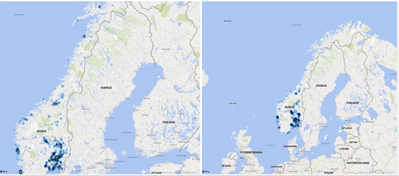
I'm trying to get the desired map view and then I want to turn off Auto-zoom. But using the mouse (as carefully as I'am able to) I cannot get a map view as desired. In the pic below the one to the left is not showing the whole country, the one to the right is showing too much. Shouldn't it be possible to choose something in between here?
regards JG
Solved! Go to Solution.
Hi, @JGG
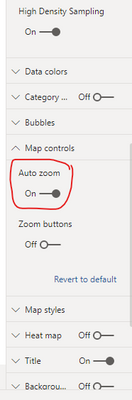
First, you can close the “Auto-zoom” in the map controls:
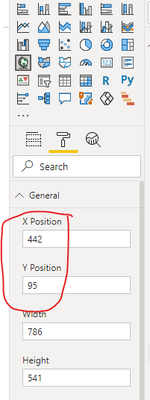
Then you can try to change the status of the map visual to the left picture you posted, and change the “X position” and “Y position” of the map visual to make the country fully displayed in your map.
If you still have a problem, you can upload your sample pbix file without sensitive data.
Best Regards,
Community Support Team _Robert Qin
If this post helps, then please consider Accept it as the solution to help the other members find it more quickly.
Hi, @JGG
First, you can close the “Auto-zoom” in the map controls:
Then you can try to change the status of the map visual to the left picture you posted, and change the “X position” and “Y position” of the map visual to make the country fully displayed in your map.
If you still have a problem, you can upload your sample pbix file without sensitive data.
Best Regards,
Community Support Team _Robert Qin
If this post helps, then please consider Accept it as the solution to help the other members find it more quickly.
The Power BI Data Visualization World Championships is back! Get ahead of the game and start preparing now!
| User | Count |
|---|---|
| 38 | |
| 36 | |
| 33 | |
| 30 | |
| 28 |
| User | Count |
|---|---|
| 128 | |
| 88 | |
| 79 | |
| 67 | |
| 62 |