FabCon is coming to Atlanta
Join us at FabCon Atlanta from March 16 - 20, 2026, for the ultimate Fabric, Power BI, AI and SQL community-led event. Save $200 with code FABCOMM.
Register now!- Power BI forums
- Get Help with Power BI
- Desktop
- Service
- Report Server
- Power Query
- Mobile Apps
- Developer
- DAX Commands and Tips
- Custom Visuals Development Discussion
- Health and Life Sciences
- Power BI Spanish forums
- Translated Spanish Desktop
- Training and Consulting
- Instructor Led Training
- Dashboard in a Day for Women, by Women
- Galleries
- Data Stories Gallery
- Themes Gallery
- Contests Gallery
- QuickViz Gallery
- Quick Measures Gallery
- Visual Calculations Gallery
- Notebook Gallery
- Translytical Task Flow Gallery
- TMDL Gallery
- R Script Showcase
- Webinars and Video Gallery
- Ideas
- Custom Visuals Ideas (read-only)
- Issues
- Issues
- Events
- Upcoming Events
The Power BI Data Visualization World Championships is back! Get ahead of the game and start preparing now! Learn more
- Power BI forums
- Forums
- Get Help with Power BI
- Desktop
- Finding records after a certain date
- Subscribe to RSS Feed
- Mark Topic as New
- Mark Topic as Read
- Float this Topic for Current User
- Bookmark
- Subscribe
- Printer Friendly Page


- Mark as New
- Bookmark
- Subscribe
- Mute
- Subscribe to RSS Feed
- Permalink
- Report Inappropriate Content
Finding records after a certain date
Hello everyone - i have the following sample data and am trying to figure out how to create a flag (calculated column) to know if a given order was placed after the evaluation date has ended. any tips on how to do this would be appreciated..
For example -
1. the first row below would have the flag as yes because the customer placed the order after the eval date
2. the second row would have the **bleep** as no because this order is prior to eval date
3. the 3rd row would be no
4. the 4th row would be yes
| Customer | Product | EvalDate | OrderDate |
| 123 | ABC | 01/15/2017 | 02/01/2017 |
| 123 | ABC | 01/15/2017 | 01/14/2017 |
| 456 | CDE | 02/15/2017 | 02/01/2017 |
| 456 | CDE | 02/15/2017 | 02/16/2017 |
Solved! Go to Solution.
- Mark as New
- Bookmark
- Subscribe
- Mute
- Subscribe to RSS Feed
- Permalink
- Report Inappropriate Content
Hi @ConstMoss,
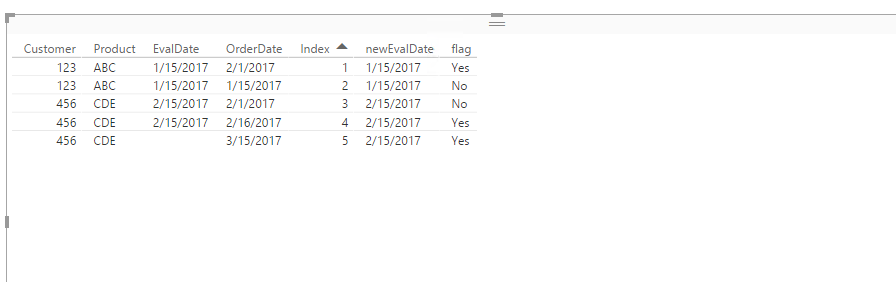
You can firstly add an index column into your current table in Query Editor, then create calculated columns using the DAX below.
newEvalDate = IF(Table2[Customer]=LOOKUPVALUE(Table2[Customer],Table2[Index],Table2[Index]-1) && Table2[Product]=LOOKUPVALUE(Table2[Product],Table2[Index],Table2[Index]-1)&& ISBLANK(Table2[EvalDate]),LOOKUPVALUE(Table2[EvalDate],Table2[Index],Table2[Index]-1),Table2[EvalDate])
flag = IF(Table2[OrderDate]>Table2[newEvalDate],"Yes","No")
Thanks,
Lydia Zhang

- Mark as New
- Bookmark
- Subscribe
- Mute
- Subscribe to RSS Feed
- Permalink
- Report Inappropriate Content
I'd create two columns:
1) A 'Custom Column':
col1=[OrderDate]-[EvalDate]
This will give you the number of dates after the EvalDate that the order was placed.
2) A 'Conditional Column': If col2=col1 > 0, then 'Yes'
This will flag the row as 'Yes' if the Order Date is greater than the eval date.
The Query Editor will remember the steps you took, so you can delete col1 after if you want.
I'm sure you could accomplish this in one custom column using DAX, but I dunno how...


- Mark as New
- Bookmark
- Subscribe
- Mute
- Subscribe to RSS Feed
- Permalink
- Report Inappropriate Content
Hi @ConstMoss
When using the Calculated Column in DAX you could use the following:
Difference = DateDiff([OrderDate]-[EvalDate],Day)
That will then give you the difference in days.
Reference: https://msdn.microsoft.com/en-us/library/dn802538.aspx?f=255&MSPPError=-2147217396
You could then create another Calculated Column which would check to see if the number is positive or negative, and then based on that could give you your Yes or No
Is Before Eval = IF(SIGN([Difference]) = -1, "Yes","No")
This will then return your data as required.
Reference: https://msdn.microsoft.com/en-us/library/ee634249.aspx
If you really wanted to, you could put it all into one column, as shown below. I advise people to rather do the columns in logical steps, makes it less complex as well as easier to troubleshoot if something is incorrect.
Is Before Eval = IF(SIGN(DateDiff([OrderDate]-[EvalDate],Day)) = -1, "Yes","No")
- Mark as New
- Bookmark
- Subscribe
- Mute
- Subscribe to RSS Feed
- Permalink
- Report Inappropriate Content
thanks @guavaq, one thing i forgot to mention is that i have rows in my table where there is no eval date, in which case i have to grab the eval date based on prior records for that customer and product combination.
For exaple, for the last row in my data below, i'll need to grab the en date from one of the previous recrods.
| Customer | Product | EvalDate | OrderDate |
| 123 | ABC | 01/15/2017 | 02/01/2017 |
| 123 | ABC | 01/15/2017 | 01/15/2017 |
| 456 | CDE | 02/15/2017 | 02/01/2017 |
| 456 | CDE | 02/15/2017 | 02/16/2017 |
| 456 | CDE | 03/15/2017 |
- Mark as New
- Bookmark
- Subscribe
- Mute
- Subscribe to RSS Feed
- Permalink
- Report Inappropriate Content
Hi @ConstMoss
Just a question in terms of are you always wanting to look at this data on a row level, or aggregated it up?
The reason for the question is if it is being aggregated up, the DAX that is used could be different?
Also how difficult would it be to get the data added if blank from your Source system?
- Mark as New
- Bookmark
- Subscribe
- Mute
- Subscribe to RSS Feed
- Permalink
- Report Inappropriate Content
@GilbertQ - We won't be aggregating it, even if we did, we always look at details. the data in the source system is populated just for the row where the eval date ends.
- Mark as New
- Bookmark
- Subscribe
- Mute
- Subscribe to RSS Feed
- Permalink
- Report Inappropriate Content
Hi @ConstMoss,
You can firstly add an index column into your current table in Query Editor, then create calculated columns using the DAX below.
newEvalDate = IF(Table2[Customer]=LOOKUPVALUE(Table2[Customer],Table2[Index],Table2[Index]-1) && Table2[Product]=LOOKUPVALUE(Table2[Product],Table2[Index],Table2[Index]-1)&& ISBLANK(Table2[EvalDate]),LOOKUPVALUE(Table2[EvalDate],Table2[Index],Table2[Index]-1),Table2[EvalDate])
flag = IF(Table2[OrderDate]>Table2[newEvalDate],"Yes","No")
Thanks,
Lydia Zhang

- Mark as New
- Bookmark
- Subscribe
- Mute
- Subscribe to RSS Feed
- Permalink
- Report Inappropriate Content
Is there a way to count the number of orders that ocurred after the Eval date if the Eval date is in a different table?
Ex:
| Order table | ||
| Customer | Product | OrderDate |
| 123 | ABC | 2/1/2017 |
| 123 | ABC | 1/15/2017 |
| 456 | CDE | 2/1/2017 |
| 456 | CDE | 2/16/2017 |
| 456 | CDE | 3/15/2017 |
| Customer table | ||
| Customer | EvalDate | |
| 123 | 1/15/2017 | |
| 456 | 2/15/2017 |

Helpful resources

Power BI Dataviz World Championships
The Power BI Data Visualization World Championships is back! Get ahead of the game and start preparing now!

Power BI Monthly Update - December 2025
Check out the December 2025 Power BI Holiday Recap!

FabCon Atlanta 2026
Join us at FabCon Atlanta, March 16-20, for the ultimate Fabric, Power BI, AI and SQL community-led event. Save $200 with code FABCOMM.

| User | Count |
|---|---|
| 39 | |
| 38 | |
| 38 | |
| 28 | |
| 27 |


| User | Count |
|---|---|
| 124 | |
| 88 | |
| 73 | |
| 66 | |
| 65 |


