FabCon is coming to Atlanta
Join us at FabCon Atlanta from March 16 - 20, 2026, for the ultimate Fabric, Power BI, AI and SQL community-led event. Save $200 with code FABCOMM.
Register now!- Power BI forums
- Get Help with Power BI
- Desktop
- Service
- Report Server
- Power Query
- Mobile Apps
- Developer
- DAX Commands and Tips
- Custom Visuals Development Discussion
- Health and Life Sciences
- Power BI Spanish forums
- Translated Spanish Desktop
- Training and Consulting
- Instructor Led Training
- Dashboard in a Day for Women, by Women
- Galleries
- Data Stories Gallery
- Themes Gallery
- Contests Gallery
- QuickViz Gallery
- Quick Measures Gallery
- Visual Calculations Gallery
- Notebook Gallery
- Translytical Task Flow Gallery
- TMDL Gallery
- R Script Showcase
- Webinars and Video Gallery
- Ideas
- Custom Visuals Ideas (read-only)
- Issues
- Issues
- Events
- Upcoming Events
Get Fabric Certified for FREE during Fabric Data Days. Don't miss your chance! Request now
- Power BI forums
- Forums
- Get Help with Power BI
- Desktop
- Re: Finding Max value in a group
- Subscribe to RSS Feed
- Mark Topic as New
- Mark Topic as Read
- Float this Topic for Current User
- Bookmark
- Subscribe
- Printer Friendly Page


- Mark as New
- Bookmark
- Subscribe
- Mute
- Subscribe to RSS Feed
- Permalink
- Report Inappropriate Content
Finding Max value in a group
Hi Everyone,
I am trying to run sales data and determine who got credit for the sale based on the date. I want to put this in a table to show where the originating agent and the final sales agent are not the same person. The issue i am running into that i only have a date stamp and not date/time. How can i do a comparison of the data if i group by the customer name? I would also like to show the Adjusted Sale Amount for each agent in the comparison. I have tried to create a unique identifier by concatinating the columns but that didnt work. Here is some dummy data to give you an idea of the data i am using. When the Sale amount = Adjusted amount that means this was a new customer and there were no adjustments to be made.
| Sale Agent Name | Sale Agent ID | Customer Name | City | State | Zip | Sale Amount | Adjusted Sale Amount | Date of sale |
| Bob | 1000 | Hulk | Chicago | IL | 12345 | 200 | 200 | 11/1/2017 |
| John | 2000 | Thor | Atlanta | GA | 23456 | 250 | 250 | 11/1/2017 |
| Mary | 3000 | IronMan | New York | NY | 34567 | 275 | 275 | 11/1/2017 |
| Luke | 4000 | SpiderMan | Queens | NY | 45678 | 300 | 300 | 11/1/2017 |
| Allen | 5000 | Captain | Brooklyn | NY | 56789 | 325 | 325 | 11/1/2017 |
| Carl | 6000 | Hawkeye | SanFran | CA | 67890 | 350 | 350 | 11/1/2017 |
| David | 7000 | Falcon | Seattle | WA | 78901 | 375 | 375 | 11/1/2017 |
| Bob | 1000 | Hulk | Chicago | IL | 12345 | 200 | 225 | 11/5/2017 |
| John | 2000 | Thor | Atlanta | GA | 23456 | 250 | 275 | 11/6/2017 |
| Mary | 3000 | IronMan | New York | NY | 34567 | 275 | 300 | 11/6/2017 |
| Luke | 4000 | SpiderMan | Queens | NY | 45678 | 300 | 250 | 11/8/2017 |
| Allen | 5000 | Captain | Brooklyn | NY | 56789 | 325 | 500 | 11/9/2017 |
| Matt | 8000 | Hawkeye | SanFran | CA | 67890 | 350 | 325 | 11/10/2017 |
| Matt | 8000 | Falcon | Seattle | WA | 78901 | 375 | 450 | 11/11/2017 |
| Matt | 8000 | IronMan | New York | NY | 34567 | 300 | 400 | 11/12/2017 |
| Bob | 1000 | Superman | Houston | TX | 12345 | 200 | 225 | 11/5/2017 |
| John | 2000 | Hulk | Chicago | IL | 12345 | 225 | 300 | 11/5/2017 |
Solved! Go to Solution.
- Mark as New
- Bookmark
- Subscribe
- Mute
- Subscribe to RSS Feed
- Permalink
- Report Inappropriate Content
@Jorgast,
Create the following columns in your table.
Original agent = CALCULATE(FIRSTNONBLANK(Table[Sale Agent Name],""), FILTER(Table, Table[Customer Name]=EARLIER(Table[Customer Name]) && Table[Date of sale]<EARLIER(Table[Date of sale])))
checkcol = IF(Table[Original agent]<>BLANK() && Table[Sale Agent Name]<>Table[Original agent],1,0)
Then set the value of checkcol to 1 in visual level filters.
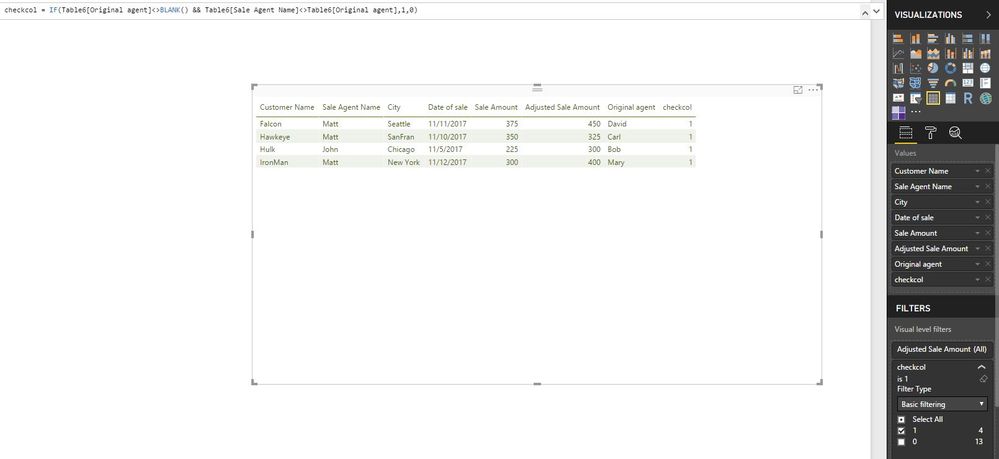
Regards,
Lydia

- Mark as New
- Bookmark
- Subscribe
- Mute
- Subscribe to RSS Feed
- Permalink
- Report Inappropriate Content
@Jorgast,
What is the result do you want to get based on the above sample data? Could you please post expected result in table format?
Regards,
Lydia
- Mark as New
- Bookmark
- Subscribe
- Mute
- Subscribe to RSS Feed
- Permalink
- Report Inappropriate Content
My ultimate goal is to be able to see those customers where the orginating sales agent and final sales agent are different. I would like to filter out those customers where the 1st sales agent and the last sales agent are the same.
| Customer Name | Sale Agent Name | Sale Amount | Adjusted Sale Amount | Date of sale | Comment |
| Falcon | David | 375 | 375 | 11/1/2017 | Originating Sales Rep is different from final |
| Falcon | Matt | 375 | 450 | 11/11/2017 | Originating Sales Rep is different from final |
| Hawkeye | Carl | 350 | 350 | 11/1/2017 | Originating Sales Rep is different from final |
| Hawkeye | Matt | 350 | 325 | 11/10/2017 | Originating Sales Rep is different from final |
| Hulk | Bob | 200 | 200 | 11/1/2017 | Originating Sales Rep is different from final |
| Hulk | Bob | 200 | 225 | 11/5/2017 | Originating Sales Rep is different from final |
| Hulk | John | 225 | 300 | 11/5/2017 | Originating Sales Rep is different from final |
| IronMan | Mary | 275 | 275 | 11/1/2017 | Originating Sales Rep is different from final |
| IronMan | Mary | 275 | 300 | 11/6/2017 | Originating Sales Rep is different from final |
| IronMan | Matt | 300 | 400 | 11/12/2017 | Originating Sales Rep is different from final |
- Mark as New
- Bookmark
- Subscribe
- Mute
- Subscribe to RSS Feed
- Permalink
- Report Inappropriate Content
@Jorgast,
Create the following columns in your table.
Original agent = CALCULATE(FIRSTNONBLANK(Table[Sale Agent Name],""), FILTER(Table, Table[Customer Name]=EARLIER(Table[Customer Name]) && Table[Date of sale]<EARLIER(Table[Date of sale])))
checkcol = IF(Table[Original agent]<>BLANK() && Table[Sale Agent Name]<>Table[Original agent],1,0)
Then set the value of checkcol to 1 in visual level filters.
Regards,
Lydia
- Mark as New
- Bookmark
- Subscribe
- Mute
- Subscribe to RSS Feed
- Permalink
- Report Inappropriate Content
@Anonymous
This is better than what i had i was thinking. Thanks
- Mark as New
- Bookmark
- Subscribe
- Mute
- Subscribe to RSS Feed
- Permalink
- Report Inappropriate Content
@Anonymous
Would the code still work when the data is sorted in a different manner?
When i try using the First Non blank, it seems to be looking at the first non blank record in the data set, so everything is being compared to that.
Original agent = CALCULATE(FIRSTNONBLANK(Table[Sale Agent Name],""), FILTER(Table, Table[Customer Name]=EARLIER(Table[Customer Name]) && Table[Date of sale]<EARLIER(Table[Date of sale])))
Customer NameSale Agent NameSale AmountAdjusted Sale AmountDate of saleComment
| Falcon | David | 375 | 375 | 11/1/2017 | Originating Sales Rep is different from final |
| Hawkeye | Carl | 350 | 350 | 11/1/2017 | Originating Sales Rep is different from final |
| Hulk | Bob | 200 | 200 | 11/1/2017 | Originating Sales Rep is different from final |
| IronMan | Mary | 275 | 275 | 11/1/2017 | Originating Sales Rep is different from final |
| Hulk | Bob | 200 | 225 | 11/5/2017 | |
| Hulk | John | 225 | 300 | 11/5/2017 | Originating Sales Rep is different from final |
| IronMan | Mary | 275 | 300 | 11/6/2017 | Originating Sales Rep is different from final |
| Hawkeye | Matt | 350 | 325 | 11/10/2017 | Originating Sales Rep is different from final |
| Falcon | Matt | 375 | 450 | 11/11/2017 | Originating Sales Rep is different from final |
| IronMan | Matt | 300 | 400 | 11/12/2017 | Originating Sales Rep is different from final |
Helpful resources

Power BI Monthly Update - November 2025
Check out the November 2025 Power BI update to learn about new features.

Fabric Data Days
Advance your Data & AI career with 50 days of live learning, contests, hands-on challenges, study groups & certifications and more!

FabCon Atlanta 2026
Join us at FabCon Atlanta, March 16-20, for the ultimate Fabric, Power BI, AI and SQL community-led event. Save $200 with code FABCOMM.


