cancel
Showing results for 
Search instead for 
Did you mean: 

The Power BI Data Visualization World Championships is back! Get ahead of the game and start preparing now! Learn more

Reply
Applicable88
Impactful Individual

Find string in text and display it in calculated column

Hello,


i have a column with long text. The string within that text I'm looking for has either 001-005 at the end, like that:


Material001, Material 002, Material 003, Material.....


That string is always at another position, in the text. But if its there my calculated column should display that text 

Calculated Column

Material001

Material002

"N/A" 

etc. 


The function Search and Find has not the features for that purpose.

Thank you very much in advance.

Best. 


1 ACCEPTED SOLUTION

Hi,

This calculated column formula works

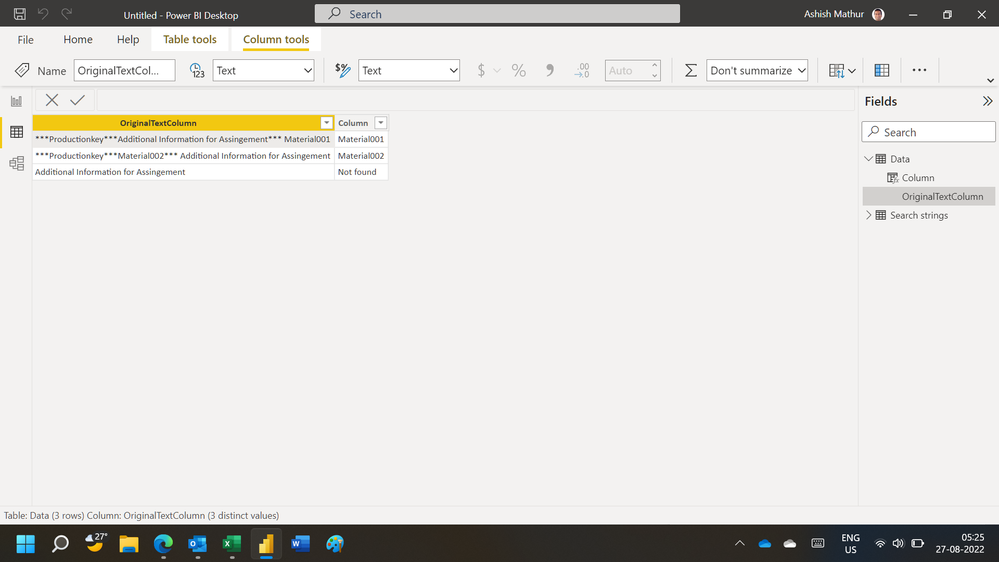
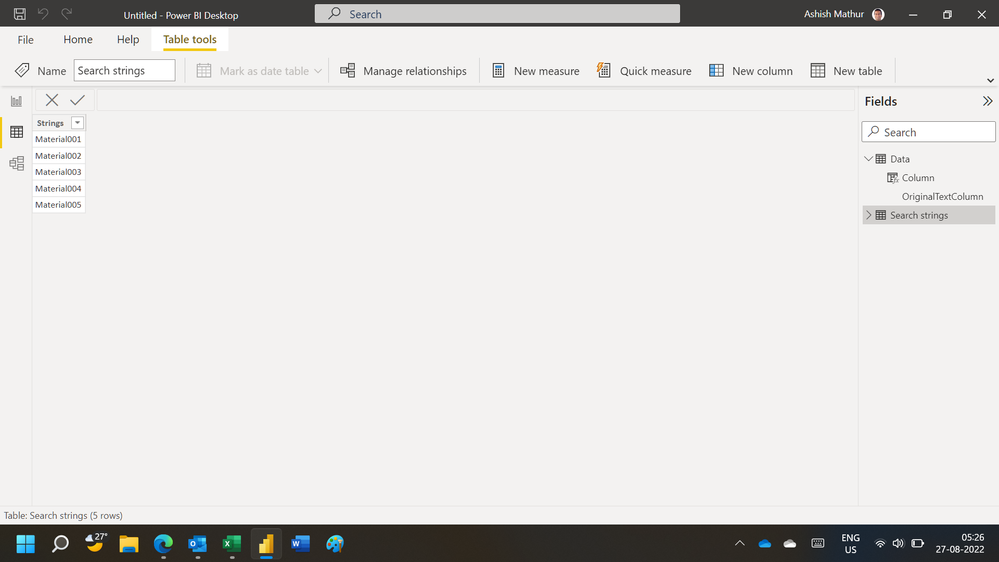
Column = coalesce(FIRSTNONBLANK(FILTER(VALUES('Search strings'[Strings]),SEARCH('Search strings'[Strings],Data[OriginalTextColumn],1,0)),1),"Not found")

Hope this helps.

Untitled.png


Untitled1.png


Regards,
Ashish Mathur
http://www.ashishmathur.com
https://www.linkedin.com/in/excelenthusiasts/

View solution in original post

4 REPLIES 4
Applicable88
Impactful Individual

@Ashish_Mathur @davehus ,


here is a sample table:


OriginalTextColumn CalclatedColumn
***Productionkey***Additional Information for Assingement*** Material001Material001
***Productionkey***Material002*** Additional Information for AssingementMaterial002
Additional Information for AssingementNo Material found


As you can see the word MaterialXXX is always at another position. 


Hope that clarifies.


Best regards. 

Hi,

This calculated column formula works

Column = coalesce(FIRSTNONBLANK(FILTER(VALUES('Search strings'[Strings]),SEARCH('Search strings'[Strings],Data[OriginalTextColumn],1,0)),1),"Not found")

Hope this helps.

Untitled.png


Untitled1.png


Regards,
Ashish Mathur
http://www.ashishmathur.com
https://www.linkedin.com/in/excelenthusiasts/
Ashish_Mathur
Super User
Super User

Hi,

Your expected result is not clear.  Show the actual data and expected result very clearly.


Regards,
Ashish Mathur
http://www.ashishmathur.com
https://www.linkedin.com/in/excelenthusiasts/
davehus
Memorable Member
Memorable Member

Hi @Applicable88 ,


Is it not possible for you to this transformation upstream in Power Query?


Did I help you today? Please accept my solution and hit the Kudos button.

Helpful resources

Announcements
Power BI DataViz World Championships

Power BI Dataviz World Championships

The Power BI Data Visualization World Championships is back! Get ahead of the game and start preparing now!

December 2025 Power BI Update Carousel

Power BI Monthly Update - December 2025

Check out the December 2025 Power BI Holiday Recap!

FabCon Atlanta 2026 carousel

FabCon Atlanta 2026

Join us at FabCon Atlanta, March 16-20, for the ultimate Fabric, Power BI, AI and SQL community-led event. Save $200 with code FABCOMM.