FabCon is coming to Atlanta
Join us at FabCon Atlanta from March 16 - 20, 2026, for the ultimate Fabric, Power BI, AI and SQL community-led event. Save $200 with code FABCOMM.
Register now!- Power BI forums
- Get Help with Power BI
- Desktop
- Service
- Report Server
- Power Query
- Mobile Apps
- Developer
- DAX Commands and Tips
- Custom Visuals Development Discussion
- Health and Life Sciences
- Power BI Spanish forums
- Translated Spanish Desktop
- Training and Consulting
- Instructor Led Training
- Dashboard in a Day for Women, by Women
- Galleries
- Data Stories Gallery
- Themes Gallery
- Contests Gallery
- QuickViz Gallery
- Quick Measures Gallery
- Visual Calculations Gallery
- Notebook Gallery
- Translytical Task Flow Gallery
- TMDL Gallery
- R Script Showcase
- Webinars and Video Gallery
- Ideas
- Custom Visuals Ideas (read-only)
- Issues
- Issues
- Events
- Upcoming Events
Get Fabric Certified for FREE during Fabric Data Days. Don't miss your chance! Request now
- Power BI forums
- Forums
- Get Help with Power BI
- Desktop
- Re: Find previous blank value in previous rows
- Subscribe to RSS Feed
- Mark Topic as New
- Mark Topic as Read
- Float this Topic for Current User
- Bookmark
- Subscribe
- Printer Friendly Page


- Mark as New
- Bookmark
- Subscribe
- Mute
- Subscribe to RSS Feed
- Permalink
- Report Inappropriate Content
Find previous blank value in previous rows
Hello, I want to be able to retrieve the value of Date1 of the previous Column1 = empty.
The result I want is in the 3rd column identified by the red arrow. As you can see, the result can repeat itself since it will search the previous empty colum1 value.
Thank you

Solved! Go to Solution.


- Mark as New
- Bookmark
- Subscribe
- Mute
- Subscribe to RSS Feed
- Permalink
- Report Inappropriate Content
Hi @11097486 ,
You can create a calculated column like this:
Re =
CALCULATE (
    MAX ( 'Table'[Date1] ),
    FILTER (
        ALL ( 'Table' ),
        'Table'[Date1] < EARLIER ( 'Table'[Date1] )
            && 'Table'[Column1] = BLANK ()
    )
)
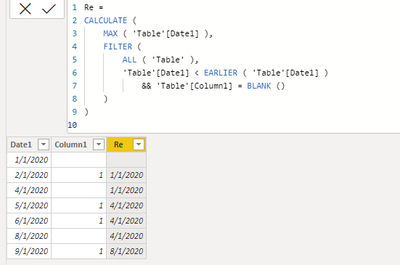
Attached a sample file in the below, hopes to help you.
Best Regards,
Community Support Team _ Yingjie Li
If this post helps, then please consider Accept it as the solution to help the other members find it more quickly.


- Mark as New
- Bookmark
- Subscribe
- Mute
- Subscribe to RSS Feed
- Permalink
- Report Inappropriate Content
can you provide some dummy data in text form?
If I took the time to answer your question and I came up with a solution, please mark my post as a solution and /or give kudos freely for the effort 🙂 Thank you!
Proud to be a Super User!
- Mark as New
- Bookmark
- Subscribe
- Mute
- Subscribe to RSS Feed
- Permalink
- Report Inappropriate Content
Hello, the data is the first 2 columns of the print screen. Thank you
- Mark as New
- Bookmark
- Subscribe
- Mute
- Subscribe to RSS Feed
- Permalink
- Report Inappropriate Content
you need to provide in a usable format, you cannot copy and paste that. If you need help its preferable you provide it in a usable format.
How do you know the sequence of the data is it date sorted? what if you have duplicates or is it unique dates only?
If I took the time to answer your question and I came up with a solution, please mark my post as a solution and /or give kudos freely for the effort 🙂 Thank you!
Proud to be a Super User!
- Mark as New
- Bookmark
- Subscribe
- Mute
- Subscribe to RSS Feed
- Permalink
- Report Inappropriate Content
Hello, yes it is date sorted and there won't be any duplicates. I cannot insert files. Creating the table should take 2 minutes... Thank you
- Mark as New
- Bookmark
- Subscribe
- Mute
- Subscribe to RSS Feed
- Permalink
- Report Inappropriate Content
Hi @11097486 ,
You can create a calculated column like this:
Re =
CALCULATE (
    MAX ( 'Table'[Date1] ),
    FILTER (
        ALL ( 'Table' ),
        'Table'[Date1] < EARLIER ( 'Table'[Date1] )
            && 'Table'[Column1] = BLANK ()
    )
)
Attached a sample file in the below, hopes to help you.
Best Regards,
Community Support Team _ Yingjie Li
If this post helps, then please consider Accept it as the solution to help the other members find it more quickly.
- Mark as New
- Bookmark
- Subscribe
- Mute
- Subscribe to RSS Feed
- Permalink
- Report Inappropriate Content
Hi, Can you please help me with a similar query:
I have a table in which I have a product key, date filter, stages, and cost to it. The stages change from one to other at certain dates and not all dates. What I want to do is populate the last nonblank value of a stage for a given product key(given the sorting of Date is Ascending for each Product key). So my table looks like this:
| Product Key | Date | Stage | Cost |
| xyz | 1/8/2020 | borrow | 10 |
| xyz | 1/9/2020 | 10 | |
| xyz | 1/10/2020 | paid | 10 |
| xyz | 1/11/2020 | 10 | |
| xyz | 1/12/2020 | 10 | |
| xyz | 1/13/2020 | 10 | |
| abc | 1/9/2020 | borrow | 12.5 |
| abc | 1/10/2020 | 12.5 | |
| abc | 1/11/2020 | unpaid | 12.5 |
| abc | 1/12/2020 | 12.5 | |
| abc | 1/13/2020 | paid | 12.5 |
What i want is to update the previous stage for each product key(based on the fact that the date is ascending order), please note that the stages are simplified here, they can be as many as 10-12 different stages. Result table should be like:
| Product Key | Date | Stage | Cost |
| xyz | 1/8/2020 | borrow | 10 |
| xyz | 1/9/2020 | borrow | 10 |
| xyz | 1/10/2020 | paid | 10 |
| xyz | 1/11/2020 | paid | 10 |
| xyz | 1/12/2020 | paid | 10 |
| xyz | 1/13/2020 | paid | 10 |
| abc | 1/9/2020 | borrow | 12.5 |
| abc | 1/10/2020 | borrow | 12.5 |
| abc | 1/11/2020 | unpaid | 12.5 |
| abc | 1/12/2020 | unpaid | 12.5 |
| abc | 1/13/2020 | paid | 12.5 |
Your help is really appreciated,
thanks,
- Mark as New
- Bookmark
- Subscribe
- Mute
- Subscribe to RSS Feed
- Permalink
- Report Inappropriate Content
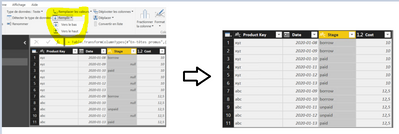
Hello, would a simple fill down in Power Query work?
- Mark as New
- Bookmark
- Subscribe
- Mute
- Subscribe to RSS Feed
- Permalink
- Report Inappropriate Content
It works perfectly! Thank you!
- Mark as New
- Bookmark
- Subscribe
- Mute
- Subscribe to RSS Feed
- Permalink
- Report Inappropriate Content
Hi,
My table is getting created in PowerBI model itself and I dont have the same coming from the query. It is essentially a bigger challenge that I am trying to solve with this exercise- I will be tabulating this and assigning a variable to this table and use it in my next calculation, hence wanted to use DAX for this, please help!
- Mark as New
- Bookmark
- Subscribe
- Mute
- Subscribe to RSS Feed
- Permalink
- Report Inappropriate Content
I tried with CALCULATE but it doesn't work with string. I unfortunately wasn't able to find a solution...

Helpful resources

Power BI Monthly Update - November 2025
Check out the November 2025 Power BI update to learn about new features.

Fabric Data Days
Advance your Data & AI career with 50 days of live learning, contests, hands-on challenges, study groups & certifications and more!

FabCon Atlanta 2026
Join us at FabCon Atlanta, March 16-20, for the ultimate Fabric, Power BI, AI and SQL community-led event. Save $200 with code FABCOMM.


| User | Count |
|---|---|
| 103 | |
| 80 | |
| 62 | |
| 50 | |
| 45 |


