Forum Discussion

Filtering on many to many relationship

HI biofio,
I'd like to suggest you create a calculated table with merged union platform types, then use this table to link detail tables which you used.
Platform Bridge =
DISTINCT (
    UNION (
        VALUES ( platformInfo[TargetedPlatforms] ),
        VALUES ( WorkOrder[TargetedPlatforms] )
    )
)
After these steps, you can use above bridge table to filter with all detail tables.
Regards,
Xiaoxin Sheng

I think I am still confused. So if I have one many-to-many relationships (let's say Platforms:Reviews), and I construct a bridge table*, then how do I actually use that bridge table to filter? I want to be able to select one a subset of platforms and give me only those reviews that have a relationship with those platforms.
* My bridge table (Bridge) looks like (ignore BigId):
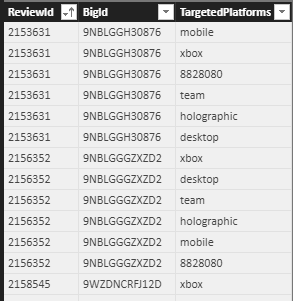
Linked to this, I have a one-column table:
Platforms
TargetedPlatform
xbox
mobile
windows
...
Reviews
ReviewId | Latency | ...
38 | 3.5 | ...
So, Reviews has a 1:M with Bridge, and Platforms also has a 1:M with Bridge. Then how do I create my slicer based on this? I had figured do it on the "TargetedPlatform" field of Platforms, but that did not work.
- Anonymous8 years agoNot applicable
HI biofio,
I think you have misunderstood my suggestion.
First, my formula is used to extract all platform informations to create a unique table with platforms type.Platform Bridge = DISTINCT ( UNION ( VALUES ( Table1[TargetedPlatforms] ), VALUES ( Table2[TargetedPlatforms] ), VALUES ( Table3[TargetedPlatforms] ) ) )After create platform information table, you can create relationships between above table and platform columns from other tables.(multiple many to one relationship)
For example:
Table1 TargetedPlatforms to 'Platform Bridge' Platform Bridge,
Table2 'TargetedPlatforms' to 'Platform Bridge' Platform Bridge
Table3 'TargetedPlatforms' to 'Platform Bridge' Platform Bridge...Finally, you can use 'Targeted Platforms' column to create slicer (from bridge table) to filter with all tables.
Regards,
Xiaoxin Sheng